Your workflow is unique 👨💻 - tell us how you use Dropbox here.
Forum Discussion

eli104
1 year agoExplorer | Level 4
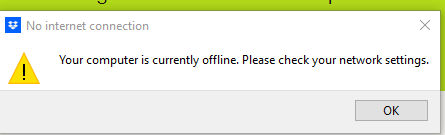
NO sync, cannot reinstall "Your computer is currently offline. Please check your network settings"
Dropbox for Windows (Win 10) did not launch this morning. One of several folders I need access to says it cannot be reached (others are fine).
I tried reinstalling the app, but an error message ...

Hannah Dropbox Community Moderator
1 year agoDropbox Community ModeratorHmm, thanks for the update, eli104.
Can you run the offline installer of the Dropbox app and let us know if that works for you?
eli104
1 year agoExplorer | Level 4
Do you mean the full installer? That didn't work either. Gets all the way to the end and that's when the error message on my first post appears.
- eli1041 year agoExplorer | Level 4
I have no issues connecting through the internet, using Google Chrome for Windows. And again, no problem using MacOS with the app installed.
The issue is ONLY that I could not connect using the Windows app, have now uninstalled it, and cannot re-install the Windows app. (Though I have not booted the Windows OS today... but had rebooted multiple times yesterday to no avail.)
I would be happy to connect by email or otherwise to get this fixed!

About Apps and Installations
Have a question about a Dropbox app or installation? Reach out to the Dropbox Community and get solutions, help, and advice from members.
The Dropbox Community team is active from Monday to Friday. We try to respond to you as soon as we can, usually within 2 hours.
If you need more help you can view your support options (expected response time for an email or ticket is 24 hours), or contact us on X, Facebook or Instagram.
For more info on available support options for your Dropbox plan, see this article.
If you found the answer to your question in this Community thread, please 'like' the post to say thanks and to let us know it was useful!


