Your workflow is unique 👨💻 - tell us how you use Dropbox here.
Forum Discussion

GabeA
6 months agoNew member | Level 2
Offline folders switching to online-only after Dropbox for Windows update
After updating to 227.4.4774 on Windows 11 (update to Windows API style) my entire folder started to index/upload/download. Most icons have been stuck in sync for about 5 hours and opening files is t...
 6 months ago
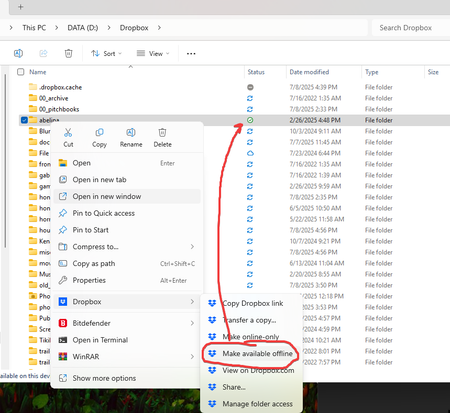
Update: it seems like syncing is finished. I still had a few subfolders set to cloud, but this may be because Unreal Engine was holding onto files that I was working in. Setting the root folder to Offline a second time seems to have worked.
So I think everything is working. As a side note, maybe the user should be asked if they want to keep offline files offline when this update hits them so they don't have to redownload everything.
You can mark this "solved." Thank you for the response.

Peter7519
6 months agoNew member | Level 2
Hi Nancy, this app update is mess. I have the same issue with Dropbox wanting to resync the entire content and all folders switching to available offline. It takes hours to reapply the settings and the desktop app is not very resposive so I have to apply the offline-only setting several times before it kicks in. 3 days later still 250k files to sync.


About Apps and Installations
Have a question about a Dropbox app or installation? Reach out to the Dropbox Community and get solutions, help, and advice from members.
The Dropbox Community team is active from Monday to Friday. We try to respond to you as soon as we can, usually within 2 hours.
If you need more help you can view your support options (expected response time for an email or ticket is 24 hours), or contact us on X, Facebook or Instagram.
For more info on available support options for your Dropbox plan, see this article.
If you found the answer to your question in this Community thread, please 'like' the post to say thanks and to let us know it was useful!


