We’re Still Here to Help (Even Over the Holidays!) - find out more here.
Forum Discussion

IsaacGaz
4 years agoExplorer | Level 4
Online only files taking up space on Windows
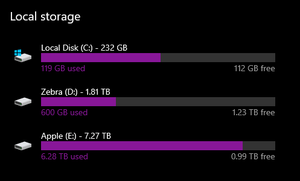
I have an 8Tb drive where I store my dropbox files on my Windows computer and despite setting all files to be 'online only' as well as going to Dropbox preferences and setting select sync to not sync...

Nancy Dropbox Community Moderator
3 years agoDropbox Community ModeratorHi from me as well, archbitis!
Can you please check your cache folder, and see if there are any files taking up space there?
Other than that, is it possible you ignored some files on your desktop app? If yes, these files will only be showing on your Dropbox app, not the web, and they’ll also take up extra space from your hard drive.

archbitis
3 years agoExplorer | Level 3
I have resolved everything by going and checking each folder for its size, and its size to disk. By that way I understood that a big number of dropobox folders showing the grey cloud outside were fool of files inside that where available of line. So I entered in each folder and changed the status of the content to available only on line. I checked the symbology of dropbox and I realized that the grey cloud doesn not mean nececeraly that all the files inside the folder are available on line. So I think that I have resolved it.
About Apps and Installations
Have a question about a Dropbox app or installation? Reach out to the Dropbox Community and get solutions, help, and advice from members.
The Dropbox Community team is active from Monday to Friday. We try to respond to you as soon as we can, usually within 2 hours.
If you need more help you can view your support options (expected response time for an email or ticket is 24 hours), or contact us on X, Facebook or Instagram.
For more info on available support options for your Dropbox plan, see this article.
If you found the answer to your question in this Community thread, please 'like' the post to say thanks and to let us know it was useful!


