Your workflow is unique 👨💻 - tell us how you use Dropbox here.
Forum Discussion

peteratdrome
2 years agoExplorer | Level 4
Problem with Blender 3d and MacOS Beta
Hi
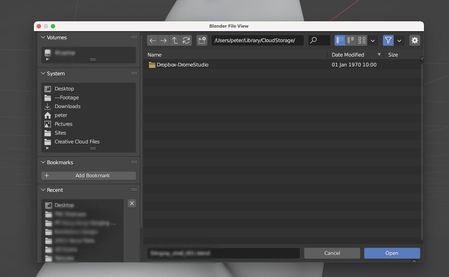
I just updated to the MacOS Dropbox BETA on Monterey 12.6.3, and it all seem to be working perfectly, except for a problem with Blender 3D 3.4.
Blender seems to use a non standard file...
- 2 years ago
Hey peteratdrome, thanks for reaching out to us.
Since your Dropbox folder is now in ~/Library/CloudStorage, there are some things you need to know about this version of the Dropbox app.
Specifically, when it comes to some third party apps, might need to be allowed access as seen here, so that you can use them properly.
Let me know how it goes.


Unicorny
1 year agoNew member | Level 1
Hi,
Sadly even after granting Blender and Dropbox access to all files, Blender still does not see Dropbox volume neither does the Cloud Storage file appears in Library...
What can be done ?
Thank you !

Jay Dropbox Community Moderator
1 year agoDropbox Community ModeratorHi Unicorny, regarding the CloudStorage issue, in order to look into this matter in more detail, I'd recommend contacting the support team directly for them to investigate further.
When that is resolved, that might help with the Blender issue you're experiencing.
About Apps and Installations
Have a question about a Dropbox app or installation? Reach out to the Dropbox Community and get solutions, help, and advice from members.
The Dropbox Community team is active from Monday to Friday. We try to respond to you as soon as we can, usually within 2 hours.
If you need more help you can view your support options (expected response time for an email or ticket is 24 hours), or contact us on X, Facebook or Instagram.
For more info on available support options for your Dropbox plan, see this article.
If you found the answer to your question in this Community thread, please 'like' the post to say thanks and to let us know it was useful!


