Need to see if your shared folder is taking up space on your dropbox 👨💻? Find out how to check here.
Forum Discussion

Martin T.1
8 years agoNew member | Level 2
Stuck on "upgrading dropbox"
As of today Dropbox is permanently stuck on "upgrading Dropbox". I'm running Dropbox in Linux. I've found references to such error messages a good while back by Googling, but no simple fix.
- Hey there Martin T.1!So as to have a better understanding of what you’re seeing, could you please send me a screenshot of this message (omitting any personal info)? Please keep in mind that if your Dropbox desktop app is trying to update, the latest stable version should be at 53.4.66 - could you hover over your Dropbox icon and let me know what version you see outlined?Thanks in advance! :grin:

31 Replies
Replies have been turned off for this discussion
 davewiner6 years agoExplorer | Level 3
I'm having this problem now. And none of the solutions I've tried, including the ones outlined here, have worked.
All my Linux servers that run Dropbox are now trying to upgrade themselves and apparently failing. Nothing is syncing.
I'm getting a jumble of errors -- I have no idea what they mean -- and I don't want to know. Here's what it looks like.
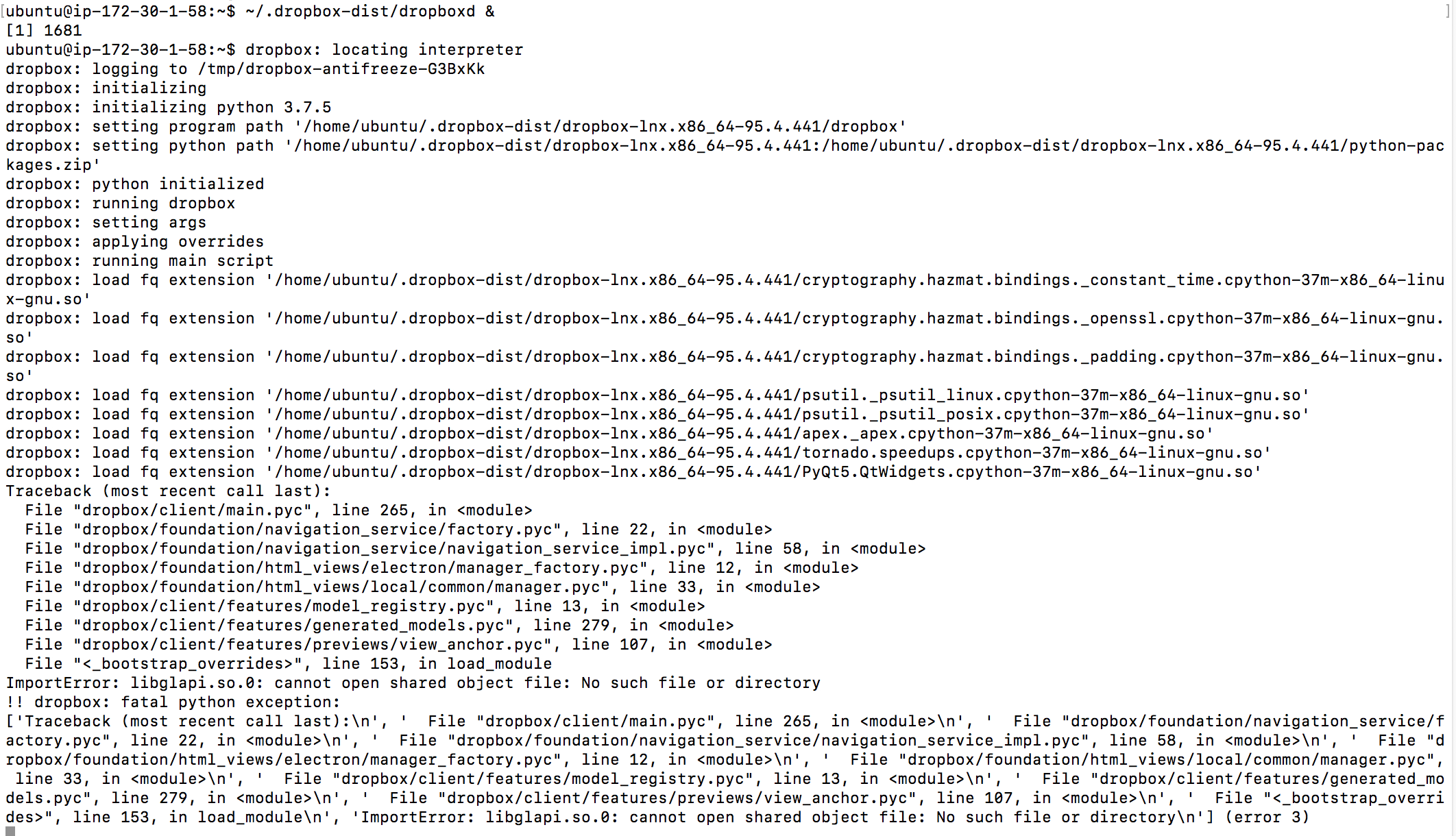
 Dinsdale6 years agoHelpful | Level 5I'm finding it difficult to read those log lines, but it looks as though you are missing "libglapi.so.0" and on my - OpenSuse Leap 15.1 - system that is being provided by the package "Mesa-libglapi0". There is a 32-bit and a 64-bit version, I only have the 64-bit version installed.
- danielbradley6 years agoNew member | Level 2
Davewiner: what Ubuntu version are you using? Also is it server (with UI) or desktop?
Daniel.
- davewiner6 years agoExplorer | Level 3
Ubuntu 18.04.3 (LTS) x64 -- five of the servers are on Digital Ocean, one is on EC2/AWS.
They're all headless servers.
- davewiner6 years agoExplorer | Level 3
The listings are impossible to read. That's exactly how they appear on my screen.
I just use Dropbox, I don't want to know anything about its internals. It's kind of appalling that they do this, auto-upgrade, and that's broken? That's the one thing you can't break. You can see from a Google search that this has been going on for YEARS.
Do any of you consider switching to something that's more stable? I know that I am. The last couple of years I've had a lot of problems with Dropbox. I've been using it since the beginning.
- danielbradley6 years agoNew member | Level 2
Davewiner:
what output do you get when you do?:
sudo apt install libglapi-mesa
- davewiner6 years agoExplorer | Level 3
I don't know what that is and why I need to update it.
It looks like an OS component??
I did a search, but there isn't much in the way of docs.
- davewiner6 years agoExplorer | Level 3
I went back and looked at the earlier message. I'll try it now.
- davewiner6 years agoExplorer | Level 3
It seemed to work, and then I did a "dropbox stop" and a "dropbox start" and it did it cleanly, no Upgrading Dropbox message on status.
Then it says "up to date" for status. But something's still not right, I'm investigating.
Thanks for the tip that seemed to get me out of the limbo I was in.
- danielbradley6 years agoNew member | Level 2
Davewiner:
Did you do the:
./dropbox.py update
If you just do the stop and start, Dropbox will at least sync, but at some point in the near future it will try to do the update again, and if you haven't installed all the missing dependencies as described above, the update will fail again.
Please review my original post from 3 weeks ago where I give the full list of libraries that need to be installed.
Have you installed all of those along with libatomic1?
Please note that, unless you have changed the configuration of 'apt', anything you install using 'apt' is from the official Ubuntu packages.
Cheers,
Daniel.
About Apps and Installations
Have a question about a Dropbox app or installation? Reach out to the Dropbox Community and get solutions, help, and advice from members.
The Dropbox Community team is active from Monday to Friday. We try to respond to you as soon as we can, usually within 2 hours.
If you need more help you can view your support options (expected response time for an email or ticket is 24 hours), or contact us on X, Facebook or Instagram.
For more info on available support options for your Dropbox plan, see this article.
If you found the answer to your question in this Community thread, please 'like' the post to say thanks and to let us know it was useful!


