2025 sparked some incredible conversations across our community 👩💻. Discover the highlights and see what’s ahead in 2026.
Forum Discussion

sfwrtr
8 months agoExplorer | Level 4
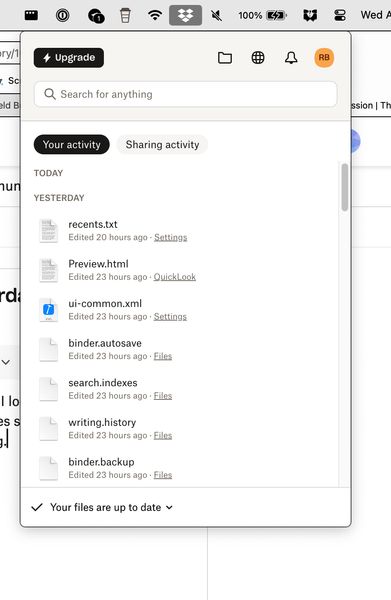
Sync results under "Your Activity" show yesterday's synced files not today's.
I can see syncing occurring with the dropbox notification icon on the Mac. When I look, syncing runs. When it completes, instead of showing what was just synced, it only shows files synced the previo...

sfwrtr
8 months agoExplorer | Level 4
DB: 221.4.5365 "Up to date", Mac 15.3.2 (24D81)
I cannot say when it started, but I noticed at least three months ago. I use Scrivener which syncs using DB. If I open Scrivener on the Mac before the sync starts, which is another issue, I get sync errors. Because DB may take many minutes to sync once I wake it, I often go to the DB icon, pause sync then resume it to force it to immediately sync.
I think I tried uninstalling then reinstalling. It wasn't recently.
One clarification about the issue. If I make changes on the Mac, the Today list fills with those sync notifications. If the change was on the iPad or iPhone that is also connected to DB, those sync notifications disappear after the sync has completed. In other words, the Today is updated with results ONLY if DB if syncing from the Mac to the cloud, not from the cloud to the Mac. HTH

Jay Dropbox Community Moderator
8 months agoDropbox Community ModeratorHi sfwrtr, just for clarification, is this only when files are updated via the mobile devices, or from the website as well?
Could you try updating a file directly on the Dropbox site, and then see if this shows up on the 'Today' list?
- sfwrtr8 months agoExplorer | Level 4
I never use the Dropbox website. I'll try something. Okay, created a file. Yes, it shows in the Today list. See image.
The problem occurs when 1) A iPhone or iPad app (e.g. Scrivener) updates the DB cloud. 2) I wake the Mac. 3) DB syncs from the cloud. The result is that Today is shown as a header, but no files are shown as in the image.
RE: The image. The other files besides the Requested file were updated on the Mac.
- Megan8 months ago
Hi sfwrtr!
Interesting find. When did you first notice this behavior?
Since it's been a while since you last tried uninstalling the app, do you think you can give it a go?
- sfwrtr8 months agoExplorer | Level 4
I trashed Dropbox app and downloaded a new package, then installed it. It is the same build as I mentioned above. No change in behavior. I updated files using an app on the iPhone, and here's the result. Pictures are worth a 1,000 words. Note the date and time. Looks like a bug to me.
- sfwrtr8 months agoExplorer | Level 4
I used the Dropbox App on the iPhone to upload an image, then thought better of it and created a text file. Surprisingly, they both showed up in the Today column after about a minute, BUT...
This is so strange, I had to do screen captures. I think I found a related different bug, probably two bits of code trying to populate the Today column with different criteria. The Today column shows content, then it disappears, then it shows again. Again, a picture (three screen captures) is worth a thousand words. Note the time stamps. Each time I clicked the notification icon.
Really, all I want to see is a scrollable list of recently downloaded files. Before the current iteration of the desktop icon, this worked perfectly well. Somebody in Q/A is not dogfooding the app mobile vs Mac desktop.
HTH

About Apps and Installations
Have a question about a Dropbox app or installation? Reach out to the Dropbox Community and get solutions, help, and advice from members.
The Dropbox Community team is active from Monday to Friday. We try to respond to you as soon as we can, usually within 2 hours.
If you need more help you can view your support options (expected response time for an email or ticket is 24 hours), or contact us on X, Facebook or Instagram.
For more info on available support options for your Dropbox plan, see this article.
If you found the answer to your question in this Community thread, please 'like' the post to say thanks and to let us know it was useful!


