Your workflow is unique 👨💻 - tell us how you use Dropbox here.
Forum Discussion

TBat
3 years agoExplorer | Level 4
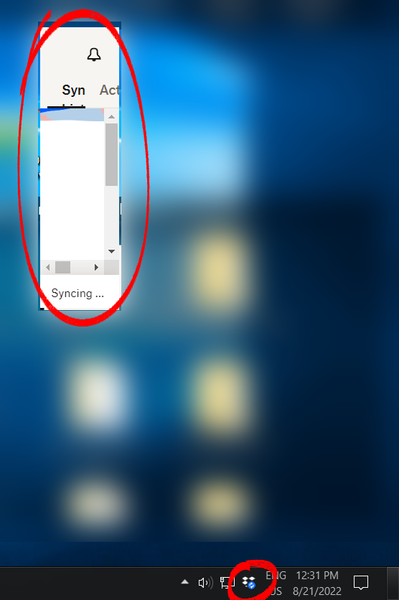
System Tray Window shrinks every time I open it
This started happening out of nowhere today. The system tray window continually shrinks from its bottom-right corner every time I open it. I can't resize the window and after 5 or 6 clicks it's s...
- 2 years ago
Hi Darryl!
We've addressed those issues in our recent Beta Builds, and we anticipate that it will function smoothly in the next stable version (expected in the upcoming week).
Let us know if you can still spot this issue after upgrading it.
Thanks.


darrylschick
2 years agoCollaborator | Level 9
And now an hour later it looks like this:

Nancy Dropbox Community Moderator
2 years agoDropbox Community ModeratorThanks for the screenshots, darrylschick.
Out of curiosity, do you happen to have any of the third-party apps that were mentioned previously (Fences, 7 Taskbar Tweaker, TaskbarX) installed on your device, too?
- darrylschick2 years agoCollaborator | Level 9
Nancy Hannah I do not have any of those apps installed, or anything along those lines.
These are the display adapters:
And Display settings:
And this is my Windows version:
The computer is
- Walter2 years ago
Hey darrylschick, thanks for the additional information.
Can you please reinstall the desktop app and let us know if this persists?
- darrylschick2 years agoCollaborator | Level 9
Walter OK, I believe I did that before, but will do a complete uninstall/reinstall and update you in a few days.
- darrylschick2 years agoCollaborator | Level 9
Walter Before I reinstall, I have a question. Last time I did this, the app would not allow me to resync to the original folder, resulting in the re-download of 6TB and more than 200,000 files. I don't want to go through that again. Is there a way to reinstall without losing connection to the existing files?
- Megan2 years ago
Hi darrylschick, when you uninstall the app, and then install it again, it should essentially continue where you left off.
That also means, the path of the Dropbox folder shouldn't change, it should still be the same. If however, in any case something happens, and the app asks you to choose a new path, all you'd have to do upon set-up, would be to check the "advanced settings", and choose the path of your existing Dropbox folder, in order to link the app there.
If you have any questions, let me know!
- darrylschick2 years agoCollaborator | Level 9
I reinstalled the current version and the problem is still happening. Any ideas?
- Megan2 years ago
Hi darrylschick, could I send you an email, in order for us to have a closer look into this?
- darrylschick2 years agoCollaborator | Level 9
Megan Yes please do (sorry I missed this earlier, for some reason I am not getting email notifications. It just happened again, this time on another PC, a Dell XPS13 laptop with Windows 11.
- Megan2 years ago
I just sent you an email, I'll see you there darrylschick!
 KenupCF2 years agoExplorer | Level 3
Is there any news on that? This is happening on my machine (Lenovo Yoga Slim Pro) as well, and it is literally out-of-the-box. No third-party apps are installed.
Any help is appreciated
Cheers,
- darrylschick2 years agoCollaborator | Level 9
I provided some additional information but haven't heard anything. Just curious, is the computer where you are experiencing this issue ever plugged into different monitors, or always using the same monitor? I have a feeling that this happens on my PC's that are sometimes used with different monitors.
- darrylschick2 years agoCollaborator | Level 9
Hannah This happens with normal screen settings. Please test on a computer while swapping monitors of 4K and 1080p resolution. Swap back and forth a few times, even better if you can use a KVM switch. This has been repeatable on two kinds of PC's that I have, but only the PC's that switch between monitors. The box keeps getting smaller and smaller and smaller.
- Hannah2 years ago
Hey darrylschick, thanks for this.
Do you have an open ticket with our support team about this that you can give us?
- darrylschick2 years agoCollaborator | Level 9
Hannah I don't know if there is still a ticket open. If you look earlier in this thread, I emailed with the person who requested to contact me by email (might have been you or someone else) and I provided information and that was the last I heard. The screenshots I posted earlier demonstrate the problem. I don't have anything more to add.
- Megan2 years ago
Hi darrylschick, I hope you're doing well!
I was able to locate the ticket number reference I had opened on my end a month or so ago for you.
It seems your desktop app was already working with more than 300K files, which isn't ideal; and furthermore the Specialized agent had already provided some steps that you respectably didn't want to try on your end, and asked them to close the ticket, which they did.
I can see where you're coming from, however in a unique case like yours when something needs a closer, more inspected look by our Advanced agents, they're the only ones that can assist, and help, and each step they provide is important.
I hope this clarifies!
- darrylschick2 years agoCollaborator | Level 9
Megan It is true that my dropbox has more than 300,000 files, which is probably not unusual for a business that has been in operation for 20+ years, and is the reason I pay for a Teams account with 7TB of storage. It is unlikely that the number of files would cause the tray menu to get smaller and smaller as shown in the screenshots I posted from two computers. The reason I did not follow the advice to reinstall dropbox is because I already did that, and it did not solve the problem, and each time I reinstall Dropbox, I must re-download 7TB of data because Dropbox has no option to re-sync to an existing folder without going through a process of stopping the sync, renaming the new director to _old, and renaming the old directory, which when I attempted in the past, resulting in Dropbox not syncing several hundred files and remaining forever in the "syncing" state. I recommend that you look into the actual issue that is causing this problem.
- Walter2 years ago
Hey darrylschick, sorry to jump in here, but could you try creating a new OS profile on your computer and try installing the desktop app there?
Upon that process you'll be able to choose just a couple of folders to sync.
Can you give this a go for troubleshooting purposes and let us know how it goes?
- darrylschick2 years agoCollaborator | Level 9
Walter One of the computers that has this issue has the full directory sync'd locally. The other computer that has the issue has only a small subset of folders selectively sync'd. I posted screenshots from both PC's earlier in this threat. The problem happens only on these PC's, but not on any other PC's that I use. The common factor for these two PC's is that they are connected to a KVM switch to connect a 4K monitor to either PC (one is a Dell Windows 11 desktop, the other is a Dell Windows 11 laptop with a 4K screen). I find that with repeated switching of the screens, the box gets smaller over time. I'm not looking to spend more time troubleshooting on my end. I'm just trying to make you aware. Others have reported the same issue.
- Walter2 years ago
Thanks for the flagging this with us darrylschick
If you'd be willing to give it a go, there are some additional troubleshooting you can do listed on this page.
I know it's not much, but I hope this helps a tad.
- darrylschick2 years agoCollaborator | Level 9
Walter They mention switching between displays of different resolutions. Unfortunately I can't avoid that. 4K is generally 3840 x 2160, but in the Dell XPS it's 3840x2400. This also happens on the PC where the 4k monitor is repeatedly connected and disconnected via the KVM switch. No other apps are having issues so hopefully this can be tracked down and fixed.
 dvanable2 years agoHelpful | Level 6
Has Dropbox been able to replicate this issue? If so, is Engineering working on a fix?
The problem is pretty irritating, and prevents me from making important setting changes.
The workarounds presented are not viable, as referenced earlier.
Please advise, thank you.
Dave
- dvanable2 years agoHelpful | Level 6
Megan, I'm using Windows 10, OS Build 19045.3324 on a Lenovo X1 Carbon.
First noticed when I reported it, because I am about to be traveling and need to set up Dropbox to fully back up my hard drive in case of loss/damage. With this defect, I'm unable to do so which is quite frustrating.
Dave
- darrylschick2 years agoCollaborator | Level 9
dvanable Does the issue you are having look like the screenshots I posted? Also curious if you switch displays/monitors like I do. I have only seen this issue on two PC's that are connected by KVM switch to use different monitors.


About Apps and Installations
Have a question about a Dropbox app or installation? Reach out to the Dropbox Community and get solutions, help, and advice from members.
The Dropbox Community team is active from Monday to Friday. We try to respond to you as soon as we can, usually within 2 hours.
If you need more help you can view your support options (expected response time for an email or ticket is 24 hours), or contact us on X, Facebook or Instagram.
For more info on available support options for your Dropbox plan, see this article.
If you found the answer to your question in this Community thread, please 'like' the post to say thanks and to let us know it was useful!


