Your workflow is unique 👨💻 - tell us how you use Dropbox here.
Forum Discussion

TBat
3 years agoExplorer | Level 4
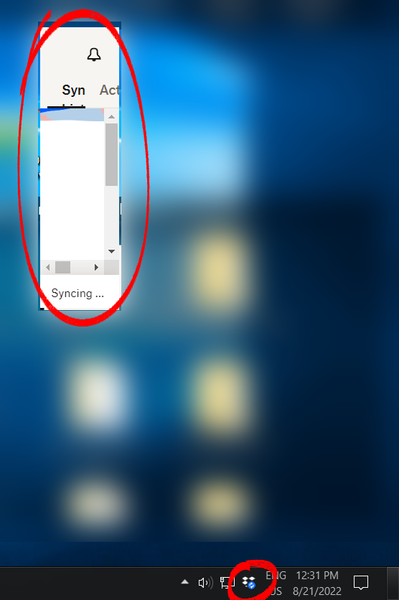
System Tray Window shrinks every time I open it
This started happening out of nowhere today. The system tray window continually shrinks from its bottom-right corner every time I open it. I can't resize the window and after 5 or 6 clicks it's s...
- 2 years ago
Hi Darryl!
We've addressed those issues in our recent Beta Builds, and we anticipate that it will function smoothly in the next stable version (expected in the upcoming week).
Let us know if you can still spot this issue after upgrading it.
Thanks.


dvanable
2 years agoHelpful | Level 6
Has Dropbox been able to replicate this issue? If so, is Engineering working on a fix?
The problem is pretty irritating, and prevents me from making important setting changes.
The workarounds presented are not viable, as referenced earlier.
Please advise, thank you.
Dave

Megan Dropbox Community Moderator
2 years agoDropbox Community ModeratorHi dvanable, I hope you're having a great Monday so far!
Would you mind clarifying the OS you're using, along with the Dropbox version that you have installed there?
Also, when did you first start noticing this behavior?
Let me know!
- dvanable2 years agoHelpful | Level 6
Megan, I'm using Windows 10, OS Build 19045.3324 on a Lenovo X1 Carbon.
First noticed when I reported it, because I am about to be traveling and need to set up Dropbox to fully back up my hard drive in case of loss/damage. With this defect, I'm unable to do so which is quite frustrating.
Dave
- darrylschick2 years agoCollaborator | Level 9
dvanable Does the issue you are having look like the screenshots I posted? Also curious if you switch displays/monitors like I do. I have only seen this issue on two PC's that are connected by KVM switch to use different monitors.
- dvanable2 years agoHelpful | Level 6
@darrylschick yes, looks like the screen caps you posted, and yes I switch displays frequently (built-in laptop monitor vs. Dell flat screen).
- darrylschick2 years agoCollaborator | Level 9
dvanable Thanks for confirming that. Dropbox should be able to replicate the issue if they test the same scenario.
 phil_stothard2 years agoExplorer | Level 4
I have exactly the same issue which the title of this thread describes very well. The window is getting smaller and smaller each time! Windows 11. Now it is
that's all. Dropbox version 180.4.4912. Happening on laptop display. Regularly swap between laptop display and external monitor.
It's weird that every time I click on the icon in the system tray it does seem to halve in size. Laptop display is set to 2880x1800 (recommended setting) and 200% (recommended)
- darrylschick2 years agoCollaborator | Level 9
Megan and Dropbox team, we have three customers (me, phil_stothard, dvanable) now seeing the same probable cause of this issue. When screens are switched, the algorithm that detects the new screen and resizes the tray popup is not scaling properly to the new screen size. I believe that you should be able to replicate this by attaching a Windows 11 PC to a KVM switch and switching between displays. Please keep us posted.
- dvanable2 years agoHelpful | Level 6
180.4.4912
Latest per Dropbox hover.
@darrylschick calls it - three reproduceable cases, all sound identical (I also use a switch between two HDMI cables - have tested without the switch, that's not it.
Dave
- darrylschick2 years agoCollaborator | Level 9
Now I have this problem. All icons are gone at the top of the tray popup.
- dvanable2 years agoHelpful | Level 6
What is Dropbox's sprint cycle and schedule? This seems like a pretty important issue, that has been open for (likely) several sprints now.
I ended up backing up my hard drive manually to be sure I had a capture before traveling -- took several hours of baby-sitting, just before a big trip which I would call quite a nuisance at minimum.
Dave
- TBat2 years agoExplorer | Level 4
This probably won't help anyone using Windows 11, but the problem fixed itself completely after I updated to Windows 10 Build 19045. At the time of my initial post I had kept my PC on an older version since MS updates kept screwing up software I need for work.
Now my Dropbox UI is working normally. Wish there was a more concrete answer😕
- dvanable2 years agoHelpful | Level 6
Thanks - and sadly I am on Win 10 v19045.3324 and still experiencing the problem... won't be moving to Windows 11 until they enable the ability to NOTE stack windows.
Dave
- Walter2 years ago
HI all, could you let us know if you happen to be running any 3rd party apps that might be causing issues?
For example, Fences, 7 Taskbar Tweaker and TaskbarX are all different apps that affect layout/organization of normal Windows functions that could be causing some kind of visual issue.
If you are running any of these, could you try disabling them temporarily and let us know if it resolves the issue?
- darrylschick2 years agoCollaborator | Level 9
Walter I don't have any of those programs. The only two PC's with the issue are Dell XPS running Windows 11 that switch between using different monitors using a KVM switch. My other 15+ computers at my business don't have the issue, although they are Windows 10. So the possibilities I see so far is that the window does not resize properly in response to changing monitors, or compatibility with Win11.
- dvanable2 years agoHelpful | Level 6
And I'm on Windows 10, and I also switch between monitors via HDMI A/B switch.
Dave
- darrylschick2 years agoCollaborator | Level 9
Walter If you take a windows laptop with dropbox installed and plug it into an external monitor (ideally with a different screen resolution) and disconnect and reconnect it a number of times you may see the issue. If that doesn't work try a HDMI switch and switch the PC between two monitors of different resolution.
- Megan2 years ago
Hey guys!
For anyone facing this, can I ask if your screen's resolution is set as the default, or if you've changed that in any way?
Keep us posted!
- dvanable2 years agoHelpful | Level 6
Both the laptop and flat panel display are set to default.
Dave
- phil_stothard2 years agoExplorer | Level 4For what it is worth mine works ok to my external monitor but does the shrinking on the laptop monitor - which is set by default to the recommended view which is a very high resolution and 200%.
The shrinking - which is literally halving in size with each view - only happens on the laptop screen. If I restart the laptop it goes back to normal then halves each time. It is always fine to the external monitor.
I’m a bit past caring I was initially pulling all of the content from Dropbox down to a new user on the laptop so needed to monitor it. Now it’s just business as usual updates largely from laptop to Dropbox and don’t need to watch. Surprised you haven’t fixed it or presumably even replicated. - Megan2 years ago
Hi dvanable, in this case, can I send you an email, in order to have a closer look into this?
Also, phil_stothard, you mentioned that on the laptop monitor the display is set to 200%. Have you tried changing it to 100%, to check if the same thing happens then?
- phil_stothard2 years agoExplorer | Level 4
i'm sure it won't happen at 100%, but I am not setting everything on the laptop display to suit one minor application............. the recommended settings are 200% and 2880x1800. I'm not going go against those just for one drop box window which should work with those display settings.
I think you have more than enough information to know what the issue is and go away and resolve it. Some other old apps misbehave with these settings but not to the extent dropbox does i.e. continually halfing the display window size.
- dvanable2 years agoHelpful | Level 6
Megan, yes please. Do you have it from my account info?
Dave
- Hannah2 years ago
Hi all, thanks for all of your insight on this.
We actually brought this up to our team, and we'll be implementing a fix soon, to address these reports.
We'll update you here once we have news.
Thanks again!
- darrylschick2 years agoCollaborator | Level 9
Hannah Will the update address both issues (shrinking window size, and disappearing icons)? The disappearing icons issue occurs even when the window does not shrink. I posted a screenshot earlier in this thread, and am seeing it again this morning. When this happens, it's impossible to access the settings, web link, search, etc.


About Apps and Installations
Have a question about a Dropbox app or installation? Reach out to the Dropbox Community and get solutions, help, and advice from members.
The Dropbox Community team is active from Monday to Friday. We try to respond to you as soon as we can, usually within 2 hours.
If you need more help you can view your support options (expected response time for an email or ticket is 24 hours), or contact us on X, Facebook or Instagram.
For more info on available support options for your Dropbox plan, see this article.
If you found the answer to your question in this Community thread, please 'like' the post to say thanks and to let us know it was useful!


