Your workflow is unique 👨💻 - tell us how you use Dropbox here.
Forum Discussion

TBat
3 years agoExplorer | Level 4
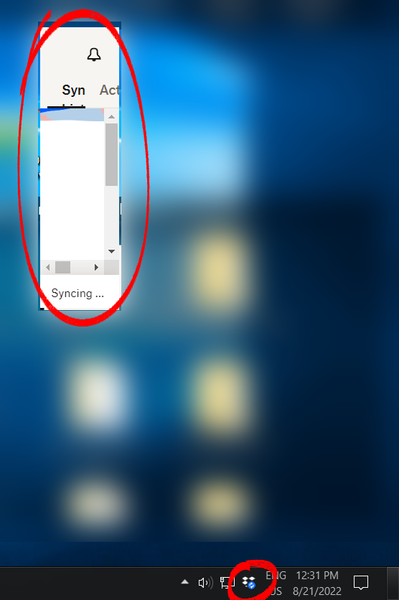
System Tray Window shrinks every time I open it
This started happening out of nowhere today. The system tray window continually shrinks from its bottom-right corner every time I open it. I can't resize the window and after 5 or 6 clicks it's s...
- 2 years ago
Hi Darryl!
We've addressed those issues in our recent Beta Builds, and we anticipate that it will function smoothly in the next stable version (expected in the upcoming week).
Let us know if you can still spot this issue after upgrading it.
Thanks.


phil_stothard
2 years agoExplorer | Level 4
I have exactly the same issue which the title of this thread describes very well. The window is getting smaller and smaller each time! Windows 11. Now it is
that's all. Dropbox version 180.4.4912. Happening on laptop display. Regularly swap between laptop display and external monitor.
It's weird that every time I click on the icon in the system tray it does seem to halve in size. Laptop display is set to 2880x1800 (recommended setting) and 200% (recommended)

darrylschick
2 years agoCollaborator | Level 9
Megan and Dropbox team, we have three customers (me, phil_stothard, dvanable) now seeing the same probable cause of this issue. When screens are switched, the algorithm that detects the new screen and resizes the tray popup is not scaling properly to the new screen size. I believe that you should be able to replicate this by attaching a Windows 11 PC to a KVM switch and switching between displays. Please keep us posted.
About Apps and Installations
Have a question about a Dropbox app or installation? Reach out to the Dropbox Community and get solutions, help, and advice from members.
The Dropbox Community team is active from Monday to Friday. We try to respond to you as soon as we can, usually within 2 hours.
If you need more help you can view your support options (expected response time for an email or ticket is 24 hours), or contact us on X, Facebook or Instagram.
For more info on available support options for your Dropbox plan, see this article.
If you found the answer to your question in this Community thread, please 'like' the post to say thanks and to let us know it was useful!


