Your workflow is unique 👨💻 - tell us how you use Dropbox here.
Forum Discussion

sustainingfarmers
4 years agoHelpful | Level 7
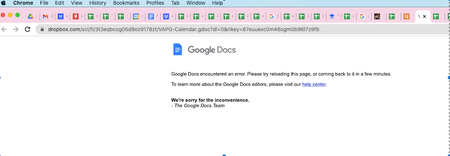
Can't open select Google docs or sheets
Hello,
I've been using Dropbox Business integrated with Google Workspaces for over a year. While the integration between Google and Dropbox can be glitchy, my team appreciates the ability to st...
- 4 years agoHi all - thanks for your reports and patience while we were investigating this.
As our status page reports, this should be resolved now.
Let us know if you're still noticing any errors!


PatriciaBB
4 years agoHelpful | Level 5
I copied the Google Spreadsheet file and downloaded it. The new copy did open. What is the answer to avoid losing documents and spending time trying to access the file? I was locked out for more than 8 hours.
Should we only use excel to avoid being frustrated?
Please advise.

ablunck
4 years agoHelpful | Level 5
We have tried all of the suggestions as well, and even disconnected and reconnected our google. We are still experiencing issues. Can DropBox look into this issue as it seems to be a DropBox issue, and not a user issue?
- Walter4 years ago
Dropbox Community Moderator
Hi all - thanks for your reports and patience while we were investigating this.
As our status page reports, this should be resolved now.
Let us know if you're still noticing any errors!  sustainingfarmers4 years agoHelpful | Level 7
Thank you for letting us know that the issue is resolved, Walter. We've tested the files that were broken/unopenable and I can confirm that they are now restored. I'm grateful that Dropbox acted so quickly on this.
A separate issue that I've been having (which may deserve a thread of its own) is my browser freezing when I'm working in Google files created in Dropbox. This also seems related to the Google integration but must be a separate issue because it's still happening.
Is anyone else having that issue?
It's becoming very irritating. I have to force quit my browser every time it happens.
- Walter4 years ago
- sustainingfarmers4 years agoHelpful | Level 7
Walter It seems to be happening when working in many different Dropbox-created Google files. Most are not very large -- spreadsheets with one or two tabs.
- Walter4 years agoThanks for clarifying that for me sustainingfarmers
If clearing the browser's cache or trying another browser doesn't help improve matters, would you like me to reach out via email to have a further look internally? - PatriciaBB4 years agoHelpful | Level 5
Yes, I am also experiencing the "freeze", very frustrating.
- sustainingfarmers4 years agoHelpful | Level 7
PatriciaBB Thanks for letting me know that's an issue you've been experiencing, too, so I know it's not just an issue on my end.
- sustainingfarmers4 years agoHelpful | Level 7
Walter I have tried clearing my browser's cache and that doesn't make a difference. I haven't had time to test another browser yet while working in Google docs, but I'll try today or tomorrow. I typically prefer to work in Google Chrome, which is where I'm experiencing the freezing problem now.
It would be great if you could reach out via email to have a further look. It sounds like others are experiencing the same issue, so I'm guessing it's not just an issue on my end, though.
- Walter4 years agoHey PatriciaBB & sustainingfarmers - thanks for your updates.
If the freezing issue persists, could I reach out via email to have a further look internally? - sustainingfarmers4 years agoHelpful | Level 7
Walter It would be great if you'd reach out via email. What's the best way to facilitate that?
I'm experiencing the freezing issue again now.
- Walter4 years agoNo worries sustainingfarmers - you've got

Whenever you get the chance, please have a look at your inbox and we'll take it from there. - dedectivmonk4 years agoNew member | Level 2
Please i need help i have sent some files from dropbox to my teacher but dropbox have deleted them.My teacher cant open them and when i try i cant open them either...i rly need your help immidietly
- Jay4 years agoHi dedectivmonk, is this related to Google docs, or some other feature, such as a file request link?
- terez3 years agoNew member | Level 2
This is NOT fixed. I am still having issues.

About Integrations
Get help with third-party integrations from the Dropbox Community.
The Dropbox Community team is active from Monday to Friday. We try to respond to you as soon as we can, usually within 2 hours.
If you need more help you can view your support options (expected response time for an email or ticket is 24 hours), or contact us on X, Facebook or Instagram.
For more info on available support options for your Dropbox plan, see this article.
If you found the answer to your question in this Community thread, please 'like' the post to say thanks and to let us know it was useful!


