Your workflow is unique 👨💻 - tell us how you use Dropbox here.
Forum Discussion

SirLothar
3 years agoHelpful | Level 5
Dropbox Paper has gone all weird
Anyone else had Dropbox paper go weird on them? Logged in and suddenly all the folder system and gone, I had no files showing on the main tab - and all paper files have been migrated into a documen...

Megan Dropbox Community Moderator
3 years agoDropbox Community ModeratorHi SirLothar, I'd be happy to help!
Where are you when you try to locate your Paper files: on the paper.dropbox.com site, or when you visit dropbox.com?
Any screenshots will be helpful, so I can have visual.
Keep me posted!
 SirLothar3 years agoHelpful | Level 5
Hi Megan,
Well... apparently I've been migrated to the 2020 Paper Design... (even though it's 2023!) which looks remarkably like an old Windows 3.1 folder interface... which looks awful and makes me want to switch to something else.
Where have all the left hand files gone for example?
Where have all the left hand files gone
- Walter3 years ago
Hey SirLothar, sorry to jump in, but can you navigate to the menu button on the upper left or your page and select Paper from the options there?
It should look like this:
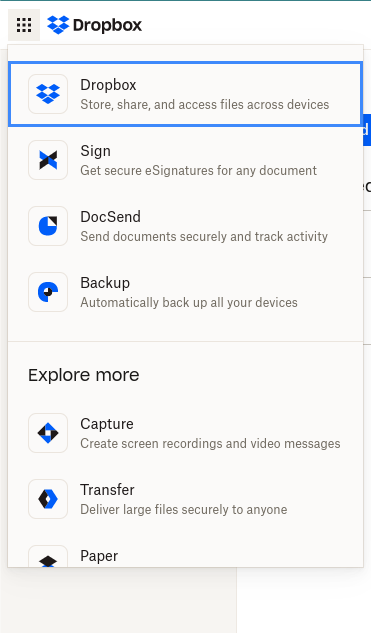
- SirLothar3 years agoHelpful | Level 5
Yep - and that's the page I get taken to - via the menu options you highlighted. It seems like the whole left hand menu bar has disappeared listing folders and docs.

About Integrations
Get help with third-party integrations from the Dropbox Community.
The Dropbox Community team is active from Monday to Friday. We try to respond to you as soon as we can, usually within 2 hours.
If you need more help you can view your support options (expected response time for an email or ticket is 24 hours), or contact us on X, Facebook or Instagram.
For more info on available support options for your Dropbox plan, see this article.
If you found the answer to your question in this Community thread, please 'like' the post to say thanks and to let us know it was useful!


