Your workflow is unique 👨💻 - tell us how you use Dropbox here.
Forum Discussion

LordRugby
5 years agoHelpful | Level 6
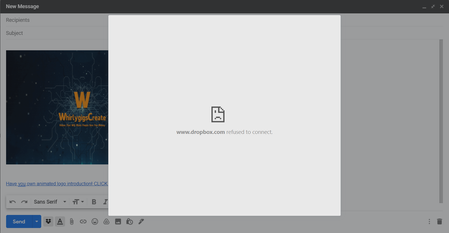
I keep getting "Dropbox refuses to connect" error pages how do I fix this??
Hi when I use the dropbox plugin I get this message. I have tried everything . please see screen shot

ken l.19
5 years agoHelpful | Level 6
Ohh I see now. The blue one has always worked for me and still does. It is way more cumbersome than the grey one though! You have to navigate through all the folders to get where you want for EACH file. Can't search for folders or files and no "recent" list, etc. Overall, the grey one has a lot more functionality...if it would work!
I have been (and still am) a HUGE dropbox fan! Really wish someone could figure out why the grey one doesn't want to connect.
Thanks
LordRugby
5 years agoHelpful | Level 6
Agree not having a search doesnt make it practbale . I wish they sort it out!
 Smokey Bluntson5 years agoHelpful | Level 6
I agree, the gray dropbox Icon is superior to the blue version, it should be
fixed as the extension is truly broken.
In other news, the "Advanced Tech" told me over email that the engineeringteam is aware of this issue and is working on it. They took nearly 3 days to
even make initial contact with me so dont hold your breath guys.
It's a shame that this is how they treat their paying customers.
 codina5 years agoHelpful | Level 5
I agree, the "blue" (Dropbox for Gmail Add-on) version is really cumbersome:
- No Recent files tab
- Selection of multiple files is not allowed
- No search capabilities
Please bring back the "gray" one (Add file using Dropbox)
Sincerely
A paying customer for over 8 years
About Integrations
Get help with third-party integrations from the Dropbox Community.
The Dropbox Community team is active from Monday to Friday. We try to respond to you as soon as we can, usually within 2 hours.
If you need more help you can view your support options (expected response time for an email or ticket is 24 hours), or contact us on X, Facebook or Instagram.
For more info on available support options for your Dropbox plan, see this article.
If you found the answer to your question in this Community thread, please 'like' the post to say thanks and to let us know it was useful!


