Our Community is in read-only mode until April 8th, learn more here. You can still search existing threads or get help via Dropbox Support, the Dropbox Help Center, or Learn.
Forum Discussion

Xavier Montaner
1 year agoHelpful | Level 5
I'm working with Adobe Lightroom Classic and Dropbox doesn't sync some .db files
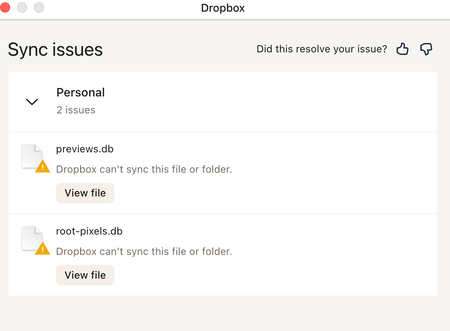
Hi everyone. Using Lightroom Classic and Dropbox. I am getting messages from Dropbox that some preview files can sync. See attached. Also when I sync again folders with my computer thumbnails are...
 1 year ago
Hi everyone!
Quick update:
The data transfer was successful. I deleted the old data, and now everything is working again with Lightroom - the error message about synchronization issues is gone.
Thank you very much for the help and have a great weekend.
Best regards,
Carina
carina83
1 year agoHelpful | Level 6
Hi Jay!
Thanks for the quick response. Unfortunately, I am not very technically skilled, so I have a few more questions:
Do I just need to log out and log back in, or do I need to uninstall the app as well? And which version should I reinstall?
What do I need to pay attention to so that I don't end up in the CloudStorage folder again?
Thanks in advance for your help!
Many greetings
Carina

Jay Dropbox Community Moderator
1 year agoDropbox Community ModeratorYou don't need to uninstall the app, all you need to do it is sign out of the account in the desktop app, and then sign back in using the steps linked in my previous post.
This should revert the desktop app to the old Dropbox folder location.
- carina831 year agoHelpful | Level 6
Hi,
I have now logged out of my Dropbox and logged back in.
Dropbox is still located in Library - CloudStorage.What went wrong?
Additional information:
In the settings, under synchronization, the storage location of the Dropbox folder shows the info: In this version of macOS, Dropbox folders are stored in a predetermined location.
Best regards,
CarinaEdit:
I found the settings during the installation where I can choose my own storage location.
It is now back under User-my-Dropbox.There is still the Library folder on my Mac and it includes Dropbox.
When I click on it, it says: This Dropbox folder is not linked.Can this folder be deleted, or will it cause problems?
I don't want to delete all the data in Dropbox and then not be able to access it.
I hope you understand my concern. - Nancy1 year ago
Hey Carina, hope it’s alright if I jump in.
What’s the syncing status of your Dropbox app now? Is it up to date?
If you open your Dropbox folder under the new location (under “Users”), do you see all your Dropbox files along with syncing icons next to them?
I’d like to make sure everything’s syncing properly before taking any actions on the previous Dropbox folder.
- carina831 year agoHelpful | Level 6
Hi everyone!
Quick update:
The data transfer was successful. I deleted the old data, and now everything is working again with Lightroom - the error message about synchronization issues is gone.
Thank you very much for the help and have a great weekend.
Best regards,
Carina


About Integrations
Get help with third-party integrations from the Dropbox Community.
The Dropbox Community team is active from Monday to Friday. We try to respond to you as soon as we can, usually within 2 hours.
If you need more help you can view your support options (expected response time for an email or ticket is 24 hours), or contact us on X, Facebook or Instagram.
For more info on available support options for your Dropbox plan, see this article.
If you found the answer to your question in this Community thread, please 'like' the post to say thanks and to let us know it was useful!


