Your workflow is unique 👨💻 - tell us how you use Dropbox here.
Forum Discussion

Olbliss
6 years agoCollaborator | Level 8
IPad: Dropbox and Google Sheets Integration
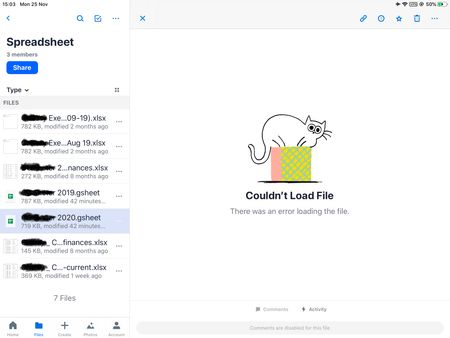
Does anyone have any advice on how to use the google suite with Dropbox on an Ipad?
As the pictures below show, the Dropbox ipad app can't open up google sheets files, even though the google sheets...

Inesita
5 years agoHelpful | Level 5
Hi Daphne! are there any news on this topic? I have the same issue, don't own a computer, and can't edit the xls files on Dropbox! I am thinking about placing my files on Drive...
Please help us out here!

Jay Dropbox Community Moderator
5 years agoDropbox Community ModeratorHi Inesita, currently, .xls files can't be opened via the Excel Online interface, only xlsx files.
The previous thread was regarding opening Google Sheets docs, are you getting an error when opening the xls files in Google Sheets? If so, what error, and could you provide screenshots of what you're seeing? Thanks!
- Inesita5 years agoHelpful | Level 5
Hi Jay!
thanks for your reply!
I try to open an xlsx file on an ipadpro from dropbox.com choosing the option open with Google Sheets for the web. It seems to open it and I see it correctly and after a while it tells me that it can't upload it and the I get the login screen of Google.
I'm now using Excel for the web and that is giving me good results (on opening and editing the file). I would have preferred to use Google Sheets as this was the software I'm used to, but am happy now with this workaround (for the moment).
Best regards!
- Jay5 years ago
No worries, Inesita, I'm glad to hear it's working better with Excel for the web. Let me know if you require any further assistance in future.
Enjoy your weekend!
- Inesita5 years agoHelpful | Level 5
Hi!
finally I would like to revert to Google Sheets as there we can simoultaneously work on a document. Is there a workaround in the meantime to open xlsx files from Dropbox with Google Sheets on an iPad Pro without saving them first on Drive?
Thanks for your help!
About Integrations
Get help with third-party integrations from the Dropbox Community.
The Dropbox Community team is active from Monday to Friday. We try to respond to you as soon as we can, usually within 2 hours.
If you need more help you can view your support options (expected response time for an email or ticket is 24 hours), or contact us on X, Facebook or Instagram.
For more info on available support options for your Dropbox plan, see this article.
If you found the answer to your question in this Community thread, please 'like' the post to say thanks and to let us know it was useful!


