Need to see if your shared folder is taking up space on your dropbox 👨💻? Find out how to check here.
Forum Discussion

Scott H.
7 years agoCollaborator | Level 9
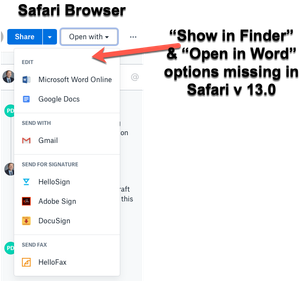
"Open in Finder" and "Open in Word" not showing in Safari OSX for Mac
Hey folks,
When viewing dropbox files from the Safari browser (Safari v 13.0) I can no longer see the "Show in Finder" or 'Open in Word" / "Open in Adobe Acrobat" options for files.
I also have ...

Scott H.
5 years agoCollaborator | Level 9
It would be reassuring to know that this is something that Dropbox is actually working on given that is affecting so many of us. Are you able to confirm this Lusil

Jo V.1
5 years agoExplorer | Level 4
Very frustrating indeed. Since Safari 13 (we are now at 14), Drobox functionality in this browser is severely crippled. Too bad to see these features gone, as I heavily relied on them. For a loyal paying Dropbox Business customer, this is very sad to experience. It works in Chrome, but no longer in Safari.
About Integrations
Find solutions to issues with third-party integrations from the Dropbox Community. Share advice and help members with their integration questions.
The Dropbox Community team is active from Monday to Friday. We try to respond to you as soon as we can, usually within 2 hours.
If you need more help you can view your support options (expected response time for an email or ticket is 24 hours), or contact us on X, Facebook or Instagram.
For more info on available support options for your Dropbox plan, see this article.
If you found the answer to your question in this Community thread, please 'like' the post to say thanks and to let us know it was useful!


