Need to see if your shared folder is taking up space on your dropbox 👨💻? Find out how to check here.
Forum Discussion

Scott H.
7 years agoCollaborator | Level 9
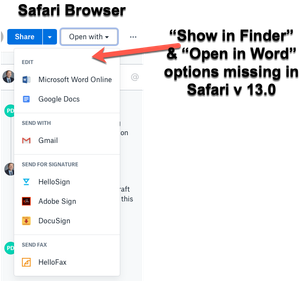
"Open in Finder" and "Open in Word" not showing in Safari OSX for Mac
Hey folks,
When viewing dropbox files from the Safari browser (Safari v 13.0) I can no longer see the "Show in Finder" or 'Open in Word" / "Open in Adobe Acrobat" options for files.
I also have ...

Edis
5 years agoHelpful | Level 6
Lusil I think whats the most annoying is that it's such a mystery HOW it works. After Loren Brihter has posted the performance issues chrome has I downloaded literally every Chromium based browser and its shocking, because even google drives app launcher (which is equivalent to reveal in finder - "plugin?") is downloadable and launchable in these browsers. Dropbox isnt. At least tell us what exactly makes Chrome sync with the dropbox application. Or is it the dropbox application itself?
Do people really have to revese engineer dropbox to find out and make this feature work again?
Hope you can help out here to at least give a hint where this search could start.

Scott H.
5 years agoCollaborator | Level 9
I'm still waiting for Lusil to respond to my earlier post. As a Dropbox Professional customer it would help give me confidence in the Dropbox p[roduct if I knew that Dropbox were taking this issue seriously, explained the issue and provide a timeline for remedy.
About Integrations
Find solutions to issues with third-party integrations from the Dropbox Community. Share advice and help members with their integration questions.
The Dropbox Community team is active from Monday to Friday. We try to respond to you as soon as we can, usually within 2 hours.
If you need more help you can view your support options (expected response time for an email or ticket is 24 hours), or contact us on X, Facebook or Instagram.
For more info on available support options for your Dropbox plan, see this article.
If you found the answer to your question in this Community thread, please 'like' the post to say thanks and to let us know it was useful!


