Need to see if your shared folder is taking up space on your dropbox 👨💻? Find out how to check here.
Forum Discussion

DCG_Marketing
3 years agoExplorer | Level 3
Salesforce Dynamic Forms & Dropbox Integration
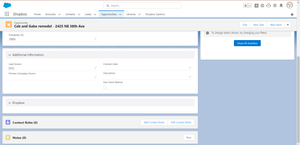
My org has used the Dropbox Salesforce integration for years now with no issues. We just enabled Dynamic Forms, and now the integration does not appear on the object. See screenshot. Does anyone have...

Megan Dropbox Community Moderator
2 years agoDropbox Community ModeratorHey wspall, have you tried out the steps my colleague Walter provided above, about disconnecting, and re-connecting the app by any chance?
Let me know!

nimbleappgenie
2 years agoNew member | Level 2
Here are some additional resources that might be helpful:
Salesforce Dynamic Forms: https://www.salesforceben.com/salesforce-dynamic-forms-overview-deep-dive-tutorial/
Dropbox API: https://www.dropbox.com/developers
AppExchange for Integration Solutions: https://appexchange.salesforce.com/
Salesforce Cloud: https://www.nimbleappgenie.com/blogs/salesforce-cloud-service/
By implementing this integration, you can streamline data collection, automate document management, and boost overall efficiency within your Salesforce workflows.
About Integrations
Find solutions to issues with third-party integrations from the Dropbox Community. Share advice and help members with their integration questions.
The Dropbox Community team is active from Monday to Friday. We try to respond to you as soon as we can, usually within 2 hours.
If you need more help you can view your support options (expected response time for an email or ticket is 24 hours), or contact us on X, Facebook or Instagram.
For more info on available support options for your Dropbox plan, see this article.
If you found the answer to your question in this Community thread, please 'like' the post to say thanks and to let us know it was useful!


