Your workflow is unique 👨💻 - tell us how you use Dropbox here.
Forum Discussion

L_Carper
1 month agoNew member | Level 2
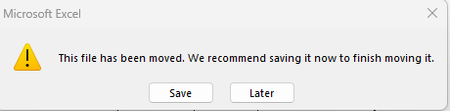
"This file has been moved" error when trying to open Excel files in the Dropbox folder
Integration Affected Microsoft 365 (specifically Excel) Operating System/Browser (if using the web) Windows 11
Question or Issue One of our users started getting errors yesterday when trying ...
 1 month ago
I contacted Dropbox support and got this as a response.
Tommy, Dec 14, 2025, 11:35 PM PST:
Hi there,
Thanks for contacting Dropbox Support! My name is Tommy, and I'll be happy to assist you with your request.
From what I understand, you'd like to inquire in regards to an issue with opening Microsoft Excel files.
I’m happy to share that the Excel issue you reported has now been resolved by Microsoft and should be working properly.
If you continue to experience any problems, please ensure that your Microsoft Office 365/Excel application is fully up to date.
Thank you again for bringing this to our attention, and we apologise for any inconvenience this may have caused.
Please let us know if you encounter any further issues, or if you have any other Dropbox questions.
Regards,
Tommy | Dropbox SupportI personally haven't been experiencing this issue any longer, so hopefully this means everything is working now!

DUNGLYLAN
1 month agoNew member | Level 2
Yesterday, i have the same issue, we try the same things:
- Update Microsoft office to the latest version 365
- Update dropbox to the last version after uninstall it from the dropbox.com site
- We verify the hard drive has enough space for synchronize the files.
- Delete the data on the recycle bin
- Restart the computer after ever installation
Results:
After update the office - same problem continue for the files in all dropbox of excel the user make and show the links to update some data are no good.
After update the dropbox- start working good and we can open the files with out the label this file have been moved, saved it now for we can finish the move
After look the harddrive we look only 33 gb available and we clean the data as most posible
and delete the trash bin, we clean more that 700gb . same issue continue
So we are still having the same issue
We will try now to change the folder of Dropbox to avoid indexing wrong , lets se if it works.
Making just the change of folder, fail, because the same folders move to the same place and the problem remains.
Now i will try to make a new installation and put a new folder not the same .
Nop same error arrived again
- DUNGLYLAN1 month agoNew member | Level 2
I found a way to avoid the problem just momentary until we get a solution from Microsoft or Dropbox,
If you open an excel file on the computer all good
If you move the file to any Dropbox folder it show the error again
"This file has been moved"But, if you open the file on Dropbox online, from there to the excel on the web, and from there to the excel on your desktop, on some way it works with no problem and you can save the files good.
the 3 steps to avoid the error
step 1 on your explorer go to the file you need to work and make right button
step 2 open on dropbox.com
step 3 open on excel for web
open on desktop in desktop
The file will let you work normally.
For reopen repeat the same steps.
Let me know if you have another solution please!!!!
About Integrations
Find solutions to issues with third-party integrations from the Dropbox Community. Share advice and help members with their integration questions.
The Dropbox Community team is active from Monday to Friday. We try to respond to you as soon as we can, usually within 2 hours.
If you need more help you can view your support options (expected response time for an email or ticket is 24 hours), or contact us on X, Facebook or Instagram.
For more info on available support options for your Dropbox plan, see this article.
If you found the answer to your question in this Community thread, please 'like' the post to say thanks and to let us know it was useful!


