Your workflow is unique 👨💻 - tell us how you use Dropbox here.
Forum Discussion

TWM Maz
2 years agoNew member | Level 2
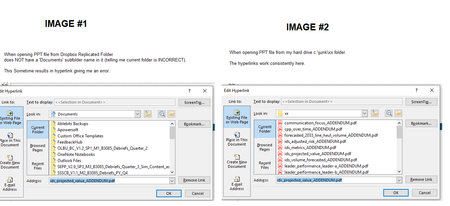
When using a PowerPoint file located on dropbox, hyperlink sometimes will error 'Cannot open file'
We have a number of PowerPoint files that our users use on Dropbox that have a number of hyperlinks in them that link to PDF files that reside in the same file as the PPT file is.
Most of the time,...

Jay Dropbox Community Moderator
2 years agoDropbox Community ModeratorHi TWM Maz, thanks for bringing this to our attention.
While this thread is related to Excel files, the same principle should apply for PowerPoint files, in terms of the relative and absolute path to a file.
II'd recommend trying the info there to see if they help.
If you have any further queries, feel free to message back.
TWM Maz
2 years agoNew member | Level 2
Jay -
thanks for the response.. That info makes sense from that other thread about MS-Office's 'Hyperlink Base' needing to be explicitly set by the user..
The challenge I have with that solution is:
1. my user base is not wanting to do more techie stuff like 'manually setting the hyperlink base' in order for the hyperlinks to work.
2. why does it work sometimes (in fact most of the time) but not always? For example, when the files are first copied to to dropbox (the PPT file and the collection of PDF files that are 'hyperlinked') to the PPT file, it works fine.. It's only sometimes if other stuff is edited in the PPT (unrelated to the hyperlinks) does it get messed up (not all the time).
I don't know the pattern of when it will mess up and when it will not mess up.. And I only hear about it when it does mess up :(.
Our backup plan is to go with a non-dropbox solution, but would really like to use dropbox if we can given that is easier to to have folks collaborate/share files.
- Jay2 years ago
It does sound like it needs to have a relative link to prevent issues across different users.
As to why it works occasionally, I can't say, perhaps the way the file is being edited, or a specific user is editing the file.
About Integrations
Get help with third-party integrations from the Dropbox Community.
The Dropbox Community team is active from Monday to Friday. We try to respond to you as soon as we can, usually within 2 hours.
If you need more help you can view your support options (expected response time for an email or ticket is 24 hours), or contact us on X, Facebook or Instagram.
For more info on available support options for your Dropbox plan, see this article.
If you found the answer to your question in this Community thread, please 'like' the post to say thanks and to let us know it was useful!


