Your workflow is unique 👨💻 - tell us how you use Dropbox here.
Forum Discussion

Ttbomk
2 years agoHelpful | Level 5
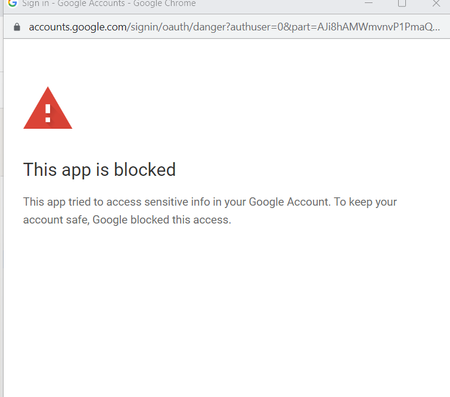
Why did Google block Dropbox?
Hey all! 👋
Suddenly Google started blocking access for Dropbox
When trying to download a file from a Google Drive account or create Google Docs documents, an error appears (screenshots👇)!
...
- 2 years ago
Hi all,
The ability to import files directly from Google Drive is back and working as expected.
Let us know if you still have issues.
Thanks,
Sam


haryadoon
2 years agoNew member | Level 2
I have no problem logging in to Dropbox on a browser page. This works fine, but I would like to take advantage of the desktop app for Windows 10.
I have downloaded and installed the app. When it runs, I am asked to "Continue to your browser to sign in".
This opens a new tab in my browser, with the URL:
The browser detects that this URL has a privacy error:
Your connection is not private
Attackers might be trying to steal your information from dropbox.com (for example, passwords, messages or credit cards). Learn more
NET::ERR_CERT_AUTHORITY_INVALID
This is clearly a problem at Dropbox's end - the servers are using expired or otherwise invalid security certificates.
How can we get Dropbox to acknowledge and fix this?

About Integrations
Get help with third-party integrations from the Dropbox Community.
The Dropbox Community team is active from Monday to Friday. We try to respond to you as soon as we can, usually within 2 hours.
If you need more help you can view your support options (expected response time for an email or ticket is 24 hours), or contact us on X, Facebook or Instagram.
For more info on available support options for your Dropbox plan, see this article.
If you found the answer to your question in this Community thread, please 'like' the post to say thanks and to let us know it was useful!


