Our Community is in read-only mode until April 8th, learn more here. You can still search existing threads or get help via Dropbox Support, the Dropbox Help Center, or Learn.
Forum Discussion

Termitter
6 years agoExplorer | Level 4
Как платить рублями? How can I pay in rubles?
При попытке оплатить расширение сервиса до Plus предлагается оплатить долларами. Но какрта у меня рублевая. Написано: "Для изменения валюты платежа вы должны отменить текущую подписку на Dropbox и по...
- 6 years ago
Thank you for keeping me posted.
This error is not related to the currency. It must be a browser issue. Please try the incognito mode of your browser and try inserting the card information again.
You can find instructions for this here:
-- Chrome: https://support.google.com/chrome/answer/95464
-- Firefox: https://support.mozilla.org/en-US/kb/private-browsing-browse-web-without-saving-info
-- Safari: http://support.apple.com/kb/PH19216Next step is to Clear your browser's cache. Please find the steps here.
Let me know if that solved the problem or not.
Thank you so much for your patience!

Fiona Dropbox Staff
6 years agoDropbox StaffI would be glad to help.
Can you post a screenshot showing what you see, so I can help the best way possible?
If there are personal information in the page you see, let me know and I will create a ticket for us to look into this in private.
Thank you! Спасибо! :slight_smile:
Termitter
6 years agoExplorer | Level 4
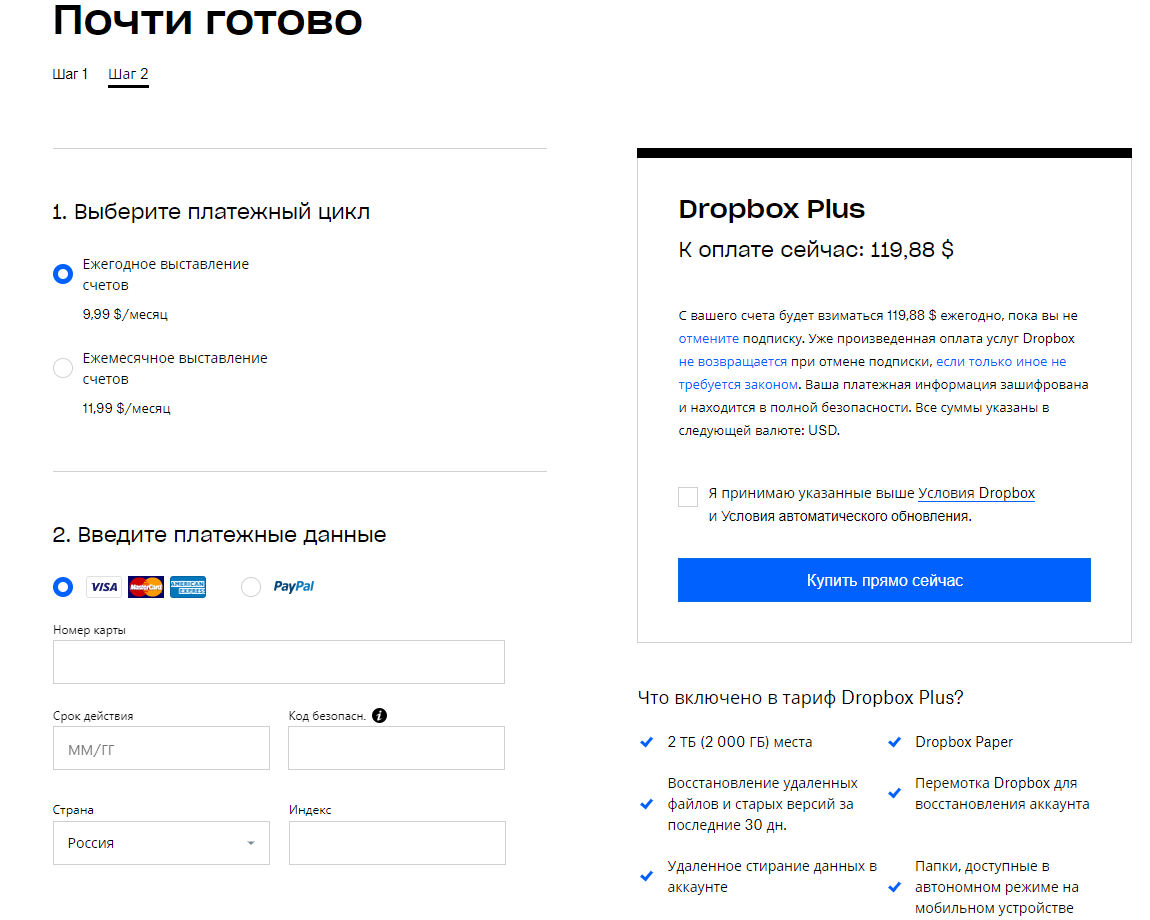
Thanks!
- Fiona6 years ago
After the account downgrades you will get the option to pay in roubles.
From what I see here the subscription you had is still ongoing Termitter. Correct?
- Daphne6 years ago
Dropbox Community Moderator
Hey Termitter, just wanted to add to the info Fiona has already given you here!
The pricing that you see there is shown in USD but the payment will indeed be paid in your local currency. This will be converted automatically for you.
Since you're getting an error message though, we'd need to do some investigating with you. Can we reach out to the email linked with your profile?
Let us know if you'd like us to contact you!
- Termitter6 years agoExplorer | Level 4
Hi, i'm ready for contacts)
[email removed as per Community Guidelines]
After trying fill out card data in payment page then I saw no curency conversion((. Instead got SMS from bank/card, kinda: insufficient funds... Cause i do not have USD account in my bank.
- Termitter6 years agoExplorer | Level 4
"After the account downgrades"... What is "downgrading". Does this prosedure means loosing my bonus Gbytes (10 items(( )? After all, i create a new account and registered it in russian email. This doesn't affect on payment currency. So i'm afraid to loose bonus my Gbs and get nothing (while trying to change currency).
Thanks for explainings
- Fiona6 years ago
When the duration of the subscription you bought is finished, your account downgrades to a free account and no longer has the paid space.
You can then buy your extra space with roubles. Just enter the card and it will charge you in your local currency after the downgrade.
No worries, this cannot affect your files. If you have more questions let me know! :slight_smile:
Спасибо!

About Plans and Subscriptions
Ask the Dropbox Community for help if you have questions about your Dropbox plan or subscription. Find solutions and share advice with members.
The Dropbox Community team is active from Monday to Friday. We try to respond to you as soon as we can, usually within 2 hours.
If you need more help you can view your support options (expected response time for an email or ticket is 24 hours), or contact us on X, Facebook or Instagram.
For more info on available support options for your Dropbox plan, see this article.
If you found the answer to your question in this Community thread, please 'like' the post to say thanks and to let us know it was useful!


