We’re Still Here to Help (Even Over the Holidays!) - find out more here.
Forum Discussion

ape11
9 months agoExplorer | Level 4
How to cancel the Seagate Dropbox Backup plan?
I received an email confirming my order, but it doesn't appear to be successfully processed in my account. I wanted to cancel it immediately to avoid being charged after six months in case I forget a...

Mark Super User II
9 months agoSuper User IIThe email usually contains a link to downgrade. Have you tried that?
OR what about www.dropbox.com/downgrade

ape11
9 months agoExplorer | Level 4
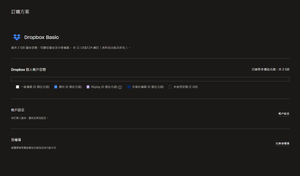
I couldn't find it in the mailbox, and the URL you provided goes directly to my order plan management (as shown in the image).😭
- Mark9 months ago
ape11 wrote:
I couldn't find it in the mailbox
Tried searching no-reply@dropbox.com ?
Otherthan that I've no idea, but, hopefully a member of staff will notice it tomorrow.
- ape119 months agoExplorer | Level 4
The official confirmation email is available, and I’ve tried all the methods mentioned in the instructions. However, the main issue is that there’s no option to click to cancel the plan—I can’t find where to cancel at all. This is currently the most frustrating part.
I also hope others will notice this.
About Plans and Subscriptions
Ask the Dropbox Community for help if you have questions about your Dropbox plan or subscription. Find solutions and share advice with members.
The Dropbox Community team is active from Monday to Friday. We try to respond to you as soon as we can, usually within 2 hours.
If you need more help you can view your support options (expected response time for an email or ticket is 24 hours), or contact us on X, Facebook or Instagram.
For more info on available support options for your Dropbox plan, see this article.
If you found the answer to your question in this Community thread, please 'like' the post to say thanks and to let us know it was useful!


