Your workflow is unique 👨💻 - tell us how you use Dropbox here.
Forum Discussion

ColoMtnWoman
6 months agoNew member | Level 2
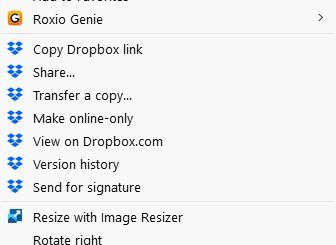
Can I remove the Dropbox context menu entries on Windows 11?
Device
HP Laptop & HP Desktop Operating System/Browser (if using the web)
Windows 11 Dropbox App Version (if using the app)
230.4.8797 Dropbox Plan
N/A
Question or Issue
How ...
- 6 months ago
ColoMtnWoman wrote:
How do I get rid of the File Explorer extensions that keep showing up. I have no use for them and they just take up space:
Dropbox doesn't have an option to remove the context menu entries. There are unofficial ways to do it, mentioned in these forums, but they'll return the next time Dropbox is updated.

Rich Super User II
6 months agoSuper User IIColoMtnWoman wrote:How do I get rid of the File Explorer extensions that keep showing up. I have no use for them and they just take up space:
Dropbox doesn't have an option to remove the context menu entries. There are unofficial ways to do it, mentioned in these forums, but they'll return the next time Dropbox is updated.
About Settings and Preferences
The Dropbox Community is here to help if you have questions about your account settings and preferences. Learn and share advice with members.
The Dropbox Community team is active from Monday to Friday. We try to respond to you as soon as we can, usually within 2 hours.
If you need more help you can view your support options (expected response time for an email or ticket is 24 hours), or contact us on X, Facebook or Instagram.
For more info on available support options for your Dropbox plan, see this article.
If you found the answer to your question in this Community thread, please 'like' the post to say thanks and to let us know it was useful!


