Your workflow is unique 👨💻 - tell us how you use Dropbox here.
Forum Discussion

roninyun
1 year agoExplorer | Level 4
Can't edit the email address associated with my account
Hi,
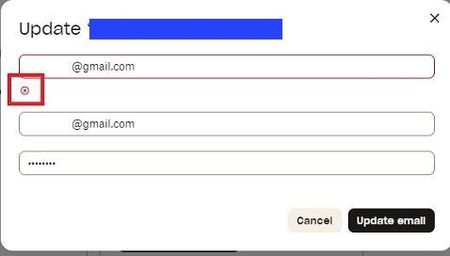
im trying to edit my email account and get an error i do not understand and nothing is updated.
help please...
Thanx!
Ronen
- 1 year ago
Is it possible that you're trying to use an address that's already used by another Dropbox account?
You can test this by attempting to sign in with that address and requesting a password reset.
If a password rest email comes to this address, it means it's already associated with a Dropbox account.
Let me know what you find.


Nancy Dropbox Community Moderator
1 year agoDropbox Community ModeratorHey mifs! So, to make sure I’m on the right track, you want to link the email address of account A to your B account instead and connect it to the desktop app of your new computer. Correct?
When asking about cancelling account A, do you mean that you’d like to delete it entirely?
Let me know, and we’ll go from there.

mifs1
1 year agoExplorer | Level 3
Hello Nancy,
I worked out the solution from the information listed here and other Google sources. I transferred the old account ( 3mb)to another email address and moved the new account (15mb) into the address that the old account occupied and all worked well. The solution is that you cannot have 2 accounts with the same email address and either one has to be deleted or moved to another email address. Pretty simple when you know what to do
Kind regards mifs1
About Settings and Preferences
The Dropbox Community is here to help if you have questions about your account settings and preferences. Learn and share advice with members.
The Dropbox Community team is active from Monday to Friday. We try to respond to you as soon as we can, usually within 2 hours.
If you need more help you can view your support options (expected response time for an email or ticket is 24 hours), or contact us on X, Facebook or Instagram.
For more info on available support options for your Dropbox plan, see this article.
If you found the answer to your question in this Community thread, please 'like' the post to say thanks and to let us know it was useful!


