Our Community is in read-only mode until April 8th, learn more here. You can still search existing threads or get help via Dropbox Support, the Dropbox Help Center, or Learn.
Forum Discussion

algae-jacket
2 years agoExplorer | Level 3
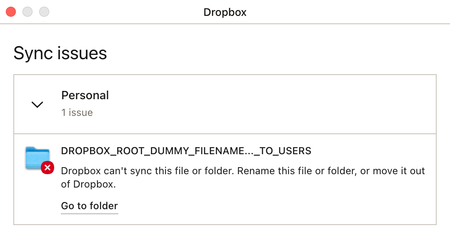
"DROPBOX_ROOT_DUMMY_FILENAME…_TO_USERS" failing to sync
I'm using Dropbox v180.4.4912 on macOS 13.5 on an Apple Silicon Mac mini. If it helps, I'm also using Maestral 1.8.0 (both GUI and daemon) on a different Mac. I have a persistent sync issue in my...

Walter Dropbox Community Moderator
2 years agoDropbox Community ModeratorHey algae-jacket, sorry to jump in here, but could you try fixing your hardlinks and permissions as outlined here and let us know if this persists?

algae-jacket
2 years agoExplorer | Level 3
Held down the option key and clicked on both buttons.
The (2) badge persisted.
I quit and restarted Dropbox.
The (2) badge came back after a bit.
Anything else I could try?
- Walter2 years ago
Thanks for the update! Have you tried enabling hidden files to show on your computer algae-jacket ?
- algae-jacket2 years agoExplorer | Level 3
Yes, I peeked at `~/Library/CloudStorage/Dropbox-Personal/` after pressing ⇧⌘. and didn't see any file like that in the root directory of my Dropbox folder. The only hidden things in there is .dropbox. Looking at the contents of the directory with
ls -laonly adds .DS_Store and .Trash/.
Anything else I could try?
- Jay2 years ago
Thanks for the info, I'd recommend contacting the support team for further assistance on this matter.

About Settings and Preferences
The Dropbox Community is here to help if you have questions about your account settings and preferences. Learn and share advice with members.
The Dropbox Community team is active from Monday to Friday. We try to respond to you as soon as we can, usually within 2 hours.
If you need more help you can view your support options (expected response time for an email or ticket is 24 hours), or contact us on X, Facebook or Instagram.
For more info on available support options for your Dropbox plan, see this article.
If you found the answer to your question in this Community thread, please 'like' the post to say thanks and to let us know it was useful!


