Your workflow is unique 👨💻 - tell us how you use Dropbox here.
Forum Discussion

algae-jacket
2 years agoExplorer | Level 3
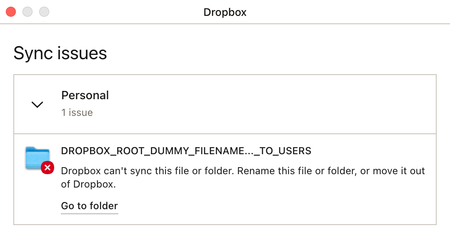
"DROPBOX_ROOT_DUMMY_FILENAME…_TO_USERS" failing to sync
I'm using Dropbox v180.4.4912 on macOS 13.5 on an Apple Silicon Mac mini. If it helps, I'm also using Maestral 1.8.0 (both GUI and daemon) on a different Mac. I have a persistent sync issue in my...

Fallschachtel
2 years agoExplorer | Level 4
Is there any solution to this in the meantime? Thx

Nancy Dropbox Community Moderator
2 years agoDropbox Community ModeratorSorry to hear this, Fallschachtel. Can you let me know the OS version of your device, as well as the app version of the Dropbox app on it?
- Fallschachtel2 years agoExplorer | Level 4
It's Dropbox Version 188.4.6302, and the OS is Sonoma 14.1.2. I'm not sure when this started, but it may have been when I updated to 14.1.2.
About Settings and Preferences
The Dropbox Community is here to help if you have questions about your account settings and preferences. Learn and share advice with members.
The Dropbox Community team is active from Monday to Friday. We try to respond to you as soon as we can, usually within 2 hours.
If you need more help you can view your support options (expected response time for an email or ticket is 24 hours), or contact us on X, Facebook or Instagram.
For more info on available support options for your Dropbox plan, see this article.
If you found the answer to your question in this Community thread, please 'like' the post to say thanks and to let us know it was useful!


