Our Community is in read-only mode until April 8th, learn more here. You can still search existing threads or get help via Dropbox Support, the Dropbox Help Center, or Learn.
Forum Discussion

sstructural1
2 years agoExplorer | Level 4
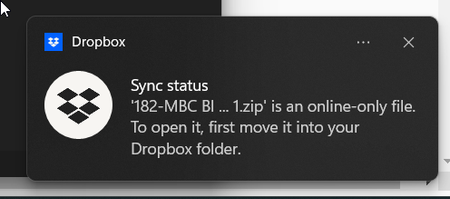
Notification for two files "File is "online only file" to open it first move it into your dropbox"
I made the screenshot to show exactly what is going on. The issue is that this file and the other one are deleted, or at least I tried to. This notification is just popping up over and over. I tried ...

Hannah Dropbox Community Moderator
2 years agoDropbox Community ModeratorThanks for the additional info here, sstructural1.
Did the notification stop for the file you deleted online?
And can you let me know what the version and sync status of the Dropbox app is currently?
You can hover over your Dropbox icon to see this info.
Also, are you on a Mac or Windows computer?

sstructural1
2 years agoExplorer | Level 4
Dropbox 178.4.4811 is the version that I see. The notification did not stop for either of the files. I'm on a windows 11 computer. Windows 11, version 22H2
- sstructural12 years agoExplorer | Level 4
Hannah I added another file to the mix. I inadvertently tried to open a file and it has the notification going too. So it appears that it's a notification from trying to open a file but it doesn't go away, it keeps popping up even after I restart.
- Nancy2 years ago
Hi from me as well, sstructural1.
Have you tried to reinstall your Dropbox app, by any chance? Does that seem to make any difference at all?
- sstructural12 years agoExplorer | Level 4
Well I reinstalled previously and it didn't work. I just reinstalled again to check and see if maybe it cleared itself but the notification is still showing up.

About Settings and Preferences
The Dropbox Community is here to help if you have questions about your account settings and preferences. Learn and share advice with members.
The Dropbox Community team is active from Monday to Friday. We try to respond to you as soon as we can, usually within 2 hours.
If you need more help you can view your support options (expected response time for an email or ticket is 24 hours), or contact us on X, Facebook or Instagram.
For more info on available support options for your Dropbox plan, see this article.
If you found the answer to your question in this Community thread, please 'like' the post to say thanks and to let us know it was useful!


