Your workflow is unique 👨💻 - tell us how you use Dropbox here.
Forum Discussion

sstructural1
2 years agoExplorer | Level 4
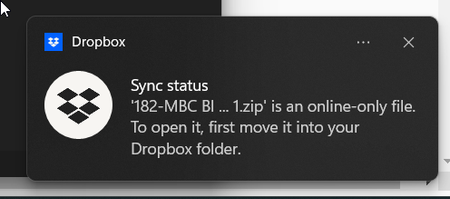
Notification for two files "File is "online only file" to open it first move it into your dropbox"
I made the screenshot to show exactly what is going on. The issue is that this file and the other one are deleted, or at least I tried to. This notification is just popping up over and over. I tried ...

Megan Dropbox Community Moderator
2 years agoDropbox Community ModeratorHey there, Valtteri, how are you today?
That sounds interesting indeed. Does that happen with all of your online-only files?
Can you check the version of the app that you have installed on your device? You can do this by hovering your mouse over the little Dropbox icon next to your WiFi.
Also, are you copying and pasting files, or dragging them within your File Explorer?
Let me know more, and we'll take it from there!

Valtteri
2 years agoExplorer | Level 4
Hi Megan!
It does not. After some testing it happens all to my files in teams folder. Personal and other shared folders works fine.
Version is: 185.4.6054
Tried to copy/paste and dragging. Results a following error message in File explorer:
Error 0x80070780 File Cannot Be Accesed by the System
Tried to remove and re-install the app. No help.
- Walter2 years ago
Hey Valtteri, sorry to jump in here, but could you send us a screenshot of the exact error you're getting so that we can have a visual too?
Also, can you (or the team admin) check if top level content management is allowed for everyone or only admins on the team?
- Valtteri2 years agoExplorer | Level 4
Hi Walter ,
Here's is some screenshots about the errors that I got:
Unfortunately this is only in Finnish. Error comes when I'll try to move/copy a file in file explorer.
When try to open a file, it always messages that file is corrupted and cannot be opened etc.
Hopefully this can be fixed fast, quit annoying (and slow) to use every files from browser.
- Megan2 years ago
Hi Valtteri, thanks for the screenshots!
So, the first one is indeed one coming from us, however keep in mind that the second error is one coming directly from Windows.
Which action do you follow, when you see the first screenshot? If you right click on the files, and select for them to be available offline, do you get the same error?

About Settings and Preferences
The Dropbox Community is here to help if you have questions about your account settings and preferences. Learn and share advice with members.
The Dropbox Community team is active from Monday to Friday. We try to respond to you as soon as we can, usually within 2 hours.
If you need more help you can view your support options (expected response time for an email or ticket is 24 hours), or contact us on X, Facebook or Instagram.
For more info on available support options for your Dropbox plan, see this article.
If you found the answer to your question in this Community thread, please 'like' the post to say thanks and to let us know it was useful!


