Your workflow is unique 👨💻 - tell us how you use Dropbox here.
Forum Discussion

EmilianoRosales
1 year agoExplorer | Level 3
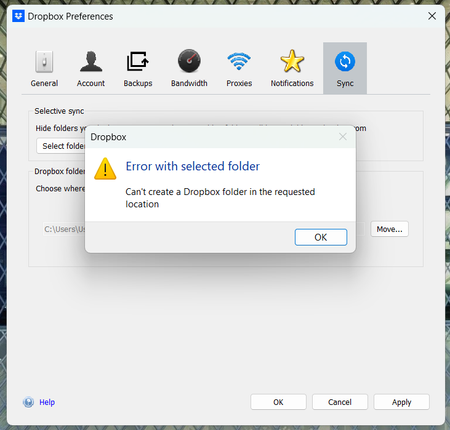
Unable to move Dropbox folder from users to C drive as I'm getting an error
I am unable to create my dropbox folder in (C:), it only lets me in users/user, but this does not work for me because im trying to work on a shared project and the file route breaks because of the lo...

Nancy Dropbox Community Moderator
1 year agoDropbox Community ModeratorEmilianoRosales, do you have admin rights on this device? If you go to the C:\ directory, are you able to create new folders, for example?
Also, did you install the Dropbox app with admin rights, after downloading it on your computer?
Did you try to move the Dropbox folder with these exact steps?

EmilianoRosales
1 year agoExplorer | Level 3
yes i have admin rights and i can create new folders, and i just installed the dropbox folder with admin preferences and i still could not move the folder. i still have the same problem
- Nancy1 year ago
Thanks for clarifying, EmilianoRosales! To investigate further, can you also send me a screenshot of the Dropbox folder location/filepath that other members are seeing on their end (specifically the ones who were able to move it directly under the C:\ directory)?
About Settings and Preferences
The Dropbox Community is here to help if you have questions about your account settings and preferences. Learn and share advice with members.
The Dropbox Community team is active from Monday to Friday. We try to respond to you as soon as we can, usually within 2 hours.
If you need more help you can view your support options (expected response time for an email or ticket is 24 hours), or contact us on X, Facebook or Instagram.
For more info on available support options for your Dropbox plan, see this article.
If you found the answer to your question in this Community thread, please 'like' the post to say thanks and to let us know it was useful!


