Your workflow is unique 👨💻 - tell us how you use Dropbox here.
Forum Discussion

PrivRelay
1 year agoExplorer | Level 3
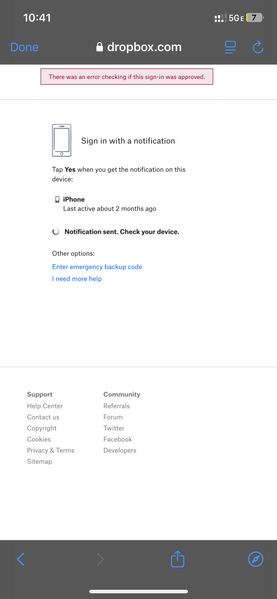
My iPhone was stolen and two-factor authentication is preventing my account access.
My iphone was stolen, and two factor authentication is stopping me from logging in. A code is supposed to be sent to my new phone, but I never receive it. Sometimes I receive an error message th...

Rich Super User II
1 year agoSuper User IIPrivRelay wrote:I have 2 factor authentication on, and I can’t get the code from the Auth App either because of the stolen phone.
The two-step verification will be what's preventing you from gaining access to the account. If you're not able to receive the code, you'll need to use the emergency backup codes you were given when you enabled two-step verification. Without them there's no way to gain access to the account. Dropbox will not bypass two-step verification due to a lost device.
About Security and Permissions
Find answers to your questions about Dropbox account security and permissions.
The Dropbox Community team is active from Monday to Friday. We try to respond to you as soon as we can, usually within 2 hours.
If you need more help you can view your support options (expected response time for an email or ticket is 24 hours), or contact us on X, Facebook or Instagram.
For more info on available support options for your Dropbox plan, see this article.
If you found the answer to your question in this Community thread, please 'like' the post to say thanks and to let us know it was useful!


