Our Community is in read-only mode until April 8th, learn more here. You can still search existing threads or get help via Dropbox Support, the Dropbox Help Center, or Learn.
Forum Discussion

PrivRelay
1 year agoExplorer | Level 3
My iPhone was stolen and two-factor authentication is preventing my account access.
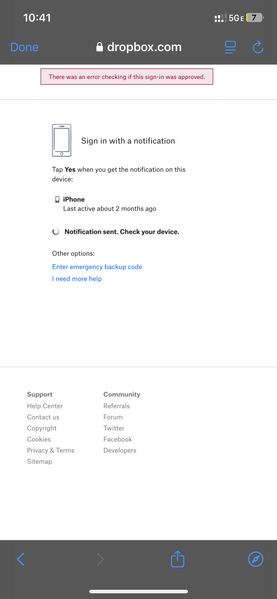
My iphone was stolen, and two factor authentication is stopping me from logging in. A code is supposed to be sent to my new phone, but I never receive it. Sometimes I receive an error message th...

PrivRelay
1 year agoExplorer | Level 3
https://www.dropbox.com/support/ticket/24807547
but I didn’t ask them for the key. You will see the help I asked for was because my iPhone was stolen and I can’t get access to my Dropbox account. I’m trying to get my Google Auth App set up again so I’m trying to add a code. I want to try to get Google Auth working to see if that will get me in to my old Dropbox account. I just set up this new Dropbox account to ask the Community for help as I’m a novice at Dropbox account issues.
I’m also going to ask you to check your audit trail to see who removed my phone number from my account. I had that as a backup. The screenshot I included in this message was preceded by a screen that said I would receive a text with a code that I could use as an alternative to getting a code from the Google Auth App. I clicked to send me this code via text message and received the error message in the attached screenshot. I believe that is when someone removed my cell phone number from my old Dropbox account. I can send you my cell phone number via a private message if that would help you. I really want the audit trail investigated. This is clearly a hack by someone. I can give you more details in a private message if that would be helpful. Thanks for your help.

Megan Dropbox Community Moderator
1 year agoDropbox Community ModeratorHey PrivRelay, I was able to locate your ticket number on our system and had a look into this.
I had a and I completely understand how frustrating it can be to wait for a resolution. And it's definitely important and vital to gain access to your Dropbox account.
I want to assure you that our specialized team is more than willing to investigate your case. However since this issue requires advanced tools and account visibility that we don't have available here in the community, your case is in the best possible hands with them.
Keep in mind that you'd need to follow their steps, and reply back using the email address linked to the Dropbox account facing the issue, in order for them to have more insight to the issue at hand.
While we can't intervene in their process, I've gone ahead and raised the priority of your communication to "High". In any case, we're here to support you and answer any other questions you might have.
Thanks a bunch!
About Security and Permissions
Find answers to your questions about Dropbox account security and permissions.
The Dropbox Community team is active from Monday to Friday. We try to respond to you as soon as we can, usually within 2 hours.
If you need more help you can view your support options (expected response time for an email or ticket is 24 hours), or contact us on X, Facebook or Instagram.
For more info on available support options for your Dropbox plan, see this article.
If you found the answer to your question in this Community thread, please 'like' the post to say thanks and to let us know it was useful!


