Our Community is in read-only mode until April 8th, learn more here. You can still search existing threads or get help via Dropbox Support, the Dropbox Help Center, or Learn.
Forum Discussion

Thuy Pham
7 months agoNew member | Level 2
Someone accessed my Dropbox account and all my data was stolen – I need urgent help.
Hi Dropbox Support,
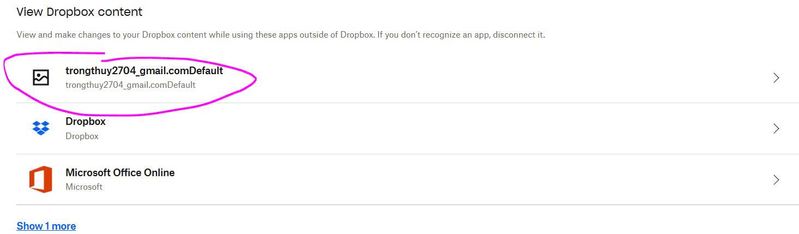
My Dropbox Basic account (email: [email removed for safety]) was hacked. Someone accessed my account from Miami, Florida (I'm in Vietnam), added an app named '[email removed for safety]', and uploaded a ransom note telling me to contact [email removed for safety]. I did not authorize any of these actions.
I have already:
- Disconnected the suspicious app
- Changed my password
- Enabled 2FA But all my files were taken or made inaccessible.
I need urgent help to:
- 1. Investigate what happened
- 2. Recover my files
- 3. Secure my account I have screenshots of login activity, the ransom note, and the app added.


Please help me. Thank you.
5 Replies
Replies have been turned off for this discussion
- Mark7 months ago
Super User II
Thuy Pham wrote:
1. Investigate what happened
You need to check your devices for ransomware and viruses etc. Thats the only way this can happen.
Publishing emails, like you have here, is a way that hackers can gain access to accounts - becuase they then know which emails are genuine active ones. Never, ever post them online like that.
Thuy Pham wrote:
2. Recover my files
Looking at the dates unless you were a paid user at the time of deletion recovery is now imposible I'm afraid - free users get 30 days of recovery only: https://help.dropbox.com/delete-restore/recover-deleted-files-folders
If you were not paid at the time there is no way around that.
Thuy Pham wrote:
Secure my account I have screenshots of login activity, the ransom note, and the app added.
Only you can do that I'm afraid via tools such as 2FA, making sure your devices are free of viruses, not using unsecure WiFi etc.
However that app at the bottom which is the hackers one, disconnect immediately or they may still have access.
 Thuy Pham7 months agoNew member | Level 2
Hi Mark,
Thank you very much for your reply. I’ve already checked my devices for ransomware and viruses, and everything seems clean. I've also secured all devices, changed my Dropbox password, and enabled two-factor authentication. The hacker accessed my account just yesterday and deleted all of my files, then emptied the Deleted Files section and somehow removed the Events and Version History. I understand I am on a free account, but since this happened within the last 24 hours, is there any way Dropbox Support could help me restore my files? Even a partial recovery would be extremely helpful. This is very important data to me, and I would deeply appreciate any help or escalation to Dropbox staff if possible.
Thank you again for your time and assistance.
- Mark7 months ago
Ah, I was looking at where you posted it as number 1.
If they permanently deleted it then again, probably no way to recover I am afraid. Do you not have backups?
The only thing you can do is go to http://www.dropbox.com/get_help and ask for assistance there, but, please dont hold your breath :(
- Thuy Pham7 months agoNew member | Level 2
Thanks, Mark.
I just checked and the files were deleted only yesterday (August 2nd), so I’m hoping there's still a chance to recover them. I don’t have any local backups, unfortunately.
Do you know if Dropbox might still store any deleted data on their servers, even if it's not visible from my account? I’ve tried using the help center but couldn’t find a way to contact support directly due to my account type. Any advice or way to escalate this would be really appreciated.
Thank you!
- Mark7 months ago
Thuy Pham wrote:
Do you know if Dropbox might still store any deleted data on their servers, even if it's not visible from my account?
I believe they dont if they are permanently deleted - which is logical really as if a person tells somebody to permanently remove a file and the company does not there could be all sorts of legal issues.
The link I gave you will let you log a ticket. You may need to go to the 'Account' option to do it. Or alternatively, use an incognito window.

About Security and Permissions
Find answers to your questions about Dropbox account security and permissions.
The Dropbox Community team is active from Monday to Friday. We try to respond to you as soon as we can, usually within 2 hours.
If you need more help you can view your support options (expected response time for an email or ticket is 24 hours), or contact us on X, Facebook or Instagram.
For more info on available support options for your Dropbox plan, see this article.
If you found the answer to your question in this Community thread, please 'like' the post to say thanks and to let us know it was useful!


