Need to see if your shared folder is taking up space on your dropbox 👨💻? Find out how to check here.
Forum Discussion

G2018
2 years agoExplorer | Level 3
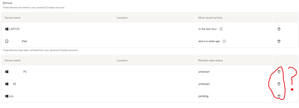
Unlinking device and deleting (clicking on trash icon) from list of unlinked devices.
I used Dropbox at a previous job in four different PCs. Once I left that job I remotely unlinked the devices that could access my Dropbox account. Its been now 5 years or so and I can still see the l...

lllsheep
7 months agoExplorer | Level 3
Hi I did the same thing and also wondering what does that mean😭

Mark Super User II
7 months agoSuper User IIIt means in theory they are still linked to your account and told it to remote wipe it, however, it hasnt happened for whatever reason. Probably, if a work device, because it was linked to your log on and hasnt reconnected after you left.
Remote unlinking only removes the Dropbox link, it does not delete the data UNLESS the computer connects again and it can. You are better off unlinking and physically deleting everything yourself.
Unfortunately there is no way of now deleting the data if you dont have access to the device. But, as I said, if its a work device and you handed it back they've almost certainly wiped it to rebuild so the data is deleted.
About Security and Permissions
Start a discussion in the Dropbox Community forum to get help with your account security and permissions. Find support from Community members.
The Dropbox Community team is active from Monday to Friday. We try to respond to you as soon as we can, usually within 2 hours.
If you need more help you can view your support options (expected response time for an email or ticket is 24 hours), or contact us on X, Facebook or Instagram.
For more info on available support options for your Dropbox plan, see this article.
If you found the answer to your question in this Community thread, please 'like' the post to say thanks and to let us know it was useful!


