Your workflow is unique 👨💻 - tell us how you use Dropbox here.
Forum Discussion

pamfuze
8 months agoNew member | Level 2
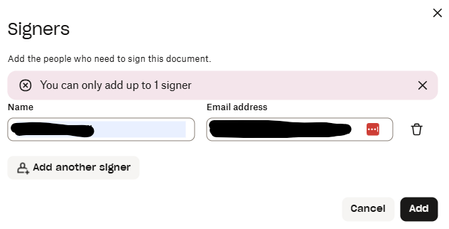
I can only add 1 signer to a document
Hello,
I'm trying to send a document for signature, but when I click on 'Add another signer', it won't allow me to add one.
I see this question was resolved about 25 days ago with another user af...
 8 months ago
Hi Jay, really sorry for the delay in responding to your efforts to help - I've been crazy busy. I've now tried both the Signatures page and Dropbox Sign page, as suggested, and both are allowing me to add more than one signatory. I also tried again from Dropbox ("send for signature" option), and this is also now allowing me more than one signatory. So whatever was happening has been resolved, thankfully, as I have another document to send for signature tomorrow. Appreciate your help - thank you.
pamfuze
8 months agoNew member | Level 2
Hi Jay, really sorry for the delay in responding to your efforts to help - I've been crazy busy. I've now tried both the Signatures page and Dropbox Sign page, as suggested, and both are allowing me to add more than one signatory. I also tried again from Dropbox ("send for signature" option), and this is also now allowing me more than one signatory. So whatever was happening has been resolved, thankfully, as I have another document to send for signature tomorrow. Appreciate your help - thank you.


About Dropbox Sign

Ask your Dropbox Sign questions here.
The Dropbox Community team is active from Monday to Friday. We try to respond to you as soon as we can, usually within 2 hours.
If you need more help you can view your support options (expected response time for an email or ticket is 24 hours), or contact us on X, Facebook or Instagram.
For more info on available support options for your Dropbox plan, see this article.
If you found the answer to your question in this Community thread, please 'like' the post to say thanks and to let us know it was useful!


