Your workflow is unique 👨💻 - tell us how you use Dropbox here.
Forum Discussion

Sharkman
2 years agoExplorer | Level 3
Dropbox app menu is hidden
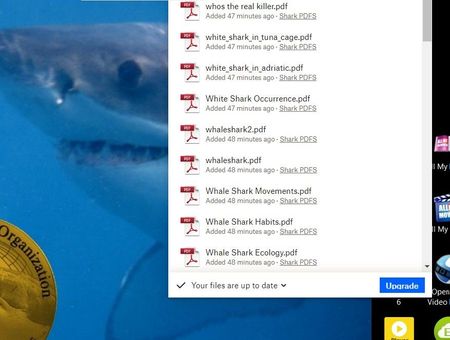
Hi all. Am new here. I have just installed Dropbox on my Windows 10. When the box opens part of the top section is hidden at the top of the page!! I cannot see the full box menu or move it. Please...

Megan Dropbox Community Moderator
2 years agoDropbox Community ModeratorHi Sharkman, it'll sound trivial, but have you restarted your device at all?
Also, can you send me another full screenshot of how the top part of the menu is showing?
Sharkman
2 years agoExplorer | Level 3
Hi Megan
Today I removed Dropbox, shut down and restarted pc, went to dropbox website and installed it again from scratch.
I still cannot see the menubar and now my files are not showing either.
See screen shot.
screen shot
Hope you can help.
Regards
Alex


About Apps and Installations
Have a question about a Dropbox app or installation? Reach out to the Dropbox Community and get solutions, help, and advice from members.
The Dropbox Community team is active from Monday to Friday. We try to respond to you as soon as we can, usually within 2 hours.
If you need more help you can view your support options (expected response time for an email or ticket is 24 hours), or contact us on X, Facebook or Instagram.
For more info on available support options for your Dropbox plan, see this article.
If you found the answer to your question in this Community thread, please 'like' the post to say thanks and to let us know it was useful!


