Your workflow is unique 👨💻 - tell us how you use Dropbox here.
Forum Discussion

pgr
2 years agoHelpful | Level 6
Is there a way to remove the Dropbox options from the context menu?
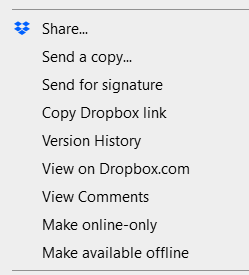
Hi, recently Dropbox has started cramming my Explorer context menu with all of these options I mostly don't plan to use:
Come on. Do you think it's ok to just dump all your stuff in there? ...

christianius
1 year agoHelpful | Level 5
Hi Walter,
Thanks for replying.
Dropbox V200.4.7134
Windows 10, Build 19045.4412
Noticed problem a few days ago, but not sure how long it's been ongoing.
Best, C.

Hannah Dropbox Community Moderator
1 year agoDropbox Community ModeratorHey peachyroar, are the options you see on your end the same as the ones that the users above are seeing?
 peachyroar1 year agoNew member | Level 2
Slightly different, still way too many.
About Apps and Installations
Have a question about a Dropbox app or installation? Reach out to the Dropbox Community and get solutions, help, and advice from members.
The Dropbox Community team is active from Monday to Friday. We try to respond to you as soon as we can, usually within 2 hours.
If you need more help you can view your support options (expected response time for an email or ticket is 24 hours), or contact us on X, Facebook or Instagram.
For more info on available support options for your Dropbox plan, see this article.
If you found the answer to your question in this Community thread, please 'like' the post to say thanks and to let us know it was useful!


