Your workflow is unique 👨💻 - tell us how you use Dropbox here.
Forum Discussion

jhedleyj
3 years agoHelpful | Level 7
Never-ending Backup in Dropbox Backup
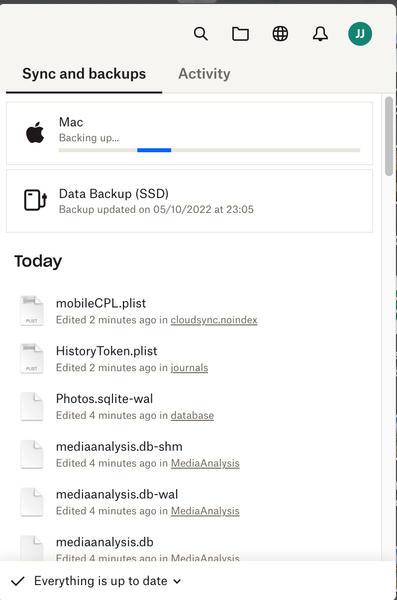
For a couple of weeks now I have noticed this phenomenon... When I opened the Dropbox Menu icon on my iMac I noticed that the Mac was backing up yet "Everything is up to date". I have checked in Fin...
- 3 years ago
Hi Megan
Good news!
I deleted version 159.3.5865 and downloaded/installed version 158.4.4564 and all is now well.
Many thanks for the help from you and your team.
John

Hannah Dropbox Community Moderator
3 years agoDropbox Community ModeratorSorry to see this issue returned for you, jhedleyj.
Can you check the status of the backup on the web surface? Do you see any issues there?
Also, if you leave it for a while, does it stop "backing up"? Does it ever go away?
jhedleyj
3 years agoHelpful | Level 7
I hope this is what you mean by web surface. You can see that it is "done" which i assume backup is complete.
If I quit the app and then sign in again it says "Backup complete" then a few seconds later the problem reappears and stays. As far as I am aware everything is backed up but I cannot be sure.
- jhedleyj3 years agoHelpful | Level 7
Yes. That's fine!


About Create, Upload, and Share
Find help to solve issues with creating, uploading, and sharing files and folders with Dropbox.
The Dropbox Community team is active from Monday to Friday. We try to respond to you as soon as we can, usually within 2 hours.
If you need more help you can view your support options (expected response time for an email or ticket is 24 hours), or contact us on X, Facebook or Instagram.
For more info on available support options for your Dropbox plan, see this article.
If you found the answer to your question in this Community thread, please 'like' the post to say thanks and to let us know it was useful!


