Your workflow is unique 👨💻 - tell us how you use Dropbox here.
Account Settings
40 Topics
Unlink Dropbox app version 2.3.5.10 from Android handset
Hello, I have an old android handset - HTC- One with Dropbox app version 2.3.5.10. I am unable to unlink device from Dropbox. A message occurs Error: ' you must be online to unlink. Check your connection or try again'. However, I am connected to WiFi. I can access the website on my other devices laptop and mobile, but the old handset is not listed on the basic Dropbox account I have. Appreciate if you can advise please. Thanks49Views0likes1Comment
Trying to sign into the app with my Plus account, but it keeps redirecting me to a Basic account.
I'm setting up a new-to-me iMac 24", 2021, M1 chip, which came pre-loaded w/ Tahoe 26.2. I'm trying to install DB on it, and bring over all the files from my DB Plus plan, which has resided on several older Macs for decades. I've DL'ed DB app numerous times now, but it keeps insisting on setting me up with a new Basic plan, which uses a Gmail acc't of mine. I suspect it got this email from Chrome, but of course I'm trying to link the new DB installation to the same email I've used for decades on my other Macs. I've tried deleting that new Basic acc't each time on the iMac, hoping I'll then be given the option of specifying my email for my Plus plan, but can't figure out how to do it. I realize this should be basic and easy, but I'm afraid I'm stumped! I'm completely at a standstill in my workflow until I can figure out this basic snag. Help DEEPLY appreciated!41Views0likes1Comment
Dropbox only opens the Dropbox folder in finder - not the app.
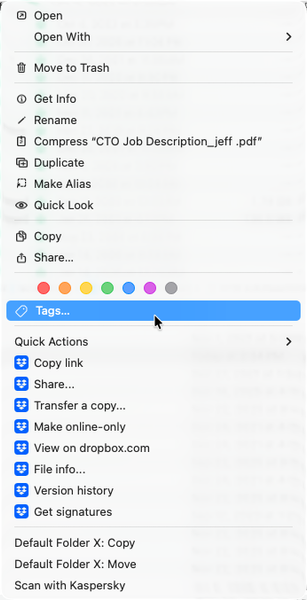
Any help would be appreciated - thank you! (I can't seem to find anything that can help...) Application Affected Dropbox Device Apple MacBook Pro M1 Max, 64Gb of RAM, 2Tb SDD Operating System/Browser (if using the web) MacOS Tahoe 26.2 Dropbox App Version (if using the app) 240.4.8493 (I got this from the "Get Info" in the finder) Question or Issue 1) Whenever I double-click the dropbox app, it opens the dropbox FOLDER in the finder. How do I open the app? 2) The menu bar icon, which previously would show sync status, sync issues, and provides access to preferences, is not shown. I have a 36" screen, and it isn't a case of "hidden" menu items. 3) I know that the app is (mostly?) running. Control-Clicking on a file shows the dropbox commands within the context menu. (See image below.) I also know its running because the various apps are shown in "Activity Monitor" (image below.) Steps I've done to try to solve the problem: Uninstall Dropbox Reinstall Dropbox Restart the computer. I don't feel comfortable doing the "Advanced Install", as it appears that doing so means losing all of my "selective sync" settings, which I've been setting up for years. (And since I can't get into the app's "prefs", I can't super easily see what is selectively synced or not. I'm at the point where I'm ready to toss the program out and move everything to Google, but I REALLY LOVE the program, and am hoping that I'm simply missing something simple, and there there is a quick fix. Thanks - Randall218Views0likes4Comments
The dark mode for Dropbox resets on my macOS desktop app whenever I restart my device.
Hello Dropbox people. I see the setting is now in the Mac App but it doesn't work until you open the settings. So this means if you reboot your computer, or quit and restart DropBox, it goes back to using the light theme even if you picked dark. It's kind of annoying to have to go into settings each time to fix this.514Views1like23CommentsDropbox icon opens Finder instead of app preferences on macOS Sonoma 14 M2
Hello, Everytime I try to open the desktop app to access my preferences the icon just opens Finder. I have read other message board posts about this issue and restarting the computer did not resolve the problem. Any assistance would be appreciated.1.6KViews0likes8Comments
App on phone has files, but app on laptop has only recent files
Application Affected (Dropbox app phone and laptop.) Device (iphone 16e, ASUS Sonic master and ACER TravelMate.) Operating System/Browser (if using the web) (Windows 11, ) Dropbox App Version (if using the app) (454.2.2 - I have Dropbox Plus on my phone and it was synced to my ASUS laptop but it shows as basic now on that device. I have Plus on my phone and always have. I downloaded Dropbox to my ACER ( work issue laptop) and logged in and it is BASIC and has only files from when it opened. The email on my phone is an old one but on the browser it shows the new one. I need the devices to sync to the one account. Any help would be appreciated.41Views0likes1Comment
Issue with connecting an additional machine to my account
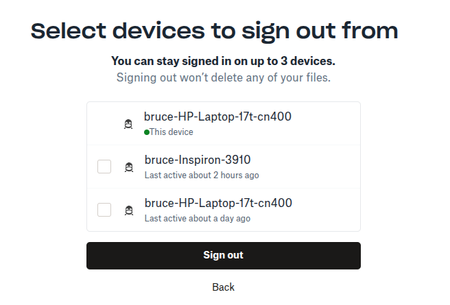
Somethings not right. I have a free plan which allows me to sync on 3 computers however when I attempt to add a second machine I get a message I have to sign out of one of them. See attched. At this juncture I am only connected to 1 computer and want to add a second. Why would I at this point have to sign out of one of them. I don't understand. In effect it's telling me I can only be signed into 2 machines, NOT 3. I never used to have this issue before, what changed. Bruce60Views0likes2Comments