Our Community is in read-only mode until April 8th, learn more here. You can still search existing threads or get help via Dropbox Support, the Dropbox Help Center, or Learn.
Dropbox Backup
52 Topics
How to restore files from Dropbox Backup
I recently backed up 200-GB of files from an external hard drive that was getting old. I used the DropBox Backup feature figuring it would be easier to simply use a "restore" feature rather than manually copying files over. I now have a new drive but have found that DropBox backup doesn't actually have a "restore" feature despite market the ability to "restore a new computer from backup". From what I can see you have to manually select files and download them (what I was trying to avoid). Dropbox also forces the files to be ZIPd, which it can't do for 200GB of files. So now my files are literally stuck on Dropbox with no way to get them off. Seems like a completely useless feature? Does anyone know a workaround or am I going to have to manually download 200GB of files in small batches?2.6KViews4likes8Comments
The Dropbox Backup feature is not complete
According to the description, Backup "that your content is safe and recoverable it if things go wrong". Recovery was never actually finished when building out this product. 1. .zip's error happens often 2. It cannot manage large files to be exported in any reasonable way 3. Browser timeouts happen 4. There is no premium or advanced method to get data out. Right now, Backup is great for customer retention because if you lose your drive or laptop, the only place the files will be sorted are in Dropbox, which requires a yearly renewal. My idea. 1. Offer a premium method to export the data to help the bottom line. 2. Build in a better download either through the browser, or the agent that is already on my machine. 3. Allow a new external drive to be mounted to export all of the data through the agent. 4. Allow me to order a hard drive at cost, with the data backed up.Solved2.1KViews3likes8CommentsMove folder from Dropbox Backup to the cloud storage
Hi, how can I move folder(s) from Dropbox Backup to the cloud storage root? There is not copy/move option. There is only a download button but in my case the folder that I need to get is about 300GB and it isn't possible to download since Dropbox Backup tries to compress the files before downloading them. As a result, it cannot compress the file due to its size and it bursts. Is there any other way to be able to use the files that are in the dropbox backup? Than you1.7KViews3likes2Comments
Can't select iMac desktop "Pictures" folder to be backed up or synced.
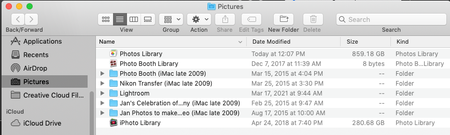
Hello, when I started my 3 TB DropBox business trial last month I was under the impression I would be able to back up all my photos (over 1 TB) from my iMac desktop computer (not from my iPhone, which only holds a fraction of my photos). I have searched endlessly, please help. System: iMac desktop/OS Mojave 10.14.6. My photos library is located: Macintosh HD > users > home (my name) > Pictures (folder) > Photos Library. I also have other folders of photos that are not in Mac photos in there. See snapshot below: What I am doing: I am going to DropBox on the top bar of my computer > to my icon > preferences > backups > manage backup. Photos/Pictures is not a folder option. The only options are: Desktop, Documents, Downloads, Music, and Movies. I also tried going to my icon > preferences > sync > choose folders, and I get the same options I just mentioned above. I appreciate any and all assistance. Thank you kindly. LTDTMSolved4.3KViews2likes7Comments
Removing My Mac folders from Dropbox
Hello - I have on on-going issue that I need help. I wish to remove the “My Mac” folders (/Desktop, /Downloads and /Documents directories using a .local folder) from my Dropbox account that got erroneously installed during the set-up of a new computer (running Big Sur 11.1). Unfortunately, I have been unable to disable the "computer backup" feature under my account, preferences, etc. It only says SET UP (but I have already set it up). In addition, I cannot get the device unlinked from dropbox.com when I try that method. All of this is is all being done on the same device where computer backup was set up, but it is still not working. I need some help undoing this. Thank you.2KViews2likes3CommentsAttempted to zip too many files error when wanting to download backup
Hi, iv'e backed up my dropbox files and i'm attempting to download them from the backup site. i'm reffering to: https://www.dropbox.com/backup/ when i go to the website and ask to download it, it tells me "Attempted to zip too many files". this made me loose a heart beat, though i know everything is there. i'm relying on this, which i guess was a fatal mistake. iv'e got all of my important files there, and i need them to continue my work - i used this as actual backup for some files, a big mistake 😞 i know everything is there, but how can i reach it if it can't download them? Thank you in advance.Solved5.2KViews1like8Comments
Not able to access backup files, get an error when trying to.
Hi, I'm not able to access my backup folder. I get an error message says: Error Something went wrong. Do not be afraid. Your files are safe and Dropbox is notified. Go to our status page to check if this is a known event. You can also visit our help center and forums for help or return to the home page.Solved8.3KViews1like18CommentsBackup feature is so broken that I cannot get my data.
I have backed up an external drive containing a folder of about 200GB in size, with many files inside it and an important, layered folder structure. Your backup feature is so broken that I cannot do anything with that backup, and now that the drive I had backed up with it has become corrupted, I am left in an impossible position. I cannot download the backup (too many files in zip?!), I cannot move it to the sync space, I cannot access it except file by file through your **bleep**ty web interface. Your software has been worse than useless - this is important data and if I knew your backup would not actually be ACCESSIBLE TO ME I would have used something else. The outcome is worse, I repeat, than if I had not used your software at all. What is worse is I gather from your support staff that the features that would have enabled me to solve this have actually been REMOVED, HAVING PREVIOUSLY EXISTED. Your support staff do not understand the seriousness of this breach of design. I need that data, which is mine, now and you are withholding it from me. I am currently informing the UK regulatory body about this. What I need is not some lame feature request putting in, but immediately that your tech team get that data and let me download it in full. It is possible if you escalate this issue enough for that to happen. Dropbox users should be quitting over this kind of broken design, I will be and I’ll be telling every professional in my field about how bad my experience has been.1.1KViews1like7Comments
Dropbox has taken over files into my PC, and how I can restore them
I bought a new PC a couple of years ago and decided it would be a good idea to install Dropbox. I am not a techie and somehow every single document and file that I have created, despite being saved to my PC, was also saved in dropbox. I really did not want this to happen as I wanted to keep dropbox for the important and quick-to-access stuff. The really bad news was that it also decided to transfer massive historic files into itself without my wanting it too, hence the knotweed analogy - I simply couldn't find a means of stopping it as none of the google search steps matched what I was seeing in dropbox. There was no 'pause syncing' button. Today I deleted a few unwanted files but decided to remove the software from my desktop. Every single file that I had saved to my PC has been removed, this even though they were only meant to be saved on my PC, not in dropbox. I accessed the app and emailed certain files to myself but they cannot be downloaded. How is this even possible? What's the solution to: 1. Preventing dropbox from stealing every piece of my data and storing it in itself if / when I re-install it? 2. Recovering my spreadsheets etc without manually reconstructing them? That would take days and a huge amount of lost income. Thanks if you have read this far.5.2KViews1like18Comments
Cannot delete My PC folder (no backup feature turned on) - help please!
My Dad has done something to his dropbox account which has got his system into quite a state, and I haven't been able to figure out exactly what he did or how to fix it. A few days ago suddenly what has happened is that somehow he now has a "My PC (MachineName)" folder appear in his online dropbox folders. And it is trying to sync an enormous amount of data off his PC - so he immediately paused the sync feature. Every time he tries to resume no matter what we do it continues on trying to sync up data from his computer. He does not have the "backup my computer" feature turned on that I have seen mentioned in another post, at least not according to the client app. I have tried using the "Selective sync" feature of the PC client app to exclude the My PC folder. However while you can uncheck it and click Apply/OK, it immediately appears back in the list again when you reopen the dialog or try to sync. Choosing "Do not sync this folder" also gets ignored in the client app for "My PC" - the moment we enable syncing again, it starts trying to sync up more data within that folder tree. It is impossible to delete the My PC folder entry in the web client, nor it's immediate subfolders. It is only child files/folders of those subfolders (i.e. children within: Desktop, Documents, Downloads, Music, Pictures, Videos) that appear to be "deletable" in the web client. Given it is still trying to "sync" every time we try to connect I am reluctant to choose the delete option anywhere at this point. There is no "My PC" folder entry within his client PC dropbox folder (i.e. no folder locally to delete) - Dropbox is trying to sync his actual computer data folders that are outside of the client dropbox folders area. I have looked with hidden files turned on, still can only see his other "regular" dropbox folders he syncs with in there. I tried uninstalling and reinstalling the Dropbox client app, still the same problems. Spent an hour remotely connected to his PC trying to figure this out and failed. Incredibly frustrated. He has no idea what he did (elderly and not a computer whiz) and me as a computer geek can't figure it out either, just concluding that Dropbox has some appalling user interface aspects to it in this scenario or is buggy as heck. How do we get some support to get this figured out? Dropbox is completely unusable in it's current state, he is very close to blowing his storage limit from all the garbage it is trying to push up and there seems to be no way to cancel whatever the heck it is it thinks it is trying to do???Solved5.2KViews1like15Comments