Our Community is in read-only mode until April 8th, learn more here. You can still search existing threads or get help via Dropbox Support, the Dropbox Help Center, or Learn.
Dropbox Backup
91 Topics
I deleted my Dropbox Backup but files still are still accessible through the 'Recents' filter
Hi, In my main account, I've deleted a Backup (proper Backup; a computer that was registered there). Today, when exploring the "Recents" filtering on the Home page, I see the name of that computer, folders and files within are still there! I can even open and visualize them. Even though they were supposed to be wiped; when I delete the whole Backup and confirm, they are not supposed to be stored under the retention period. Also, I don't see them anywhere else; not in Deleted Files; not in dropbox.com/backups, so there is no way to restore them or properly delete them. When selecting those files in questions from the Recents filter, the only options I get are "File Info" and "File Activity", so Dropbox "knows" that those files are supposed to not exist anymore and, hence, it won't let me do anything. When you right click other; existing files there, you get all the options like Open, Share, Delete, etc. In summary, this is clearly a (serious) bug: Those files should have been completely removed when I deleted the Backup They shouldn't show up in Recents list as a leftover Serious privacy issue, as not only they show there as some useless remnants, I get a thumbnail preview of them and I can double click to open! You are clearly storing my data I chose to delete! As a side note, why can't we clear or selectively remove items from the Recents list; nor on the Web or the App? I've seen some posts from years ago. Is this ever going to be addressed? All the other main players (Google Drive, OneDrive, etc.) allow that, so why do I have to see stuff I don't want in my Recents filtering "forever" (or until they get cycled out; which I couldn't find any documentation on how many files you keep there) Thanks.Solved366Views0likes15Comments
Impossible to Restore an External Drive Backup
Dropbox is an absolute joke! If you back up an external drive and that drive crashes, congratulations — you’ve just discovered that Dropbox “Backup” is basically useless. You cannot restore the backup to a new drive. Let that sink in. A backup service that can’t restore to new hardware... Yeah, funny, I know. Your only option? Crawl to the web interface like it’s 2005 and manually download your own data. And it gets worse: you can’t even download large folders. Try it and you’ll be slapped with “too many files” or ZIP limit errors. So instead of restoring a drive, you’re forced to download a few folders at a time, over and over, for thousands of folders. Absolute insanity. - Easy for Dropbox support clowns to say, just do it in small batches... Right. You do understand that some of your clients have subfolder within subfolders where some of those folders have large volumes of data? Oh, duh, just download one folder at a time. OK Dropbox Support Hero, how do I reliably rebuild all this manual intervention without accidentally losing valuable data? Come on guys! You should have a restore drive option that mirrors the data on your useless server with the new drive. Dropbox Backup is not a backup service — it’s a data hostage situation. It’s fine for a couple of documents, but if you trust it with real data, you’re asking for pain. I paid for 2TB and got a masterclass in how not to design a backup product. If you value your time, your sanity, or your data: stay far away from Dropbox Our company has almost 40 team members, we are ALL moving to Google Drive the moment our paid subscriptions end.223Views0likes6Comments
How can I recover my files from Dropbox Backup?
I backed up a large number of files (close to a terabyte) to Dropbox Backups. Now I'd like to download them, but I'm running into problems. The only way seems to be through the web platform, but this limits downloads both by filesize and by total number of files, so that large folders must be downloaded in dozens or hundreds of small pieces. Even this method sometimes proves impossible, because the web platform lags heavily in folders with many files, such that attempting to download more than a few dozen at a time causes it to lag and eventually freeze. I tried using the API but it seems that it can't be used to access Backups, only the normal Dropbox sync. I spoke with the support chat and the representative told me that as far as he knows, there is no way to recover my files. I'm a paying subscriber so I hope this isn't true. Is there some other way for me to get my files back, or are they lost?Solved359Views0likes4Comments
I can't delete my old backups
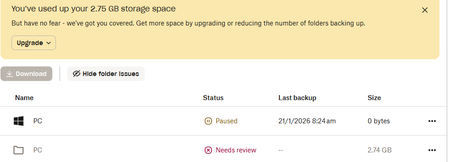
Need help: I looked at a few threads concerning deleting Old Backups but none have solved my issue. See attached screenshot. Somehow I've managed to set up a new backup for my PC which I've paused for now. I have tried countless ways to delete the backups that have filled my Dropbox...no joy. I've gone through the Backup Settings, and I cannot find the old backup to delete: Can anyone see what I need to do for this? Mike148Views0likes7Comments
Can I delete the backup of PC that I can't access using my mobile browser?
I am running out of storage. But I do not have files on dropbox. But when I go to the backups page I saw a device which I think have linked to PC that I don't have access anymore. I cannot delete it. I tried to delete a file of that device then there pop up "delete [folder] from your [device] backup". I don't click backup settings because I don't have access to that PC. So instead I click "I don't have access" and it go me to settings/security and unlink the PC. But after unlinking I still can't delete the device or any of it's file from backup page of my browser. Can anyone help me to solve this issue.Solved338Views0likes9CommentsDropbox Backup won't restore or download and no option to copy Dropbox Backup to regular Dropbox
SUMMARY: Dropbox Backup will NOT "restore" OR "download" the backup, and will not even allow a single file to be downloaded, with NO ability to "copy" the backup from Dropbox Backup to regular Dropbox storage either. The files inside the backup are only viewable in a web browser, with NO ability to download any file to a computer or other device. WARNING FOR OTHERS: *** First, a warning to others *** From my own experience, Dropbox Backup has currently been a USELESS option/method for backup or storage, as I can't access any of my files via a Restore or Download to any new computer or device. I urge you to NOT use or rely on "Dropbox Backup" and to only use Dropbox's regular Dropbox storage, as now that my old Mac has crashed and I'm trying to restore/download the contents of the last backup that is within Dropbox Backup, I cannot restore (sync) the backup, I cannot download the backup, and I cannot even download a single file at a time (which obviously no one would want to have to download one file at a time anyway -- but I'm merely pointing out that I also cannot even download a single individual file or a single individual folder at a time either). Further, there is no option to copy the backup to be in a folder in Dropbox's regular Dropbox storage either. To make matters worse, there doesn't seem to be any way of contacting Dropbox Customer Support (no option for email, online chat, or submitting an online ticket -- although Dropbox advertises these as being available options with my Dropbox Plus membership. I can see a file inside a web browser when I log into Dropbox and then click More and then click Dropbox Backup, I can then see a couple of different backups including the backup from a few days ago (1-7-26) of my Mac that crashed on 1-8-26, and so I can open a given file from that backup while in the web browser, but I CANNOT download even one single file at a time. It REFUSES to let even one file at a time be downloaded. What a horrible "backup" system, when you can no longer download or restore (sync) any file whatsoever to a new computer or external hard drive. Heed my warning and ONLY use Dropbox's regular Dropbox storage and NOT their "Dropbox Backup" option, given that Dropbox has clearly not yet worked out the bugs for their Dropbox Backup to actually be usable. (Dropbox Support, please HELP. This problem renders Dropbox Backup as a *useless* backup or storage option until Dropbox fixes this major bug.) - - - - - - - - Note: The below info I'm providing for "Device, Operating System / Browser, and Dropbox App Version / Browser Version" is the Device, Operating System / Browser, etc. for the temporary Mac I am using to try to restore and/or download my Dropbox Backup of my Mac that crashed a few days ago. (It crashed on 1-8-26. The last backup I have inside Dropbox Backup of that Mac is from 1-7-26). I am now using a different temporary Mac (where I created a brand new user account on the temporary Mac) and am using it to try to restore (sync) and/or download the Dropbox Backup of the old Mac, to no avail. Info for the new temporary Mac I'm currently using: Device: MacBook Pro, 16-inch, Nov. 2024, Chip: Apple M4 Pro; Memory: 24 GB; Startup disk: Macintosh HD; Operating System: macOS: Sequoia 15.5 Browser: The download errors occur whether using Safari or Google Chrome. Dropbox App Version: Unsure of what "Dropbox App Version" but I just downloaded Dropbox to be on this new user account on this temporary Mac 2 days ago (on 1-8-26), so it has to be an updated version. Also, the issue I'm dealing with has to do with Dropbox Backup (rather than the regular Dropbox storage). Unable to contact Dropbox Support (no option to email, chat, or submit a support ticket, despite Dropbox advertising these as available support options with my Dropbox Plus membership). First, a note about inability to contact Dropbox Support (cannot email them and cannot submit any sort of a support ticket or chat with anyone online, despite Dropbox saying my current Dropbox plan offers this): My current plan is the Plus plan, and when I am logged into Dropbox via a web browser and I go to www.dropbox.com/get_help it tells me the following: "Your support options: Your Plus plan includes access to our Help Center, Community, Chatbot, Email and Chat." However, there is no email address provided to actually be able to email Dropbox, and when I ask the DropBot chat feature (Dropbox's AI chat feature) within the webpage www.dropbox.com/get_help it tells me that there is no Dropbox email address for Customer Support (or any other Dropbox email address), even though on that very same page, it states that my Plus plan includes Email support. The http://www.dropbox.com/get_help also shows "You have no active requests" and when I click "View All" I can see a request I'd apparently made back in 2021, but it does not show any button whatsoever to be able to submit a new request or a new ticket. How does one submit a new ticket when there is no button or link or anything to do so? There is also no option to chat with a representative (even though the support options listed for my plan also mentions that Chat is an available option to me). VARIOUS ISSUES WITH DROPBOX BACKUP, OUTLINED IN DETAIL Question or Issue The email I drafted to Dropbox Customer Support (but have been unable to send to them due to them not sharing any Customer Support email address with customers, despite advertising within the Plan that I purchased that email support is available...) The information below outlines all of the different problems I have had with their Dropbox Backup, and what I'm requesting for them to do: Side-note: Because I was unable to send the email I drafted to Dropbox Customer Support (due to there being no email address for Dropbox), I am copy & pasting the content of the email I drafted to Dropbox's Customer Support -- although for the purpose of posting inside this online forum, I am modifying the actual names of the backup, etc. so that it does not include my name. I'll simply replace it with NAME instead of including what the actual name is within the backup. Subject: Urgent: Dropbox Backup inaccessible — restore and download attempts all fail (request copy/duplication to regular Dropbox) Hello Dropbox Support, I am requesting assistance with a Dropbox Backup that is fully visible in the web interface but cannot be restored, downloaded, or copied in any way, despite extensive troubleshooting. This backup is currently my only full backup of a Mac that died recently, and I want to be very clear up front: • I do NOT authorize moving or detaching the existing backup in a way that removes it from Dropbox Backup. (Likewise, I certainly do NOT authorize anyone to delete the backup from Dropbox Backup.) • I am ONLY requesting that you create a COPY / DUPLICATE of the backup contents into regular Dropbox storage. Please do not move, delete, or otherwise alter the original backup. Background / Timeline • My original Mac stopped working on January 8, 2026 • The last successful backup of that Mac was January 7, 2026 • Backup size: 214.82 GB • The backup is fully visible via dropbox.com → Backups, and all files/folders appear intact when viewed in the browser • The backup inside "Dropbox Backup" that I'd like copied/duplicated to my regular Dropbox is named: Mac (NAME's MacBook Pro purchased in 2022) ◦ Downloads ◦ Documents ◦ Desktop ◦ It is exactly 214.82 GB ◦ Inside it are 3 folders: ◦ These folders have subfolders (particularly the Desktop folder has many subfolders and files). • When you copy/duplicate this content into my regular Dropbox account, I would like this backup (named inside Dropbox Backup as: "Mac (NAME's MacBook Pro purchased in 2022)" that you're copying into my regular Dropbox to all be put inside a folder named: ◦ BACKUP from 1-7-26 of NAME's MacBook Pro purchased in 2022 • That is, I will then see a folder inside my regular Dropbox account labeled: BACKUP from 1-7-26 of NAME'sMacBook Pro purchased in 2022 ◦ And inside the folder labeled "BACKUP from 1-7-26 of NAME's MacBook Pro purchased in 2022" will then be the 3 subfolders of Downloads, Documents, and Desktop, with all their respective subfolders and files inside those folders. Below I am going to detail below the many problems that have occured when trying to restore and/or download any/all files from the backup inside Dropbox Backup that is named: "Mac (NAME's MacBook Pro purchased in 2022)." Please read the below details before proceeding, and please forward these details on to your IT / development team, because they need to know that the way Dropbox Backup currently operates, it is currently impossible for any user to restore or download even a single file from the "Dropbox Backup." (This is not the case with regular Dropbox, but it is a MAJOR problem with Dropbox Backup. I would have NEVER have used Dropbox Backup as my method of backing up files had I known it would be impossible to restore OR download not just the entire backup but even impossible to restore or download even a single file at a time.) Issue 1: Downloading the backup via the web does not work When I attempt to download the entire backup via the Dropbox web interface: • I click Download • Dropbox immediately returns the error: “Attempted to zip too many files” No download is initiated. (This is the case whether I try using Safari or Google Chrome.) Issue 2: Downloading individual folders or files does not work I also attempted to download smaller subsets, including: • A single individual subfolder within Desktop • A single individual file (Word doc) that is within a subfolder within Desktop What happens: • Safari creates a placeholder file ending in.zip.download • The file icon appears (Safari icon with “DOWNLOAD”) • No actual ZIP data is ever received When I double-click the file, Safari displays: “Safari can’t resume this download. The file ‘[filename].zip.download’ doesn’t appear to be a valid download file.” This occurs even for a single folder or single file. Issue 3: Dropbox Backup restore via the desktop app does not work I installed the Dropbox desktop app on a temporary Mac and attempted to restore the backup twice. First restore attempt: • Restore appeared to start, but no files or folders ever materialized • Disk space appeared reserved, but Finder remained empty • Restore never progressed beyond initialization Actions taken between first and second restore attempts: • Between the first and second restore attempts, through online research I was instructed to change settings to remove restore blockers. Specifically: • I confirmed Dropbox had Full Disk Access enabled in macOS System Settings • I ensured Dropbox background items were allowed • I identified that Restore was blocked, as the Dropbox Backup said: "We can't restore to this computer since it's already backing up." • I then deleted the temporary Mac's Dropbox Backup entry (from within the Dropbox app on the temporary Mac laptop, as directed by what Dropbox Backup said when viewing Dropbox Backup from a web browser), because that new account on that MAc had no real data of its own and was preventing restore. (I had only creating this new account on this temporary Mac for the sole purpose of trying to restore and/or download my old Mac's backup from Dropbox Backup, so that I can put all of its contents on an external harddrive.) • After deleting the backup of the temporary Mac (which didn't have anything saved to it yet, since I'd only just created the new account on the temporary Mac with the sole purpose of trying to restore/or download my old Mac's backup from Dropbox Backup), the Dropbox menu bar icon temporarily disappeared and then reappeared once Dropbox was manually relaunched. • After deleting the temporary Mac's backup entry and before attempting the second restore, I waited a brief period to ensure everything had time to fully complete, and then fully restarted the computer, logged back into macOS via my account on this temporary Mac laptop, and confirmed the Dropbox desktop app was running again before initiating the second restore attempt. Second restore attempt: • I then once again tried to restore the Dropbox Backup labeled Mac (NAME's MacBook Pro purchased in 2022) • Restore again appeared to start • I allowed it to run over 17 hours • This time, from the time that this restore attempt started until over 17 hours later when it was clear nothing was materializing or working, the Dropbox menu bar status endlessly alternated between: • “Updating 2 files” • “Updating 3 files” • “Updating .dbxignore” • • No folders or files ever appeared on disk Eventually: • Restore is now greyed out for both the original Mac backup and the temporary Mac entry's "backup" • There is no Stop / Pause / Cancel restore option • Restore cannot be re-initiated Issue 4: Duplicate backup entries with identical size Currently, in the Dropbox web interface: • I see two device backups • Both show a size of 214.82 GB • One corresponds to the original Mac (last backup 1-7-26) • The other corresponds to the temporary Mac (where within the web browser, it seems like the backup of the old Mac is now on the temporary Mac -- however, in reality, no files or folders whatsoever from the backup of the old Mac are actually on the new temporary Mac). Despite this, no files from the (supposed) temporary Mac backup exist locally — the content only appears in the web interface. Issue 5: Additional limitations - No option to Copy files or folders out of Dropbox Backup into regular Dropbox storage • There is no optionin the web interface to Copy files or folders out of Dropbox Backup (including not being able to "Copy" or duplicate the backup or any of the backup's folders to copy to my regular Dropbox) • Only Download and Delete are available • Download fails as described above. • As mentioned above: ◦ If attempting to download the entire backup of my old Mac -- which was last backed up on 1-7-26, then Dropbox Backup's error message is where it immediately says: “Attempted to zip too many files” and therefore doesn't proceed to even attempt any download. ◦ Meanwhile, if attempting to download an individual subfolder that is inside the Desktop folder, or even an individual file (an individual Word doc) that is within a subfolder iinside the Desktop folder, I then run into a different issue where a download with the file icon appears (Safari icon with “DOWNLOAD”) and the file name for it is something where Safari creates a placeholder file ending in .zip.download, but no actual ZIP data is ever received as when I double-click the file, a pop-up window says: “Safari can’t resume this download. The file ‘[filename].zip.download’ doesn’t appear to be a valid download file.” • Therefore, I cannot restore/sync, download, copy, or in any other way extract any file or folder onto a physical computer (or to an external harddrive). What I am requesting (very specific) Because: • The backup is visible when looking at Dropbox Backup inside a web browser, but is inaccessible to me, the client, as: • Restore is blocked • Download is impossible (whether trying to Download the entire backup, or an individual folder or individual file) • Copy is not available I am requesting that Dropbox Support: Create a COPY / DUPLICATE of the backup contents inside the Dropbox Backup labeled "Mac (NAME'sMacBook Pro purchased in 2022)" into my regular Dropbox storage (outside of the Backup container), while leaving the original Dropbox Backup completely intact and visible in the Backups section. Do not "Move" or "Delete" the Dropbox Backup. I am merely wanting the backup copied (that is, duplicated) to my regular Dropbox storage, given that regular Dropbox storage is the only aspect of Dropbox that actually works for a customer to be able to download/access their files as normal on a computer. I do not authorize anyone at Dropbox to delete any of the backups listed within Dropbox Backup. I do not want any existing backup moved, detached, or removed. I only want a duplicate of "Mac (NAME's MacBookPro purchased in 2022)" created so that: • The desktop app can sync files normally, and • I can copy files to an external drive • When you copy/duplicate this content into my regular Dropbox account, I would like this backup (named inside Dropbox Backup as: "Mac (NAME's MacBook Pro purchased in 2022)" that you're copying into my regular Dropbox storage to all be put inside a folder named: ◦ BACKUP from 1-7-26 of NAME's MacBook Pro purchased in 2022 ▪ (Side-note: I want the Backup to be named where my first name is in place of where it says NAMEabove ... I only inserted NAME as a placeholder for my first name since I'm having to paste what I drafted originally to send to Dropbox Customer Support into this online public Dropbox forum, due to Dropbox advertising that they offer email support even though they actually don't (they provide no email address for customers to be able to contact them, despite claiming that they offer email support with the level of Dropbox account that I currently has.) • That is, I will then see a folder inside my regular Dropbox account labeled: BACKUP from 1-7-26 of NAME's MacBook Pro purchased in 2022 ◦ And inside the folder labeled "BACKUP from 1-7-26 of NAME's MacBook Pro purchased in 2022" will then be the 3 subfolders of Downloads, Documents, and Desktop, with all their respective subfolders and files inside those folders. Summary At present: • I can see my files in Dropbox Backup when logged into Dropbox via a web browser (and then clicking the "More" icon and then selecting "Backup" so that Dropbox Backup opens inside the web browser). • I cannot restore, download, or copy even a single file • This backup inside Dropbox Backup is my only copy of this data If you'd like, I am happy to also provide photos of the various error messages and other issues that arose with each of the various methods I tried to attempt to restore and to download my backup (which I already detailed/outlined above, within this email). Thank you for your help in resolving this. Thank you, [NAME] - - - - - - - Thank you in advance if anyone inside The Dropbox Community's public forum is able to help me with this Dropbox Backup malfunction. I hope even if no one in the community is able to help, that: • a) someone who works at Dropbox sees this so that they fix this MAJOR issue with Dropbox Backup that renders the whole thing as a useless backup/storage option until Dropbox manages to fix this bug, and • b) hopefully this information I've posted about my own troubles will be helpful information for other Dropbox users to know, as at the moment Dropbox Backup is NOT a reliable or useful form of backup or storage...because if heaven forbid something happens to your computer, you currently CANNOT restore or download the backup to any new device, and furthermore, you currently cannot even download even a single file at a time. At the moment, onlyDropbox's regular Dropbox storage is reliable for a customer to be able to access and download their files. I hope others are able to avoid such devastating troubles, time lost, etc., by NOT using or relying on Dropbox Backup given it currently has too many bugs to even function. Thank you, Liberty1991 P.S. / Yet another side-note: I originally had this formatted beautifully where it was easy to read, with some aspects bold, the headers in a larger font, etc. -- all of which were available options within the formatting menu bar within the space to create a new post within this online forum. However, when I clicked "Publish" it claims the following in an error message "Content Not Published: Your post contains invalid HTML. Remove the following invalid tags before publishing: p, p (aria-controls), p (aria-expanded), p (aria-label), p (aria-multiline), p (aria-owns), span". ..... so I had to strip everything of any formatting ... and will now try to push Publish again. One problem after another every step of the way, when it comes to trying to get any support or help from Dropbox. What a waste of time.261Views0likes5Comments
Dropbox takes over the Documents folder
i am having this issue with a mac mini M1 - i am running the beta software that is supposed to work with the M1. I migrated data only using the migration assistant built into macs. Dropbox takes over my documents folder as soon as a sign in and the path changes showing it is now a dropbox folder - after doing a migration that folder is empty and if i restore to that folder the files disappear within a few minutes. I am likely saying goodbye as i am fed up with poor mac support and poor support in general. I spent 4 hours chatting with their support people BEFORE i did the migration because i anticipated issues and sure enough the issues are real.Solved6.6KViews2likes13Comments
Using Dropbox Backup with Backblaze or other Cloud Backups no longer works
I use Dropbox Backup but, importantly, I use the setting that means my files are also stored locally, offline, on my computer. For years, I have also used Backblaze as a "backup to my backup" - backing up my locally stored files to BackBlaze just in case I accidentally delete something from Dropbox or there is some catastrophic failure. However, that no longer works. Due to a change in how Dropbox categorizes files - even those stored locally offline - most Cloud backup services like Backblaze can't back them up anymore. This has been discussed here, here, here, and confirmed in my conversations with BackBlaze support. So I suppose my questions are - has anyone else experienced this? Are there any workarounds? And if not, do you feel comfortable with Dropbox Backup being your only cloud backup?Solved303Views0likes6CommentsDeliberate omission of critical folders for Basic accounts.
I would like to bring to your attention a concerning practice that appears to affect free-tier users. Dropbox is not any more secure without external backup. It has become evident that certain shared folders (which are visible and accessible in read-only mode under a single account) are intentionally excluded from backups and event logging for users on the free plan. This omission makes it effectively impossible to track or recover any changes or deletions, as: Backup history is almost not available for free accounts. Event and activity logs are retained for only 30 days in the free tier. No relevant events or actions appear in the logs, even when changes or deletions are suspected. This issue has been reported and discussed by multiple users across various forums and communities, with many suspecting that folders are being deliberately hidden or removed in free accounts as a way to pressure users into upgrading to a paid subscription.105Views0likes2Comments