Our Community is in read-only mode until April 8th, learn more here. You can still search existing threads or get help via Dropbox Support, the Dropbox Help Center, or Learn.
Dropbox Backup
14 TopicsTell Us How You Use Dropbox
No two people use Dropbox in exactly the same way. Some of you rely on it every day for work, others for school, creative projects, or keeping life organized - and we love that. We’d love to hear how you’re using Dropbox today - is it something you use once in a while, is it part of your day to day, are there any features you can’t live without? What workflows have you built that save time or reduce friction? And where do you see opportunities for us to do better? Your tips, ideas, and honest feedback really help us to make sure we can share useful tips, and they help other community members discover new ways to get more out of Dropbox too. Share your experience, favorite features, or suggestions in the comments below. Your voice truly helps shape the future of the Dropbox community 😁 The Dropbox Community Team3.9KViews4likes14Comments
Why can I only back up specific folders? [SOLVED]
An older thread (https://www.dropboxforum.com/discussions/101001016/why-can-i-only-back-up-specific-folders/612837 ) (replies are turned off) said: I just started using the back up feature in Dropbox but it seems to only back up 3 folders: DOWNLOADS, DESKTOP & DOCUMENTS. I don't keep important stuff in any of these. How do I select my 2 most important folders? It doesn't seem to let me choose. So far I have only seen answers confirming that is true, and tough luck - you are stuck with this maddeningly limited functionality. I just wanted to say that there is a great solution, but it does require a higher learning curve. It is called rclone (https://rclone.org/dropbox/ ) - free and Open Source software designed to integrate as many different cloud storage solutions as possible, and enable you to copy between them, and also back and forth with any folder on your computer that you so choose. Perfect! The downside is the learning curve as by default, you need to type commands into a command line to use it (I've created script files to do that work on a monthly basis, so I don't manually type in any commands any more). BUT there are multiple GUI's (Graphical User Interfaces) for rclone, including one in beta from the rclone team themselves - this provides a 'point and click' interface that is easier to use. I haven't tried any of the GUI's so I can't recommend any, but I'd say it is well worth a shot!270Views0likes2Comments🌟🤝Community Spirit Badge 🤝🌟
Hey everyone! 🌟 It’s Theresa here. You’ve probably seen me hanging out in the Community, jumping into conversations and joining discussions (if you haven’t seen me before, well, hello 👋). And while doing that, I’ve noticed something pretty great (well, we all have here on the Dropbox Community Team) – so many of you are out here making this Community an amazing place. Whether you're helping others, sharing useful tips, or just bringing good vibes ✨, your contributions really stand out. To recognise and celebrate this, we’ve created a brand-new badge… This badge is all about celebrating the people who make this space feel like home. It’s for those who do more than just answer questions – the ones who offer a helping hand 🤝, share great tips 💡, and keep the good vibes flowing. Whether you're solving tricky problems 🧩, sharing useful resources 📚, or just making the Community a fun place to hang out 😃, we see you and we appreciate you. The Community Spirit Badge is a one-time award 🏆, so if you earn it, you know you're doing something special. It's a little extra recognition for those who truly bring the Community to life. We’re so excited 🎊 to launch this new badge and can’t wait to start recognizing the amazing individuals who truly bring the spirit of this Community to life. And if you spot someone who you think deserves the Community Spirit Badge, don’t hesitate to tag me Theresa within the thread. T 💙 (Dropbox Community Manager)857Views5likes0Comments
Can I back up 8TB of photos on external hard drive?
I currently have a Dropbox account. We are using it for our daily business documents. I would also like to save about 8 TB of photographs on this account. We don't work with these weekly even but I would like them to be backed up. Is there a way I can do this on dropbox without having the hard drive that contains those photographs attached to the computer which is constantly backing up our other files? I would like to back up the photo drive incrementally perhaps once a month. Is this possible?261Views0likes2Comments
Download Dropbox backup folder to synology
Dropbox backup keeps giving me an error that there are too many zip files when I u to download my root folder. It is a backup of an external hdd which was physically damaged. Since I cannot download the root with the web ui, could I use synology or another app to download the entire Dropbox backup folder with an app instead of a web browser?1.1KViews0likes5Comments
Experiences with Dropbox Backup
Hi, how are others experiences with Dropbox Backup? I'm currently using Acronis. After some nasty problems with full disk access going missing over night I'm looking for alternatives. But I can't even find reviews of Dropbox Backup. Are there any restrictions like not being able to back up my apps folder (Backblaze) or silly problems with modern file names (OneDrive)? Regards Beatrix1KViews0likes2Comments
Do people back-up their Dropbox files?
Hi all, A recent cyber audit in our organisation recommended we back-up our entire Dropbox. We are an organisation of approx 50 employees. We use MFA for Dropbox access and use Dropbox exclusively for filing across the entire business. Does anyone else choose to back their Dropbox files up and why? The research I've done of Dropbox shows it to be pretty robust. I get a non-committal, politicians-style answer from the auditors, as to whether they think this is business essential or a nice-to-have, and am interested in what others opinions are. Thank you.1.3KViews0likes3Comments
Massive Data Upload and Sync Process - 20TB
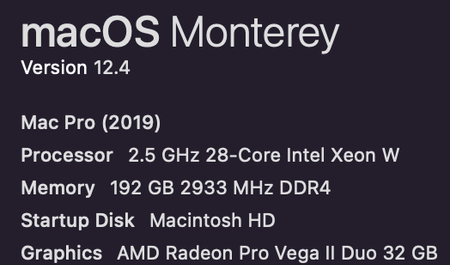
Hi everyone, I am writing here to explain the process of our most recent data upload of 20TB to Dropbox via a 2019 Mac Pro connected to a 10Gbps Fiber line. The goal is to help those understand some of the issues we experienced as well as setting expectations to those who plan on uploading massive amounts of data at once. Below are the steps: Procure a 10Gb fiber PCIe card for the 2019 Mac Pro - Solo10G SFP+ 10GbE PCIe Card with SFP+ Module - after working closely with our Apple business rep, we found the this card which would work for our requirements. Yes, the 2019 Mac Pro has 10Gb ethernet ports, but we only had Fiber lines in our setup, not Ethernet. Not to mention adapters usually have 1Gb limits so this was not an acceptable solution either. We wanted to experience max speeds so we opted for a dedicated 10GbE fiber card. Speed Tests - we conducted speed tests after card installation and confirmed the speeds were around 4.5Gbps to 5Gbps upload and download. We could not figure out if the 50% falloff was on the 2019 Mac Pro side or on the ISP side. Still however, 5Gbps is no joke so we continued onward. (PS: We could not conduct speed tests via the Speedtest.net when on 4GB+ fiber. We had to download software to the PC/Mac to get true internet speeds.) Upload - We already had 20TB on the Dropbox Folder moved and was paused & ready to sync. We simply turned the computer on, ensured it had a good connection, and then turned Sync on via the Dropbox for Mac application. Thats it. The data automatically began to upload just as it would any other sync. Realized Speeds - Even with the 4.5 to 5Gbps up|down speeds, we only saw between 600Mbps to 900Mbps being uploaded to the Dropbox cloud. We hoped to see at least 2Gbps or 3Gbps being sent to Dropbox but this was not the case unfortunately. Still however, the ~750Mbps speed was enough to upload the 20TB in about three days which we were ok with. Note: At the beginning of the sync, the speeds were extremely slow which we contributed to the initial file indexing. About 3 hours in to the main sync is when the speeds started to get to their highest levels. Also, we checked our ISP speeds twice per day and at its LOWEST point we saw internet speeds of 3.5Gbps. Online-Only (Spoiler Warning - massive bottleneck!) - After about 70 hours of upload time, the full 20TB was on the cloud. Our Dropbox account confirmed the newly uploaded data storage amount. Our next step was to get this 20TB off of our 2019 Mac Pro external RAID (Pegasus R4i). Again, the process was just like any other file(s). We simply highlighted thew newly uploaded files and right-clicked, then selected "Make online-only". Simple right? Yeah, not so much. This is where we noticed lots of issues with our system. Essentially this 20TB "indexing?" caused us to essentially have to run Dropbox completely via the browser. There was no possibility of doing other things like downloading files via the Dropbox Mac application or Double clicking and a small JPEG opening up. The application simply said, "NO" and only had one task in mind, get these 20TB worth of files OFF of this hard drive. The good news? It did so, only taking a whopping 500 hours to remove these files off of the drive. A few notes: We were able to pause syncing during the "file-removal" / online-only process), restart the computer, resume syncing all without any error messages which was very impressive. I expected the application to crash, hang up, etc. Not at all. Note: We did NOT pause syncing during the main 20TB upload. Why did it take so long? I am not a software engineer but clearly it did not enjoy this task and it could be due to a number of reasons. Maybe simply the application was not built to handle 20TB? Maybe our computer did not have the power? Maybe it was due to the main Dropbox drive being on a RAID array? Who knows. Thats about all I wanted to say here. Again, the purpose of this small write up is to show how the software/cloud performed under extreme tasking. I would say overall very well considering. Hopefully this helps someone out there who's considering uploading massive amounts of data at once. TLDR: Uploading massive amounts of data via fiber internet = quick and easy. Removing this data off the drive / Making files "Online-only" = very time-consuming and not for the faint of heart. 2019 Mac Pro specs:4.6KViews0likes3Comments
How to Sync two drives but dropbox drive remaining only in one?
I have 2 Drives and E: which is named Music Production and General Life Drives respectively. Both drives have 10 folders each among which 6 of them from both drives should be synced to dropbox offline mode that is available on dropbox as well as offline locally and 4 folders must not be on dropbox and not hence not synced ever but only on there present on the drives. So now how do I sync 6+6 folders from both the drives to dropbox without moving anything. Please note currently that dropbox folder is in drive and I don't want to move the 6 folders to drive nor do I want to move from to E:. Since Dropbox drive folder is only one but there are two places/drive folder selections to sync to and still keeping them locally available what all workarounds are available? I searched all the internet but couldn't find anything. Please note right click > "sync this folder" option is not showing for inside dropbox folder as well as the and E: drive folders even if admin rights are given. Its my personal windows Laptop. Also I tried this https://help.dropbox.com/sync/ignored-files and it works so possibly can us this for the 4 folders from both the drives to not sync, but still how to connect the one dropbox folder to two drives, please tell. Also one more thing I want to have 1 among the folder to be in selective sync for only online mode from both the drives serperately. Its been 15 days now and have been stuck on structuring my files and understanding dropbox and getting irritating, please resolve soon. Thank you1.3KViews0likes3Comments