Your workflow is unique 👨💻 - tell us how you use Dropbox here.
Folders
67 Topics
Removing Dropbox Context Menu Entries on Windows - Persistent Fix
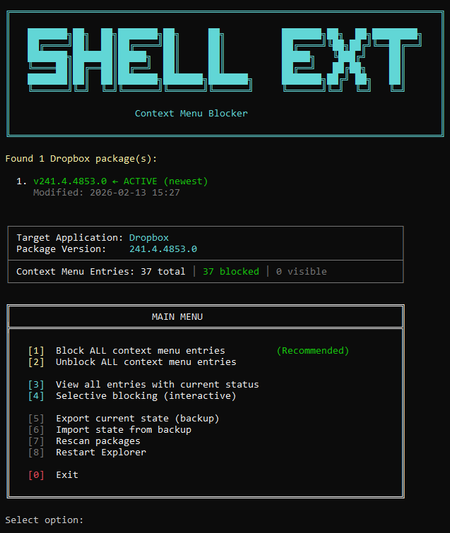
I've seen dozens of threads here from people trying to get rid of the Dropbox right-click context menu entries on Windows. There is no official toggle for this. The common advice involves manually editing registry keys, but people report those changes revert after Dropbox updates. Here is my solution: The linked script solves that differently. Instead of modifying Dropbox's own registry entries (which Dropbox overwrites on update), it uses Windows' built-in Shell Extensions Blocked mechanism — a per-user registry key (`HKCU:\...\Shell Extensions\Blocked`) that Windows itself respects. Dropbox updates don't touch this key because it's not theirs. What it does: Reads Dropbox's AppxManifest to find all context menu CLSIDs automatically Blocks them using Windows' own sanctioned blocking method Fully reversible — unblock everything with one click Interactive menu or silent command-line mode for automation Tested for 2+ months across three machines via PowerShell 7, through multiple Dropbox updates. The entries have never come back. The script is open, readable, and modifies nothing outside that single user-scoped registry key. If you want an independent safety assessment, paste it into any AI assistant and ask. Here is the script + AI safety assessment: https://grok.com/share/bGVnYWN5_e1f2cac5-5e0f-4731-bbbe-63fd72af7a7b49Views0likes1Comment
Should I make everything online only before moving my Dropbox folder to another drive?
Hi, so I want to move my dropbox folder to another drive with more space. Currently my dropbox have around 500 GB of available offline files. It's a company dropbox so in total it has 6 TB of files. I want to move the dropbox folder to a 2tb drive. I read so many problem about indexing that took forever or other syncing problems, so should I make all my 500gb of available offline files into online only before moving? And can I show all the 6 TB folders on my PC but make it available online only? because last time I tried to show the folder, it automatically tried to sync 6 TB into my PC. I only want to see the folder and it's content but not have it locally stored on my PC.33Views0likes1Comment
Logged out of the Dropbox app and back in and now I have a 'Dropbox (old)' and a 'Dropbox' folder
Application Affected Synching files Device PC Operating System/Browser (if using the web) Windows 11 Dropbox App Version (if using the app) Windows Desktop Question or Issue Had a funny problem with the Windows Explorer status icons not all being corrected, and saw a recommended to "simply" sign out of Dropbox and sign back in. Simple enough. Which I did. I then got a pop up asking me (telling me really) to rename my Dropbox folder. I said OK, and I now have a Dropbox and Dropbox (old) in the User directory. All of my files are in (old). None are in new. Every link on my PC to my old files is now of course broken. I paused syncing because I am worried Dropbox is going to try and create an entirely new copy of all of my files in the new Dropbox folder. Does anyone know what it going on here? And how to put things back to they way they were before? Why on earth would a logout/login totally reorganize all of my files??? I'm kind of dead in the water right now so any help would be greatly appreciated. Dropbox support seems to be non-existent.217Views0likes13Comments
The desktop app is asking me to create a new Dropbox folder after signing out and back in
My Dropbox is connected to my Gmail ID. Due to some reason, I changed my password, because of which the Dropbox that was logged in on my computer system got disconnected. While trying to reconnect Dropbox on my computer, it is asking me to create a new folder on the system. However, my Dropbox already contains data of more than 100 GB and is linked to my computer’s hard drive. If they ask me to reinstall Dropbox, it will take a lot of time, which I want to avoid. Please advise how I can resolve this issue52Views0likes2Comments
How to "Free up space" locally on my Linux device?
Device Acer Aspire 3 15 laptop Operating System/Browser (if using the web) Linux Mint & Firefox Dropbox App Version (if using the app) v240.4.8493 Question or Issue In Linux (Mint), are there OneDrive comparable functions of "Always keep on this device" and "Free up space"? I want to make sure that the large amount of online storage that I use (2 TB) are not taking up space on my laptop drive (1 TB). Ideally, similarly to OneDrive's functionality, I would like to be able to set individual folders and files to "Always keep on this device" or "Free up space" when using right-click. Thanks!93Views0likes5Comments
Set directories to be ignored in Dropbox via a given name/regex
I am referring to discussion "How to set all directories in Dropbox with a given name/regex to be ignored" (https://www.dropboxforum.com/discussions/101001016/how-to-set-all-directories-in-dropbox-with-a-given-nameregex-to-be-ignored-/830218) vladgasan mentioned that the engineering team wants to tackle this feature. How far have they come? Thanks, waldallaSolved94Views0likes4Comments
Syncing multiple hard drives
Hello, I'm going to have to different Mac on two different places and need to synchronise all my datas so when I switch from one computer to another, I can access all my data. The fact is that I have multiple hard drives cause I need lot of space. For each mac, I get 4 disk storage (one SSD inside the mac, and one or two SSD and one SATA). Dropbox Advanced subscription allow me to back up unlimited data, which is perfect for me (I have 20To of Data). Is there a way to asked dropbox to synchronise all my disk storages ? As a intensive user of dropbox, I know that I can only select one location for my main dropbox folder. The easiest way to proceed will be to have only one folder to synchronise, but the fact is there is no SSD on the market with 12To space ... Does anyone know the solution ? Can I define one place for my dropbox folder and then dispatch the folders on other disk storages or does this solution will not synchronise my datas ? Best T/4.8KViews1like12CommentsNew experience in system tray: Clicking folder link also opens file
Application Affected Dropbox desktop app Device Desktop PC Operating System/Browser (if using the web) Windows 11 Dropbox App Version (if using the app) 233.3.4870 Question or Issue I enabled the new experience for Dropbox in the system tray. I understand that it is in beta, but a regression seems to have occurred that I would like to see addressed. When I bring up the tray popup from the icon. a list of my activity appears--files I added, when I added them, and the folder to which they were added. When I click the folder link next to the "Added (duration) ago" text, the folder opens, but so does the file. I expect that only the folder should open. If I recall correctly, only the folder opened prior to the apparent regression. I can work around this issue by disabling the new experience. In the current experience, the folder link only opens the folder as expected. I would appreciate it if this issue could be addressed before the new experience becomes the default experience.Solved168Views0likes6Comments
I'm missing the Dropbox icon from my Windows explorer.
Application Affected Dropbox Device Asus Vivobook Operating System/Browser (if using the web) (Windows 11 25H2d, Mozilla Firefox Dropbox App Version (if using the app) 238.4.6075 Question or Issue Hi! I have tried to open up "properties" for the dropbox icon and chose one image as new icon but it won´t take it. Nothing happens. I am on a Windows 11 25H2 and the app version is 238.4.6075. Does anyone know how to solve this? I´d appreciate all help could get! Thanks...81Views0likes1Comment