Your workflow is unique 👨💻 - tell us how you use Dropbox here.
Install
483 Topics
Linux install - do not add "dropbox.list" to apt... (deb)
Linux install - do not add "dropbox.list" to apt... (deb install) latest Linux versions use DEB822 Source Format now (.sources) or replace "dropbox.list" with "dropbox.surces" example: Types: deb URIs: http://linux.dropbox.com/ubuntu/ Suites: questing Components: main Signed-By: /etc/apt/trusted.gpg.d/dropbox.ascSolved274Views1like10Comments
Can't start the Dropbox app on my new Windows device. Nothing happens.
Application Affected Dropbox Device HP generic, new, laptop Operating System/Browser (if using the web) Windows 11 Dropbox App Version (if using the app) Can't really tell since it won't start Question or Issue Have been using Dropbox for years. Recently had to get a new laptop because of work issues. I downloaded the app from dropbox.com. It installs just fine. When I start it and press the login button, it very briefly starts a hidden terminal session. The terminal closes almost instantly without displaying its window (therefore I can't see what it tries to do) and then nothing more happens. It will not even display the login window (username/password). Tried reboots and starting the application with administrator privilegies. Doesn't work. No error messages. Works just fine on my other computers, but this is the one I travel with which is a problem. One thought is that the installer tries to access the Edge browser or its dependencies, which I don't have installed (optional in the EU). Please help!30Views0likes3Comments
Not getting 6 digit code to set up Dropbox on new iPad
Application Affected Dropbox Device iPad Pro Operating System/Browser (if using the web) iPad OS 26.3 Dropbox App Version (if using the app) trying to set it up on this iPad, I have it on my other devices (all apple) Question or Issue In trying to set up Dropbox on this iPad, it says to log in and then it will email my primary email a 6 digit code. I am not getting the coded and I am getting other emails from Dropbox12Views0likes1Comment
Dropbox for iOS cannot be installed.
Application Affected dropbox for ios Device iphone 15 pro max Operating System/Browser (if using the web) ios 26.2、26.2.1、26.3 Dropbox App Version (if using the app) (for ios 460.2) Question or Issue Ios 26.2, 26.2.1, 26.3 cannot be installed. After clicking on the app store, turn around, and then return to get it. It can't be installed. I called apple customer service and replied that the application was incompatible with 26.2. I asked for help in the community, hoping to solve it.88Views0likes8Comments
Dropbox apt infrastructure relying on unsecure SHA1
When one update its software list with apt on Debian Trixie at least, he gets this error: Err:13 http://linux.dropbox.com/debian sid InRelease Sub-process /usr/bin/sqv returned an error code (1), error message is: Signing key on 1C61A2656FB57B7E4DE0F4C1FC918B335044912E is not bound: No binding signature at time 2026-01-16T19:39:14Z because: Policy rejected non-revocation signature (PositiveCertification) requiring second pre-image resistance because: SHA1 is not considered secure since 2026-02-01T00:00:00Z (...) Warning: OpenPGP signature verification failed: http://linux.dropbox.com/debian sid InRelease: Sub-process /usr/bin/sqv returned an error code (1), error message is: Signing key on 1C61A2656FB57B7E4DE0F4C1FC918B335044912E is not bound: No binding signature at time 2026-01-16T19:39:14Z because: Policy rejected non-revocation signature (PositiveCertification) requiring second pre-image resistance because: SHA1 is not considered secure since 2026-02-01T00:00:00Z Error: The repository 'http://linux.dropbox.com/debian sid InRelease' is not signed. Notice: Updating from such a repository can't be done securely, and is therefore disabled by default. Notice: See apt-secure(8) manpage for repository creation and user configuration details. Notice: Some sources can be modernized. Run 'apt modernize-sources' to do so. This issue was already reported in an unrelated apt issue thread (now closed for replies) in https://www.dropboxforum.com/discussions/101001016/openpgp-signature-verification-failed-with-debian-trixie-/835761/replies/842767 by steinarb Looks like you're signing with SHA1 and that will be forbidden by debian APT policy in a year from now. at which it was replied that Debian Trixie is not officially supported... But the support tells Ubuntu 64 bits : 18.04 ou version ultérieure please see the process to switch to SHA256 in (there might be better options since because this process is from 2016): https://github.com/mxe/mxe-apt/issues/2 and this page tells that the support for SHA1 was removed in Ubuntu in release 16.04 and https://wiki.debian.org/Teams/Apt/Sha1Removal tells that dropbox switched to SHA256 long ago. I believe that recently one of your admin switched back your apt repository signing to SHA1 which is broken on Debian Trixie but also on all Ubuntu above 16.04 so this bug lies in your "offical support". Cheers205Views1like3Comments
I accidentally deleted SyncRootManager from the Windows registry
Application Affected Dropbox Device Dell Latitude 9440 Operating System/Browser (if using the web) Windows 11 Dropbox App Version (if using the app) Question or Issue To resolve an issue not related to dropbox I deleted this key in the registry: HKLM:\SOFTWARE\Microsoft\Windows\CurrentVersion\Explorer\SyncRootManager Now Dropbox won't start. I have recreated with Key + permissions using another PC, but it seems Dropbox doesn't have the permissions to install what it needs inside this key. How can I fix this? bn.BUILD_KEY: Dropbox bn.VERSION: 240.4.8609 bn.constants.WINDOWS_SHELL_EXT_VERSION: 89 bn.is_frozen: True machine_id: 6b10792b-b8a4-4e49-9bf3-c20ac465f00e pid: 24860 cwd: 'C:\\Program Files (x86)\\Dropbox\\Client' real_path='C:\\Program Files (x86)\\Dropbox\\Client' mode=0o40777 uid=0 gid=0 parent mode=0o40777 uid=0 gid=0 HOME: None appdata: 'C:\\Users\\ricky\\AppData\\Local\\Dropbox\\instance4' real_path='C:\\Users\\ricky\\AppData\\Local\\Dropbox\\instance4' mode=0o40777 uid=0 gid=0 parent mode=0o40777 uid=0 gid=0 dropbox_path: None not found parent not found sys_executable: 'C:\\Program Files (x86)\\Dropbox\\Client\\Dropbox.exe' real_path='C:\\Program Files (x86)\\Dropbox\\Client\\Dropbox.exe' mode=0o100777 uid=0 gid=0 parent mode=0o40777 uid=0 gid=0 trace.__file__: 'C:\\Program Files (x86)\\Dropbox\\Client\\240.4.8609\\python-packages.zip\\dropbox\\client\\ui\\common\\boot_error.pyc' real_path='C:\\Program Files (x86)\\Dropbox\\Client\\240.4.8609\\python-packages.zip\\dropbox\\client\\ui\\common\\boot_error.pyc' not found parent not found TMP: C:\Users\ricky\AppData\Local\Temp TEMP: C:\Users\ricky\AppData\Local\Temp tempdir: 'C:\\Users\\ricky\\AppData\\Local\\Temp' real_path='C:\\Users\\ricky\\AppData\\Local\\Temp' mode=0o40777 uid=0 gid=0 parent mode=0o40777 uid=0 gid=0 Traceback (most recent call last): File "desktop/dropbox/client/main.py", line 6949, in _setup_root_for_account File "desktop/dropbox/sync_root/helpers.py", line 199, in create_root_for_account File "desktop/dropbox/foundation/futures/basic.py", line 1040, in result File "desktop/dropbox/sync_root/manager.py", line 382, in create_root File "desktop/dropbox/sync_root/handlers/windows/cloud_files.py", line 299, in register File "desktop/dropbox/sync_root/handlers/windows/cloud_files.py", line 601, in _register PermissionError: [WinError -2147024891] Access is denied54Views0likes2Comments
New installation of the desktop app on Fedora remains on Starting...
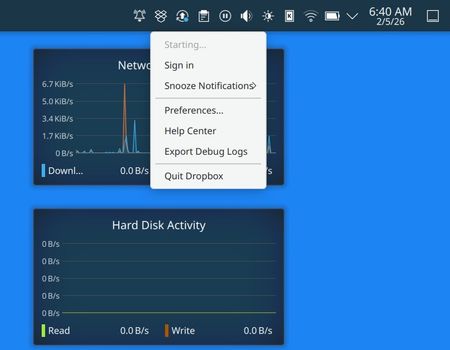
Application Affected Dropbox deamon for Linux System Operating System: Fedora Linux 43 KDE Plasma Version: 6.5.5 KDE Frameworks Version: 6.22.0 Qt Version: 6.10.1 Kernel Version: 6.18.7-200.fc43.x86_64 (64-bit) Graphics Platform: Wayland Processors: 24 × AMD Ryzen AI 9 HX 370 w/ Radeon 890M Memory: 32 GiB of RAM (30.6 GiB usable) Graphics Processor: AMD Radeon 890M Graphics Manufacturer: Framework Product Name: Laptop 16 (AMD Ryzen AI 300 Series) System Version: A9 Dropbox App Version dropbox-lnx.x86_64-241.4.4795 Issue Fresh install of dropbox on a new laptop running fedora 43 linux. It is "stuck" on "Starting..." I can't figure it out. Need help. If it matters I've been running dropbox on Linux for about a decade and have never experienced this issue. It is currently running just fine on my desktop PC, which is running fedora 42 Linux. I installed drop using the instructions on the dropbox site, using the Fedora 64 bit RPM. That was fine, and the usual files are installed in the places I usually see them. The deamon even properly set itself up to auto start - so when I reboot it starts up and puts itself in the tray (see screenshot). When I reboot it does ask me to sign in - bringing up the web browser, which asks me to 'Connect' my existing account. Which I do in the web browser. I get no complaints or errors. But it doesn't seem to have any effect on the deamon. When I look at the linked devices in my dropbox account the new laptop is listed there. So dropbox has made the association somewhere in it's databases. I have looked around in the linux firewall settings, but don't see anything relevant there. But then again I'm no expert in that regard. Permissions on the disks/files are under my user/group. I am the only user account on this system. I am not seeing any network issues on the system - all other network-using apps are running as expected. If anyone has ideas -- I'm all ears!Solved101Views0likes6Comments
How can I sync my Dropbox files to File Explorer?
Question or Issue On my old laptop I could see Dropbox in my file explorer. After changing to a new laptop I can not find any instructions on how to do this. The more I look the more I get annoyed because there is just nowhere where I can find instructions or get help. Can anyone here help me with this?Solved187Views0likes12Comments
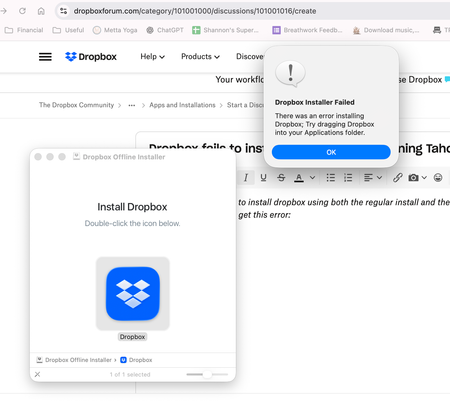
Dropbox fails to install on my new Mac M4 running Tahoe.
I've tried multiple time to install dropbox using both the regular install and the offline install. I enter my password and then get this error (and if I drag the dmg to applications, I just get a shortcut to the installer). I reviewed this thread -- same problem, no solution. Any suggestions? Thank you!142Views0likes7CommentsUbuntu Plucky - Policy will reject signature within a year
warning: https://linux.dropbox.com/ubuntu/dists/plucky/Release.gpg: Policy will reject signature within a year, see --audit for details Control: https://linux.dropbox.com/ubuntu/dists/plucky/Release.gpg: Sub-process /usr/bin/sqv returned an error code (1), error message is: Signing key on 1C61A2656FB57B7E4DE0F4C1FC918B335044912E is not bound: No binding signature at time 2025-05-30T19:08:44Z because: Policy rejected non-revocation signature (PositiveCertification) requiring second pre-image resistance because: SHA1 is not considered secure since 2026-02-01T00:00:00Z -- Ubuntu Plucky is stable enough to support Dropbox, update signature PLEASE!!!!!! André234Views0likes4Comments