Your workflow is unique 👨💻 - tell us how you use Dropbox here.
Microsoft Office
32 Topics
Changed password on Excel file, now I get Decryption Failed error on latest iOS
Hi everyone. This is with the latest version of iOS. I have an existing Excel File that is encrypted with a password. It works fine with Dropbox. I change the password and save it, and now I get the error Decryption Failed when I open it on the iPhone with the password. The worksheet works fine on PC. I've even tried changing the password back to the old one and it still doesn't work. Is there some encryption setting in Excel that may be affecting this? I am using Office Professional 2019. Thank you.129Views0likes9Comments
Cannot open Word documents in Dropbox
I am synced to open Dropbox documents in the online-only mode on my Surface Pro since it doesnt have a ton of hard drive memory. That has worked well for several years. Recently, my Surface Pro has been unable to open Word documents stored stored in Dropbox. Instead, I get the "Unspecified Error" message. I can open pdf files stored in Dropbox without a problem. What changed? How do I resolve this? I have updated my Windows and Dropbox apps. Thanks.Solved12KViews2likes7Comments
WOPI Version of .xlsm files opening in Desktop App. Why is this happening?
Hello, With zero support from Dropbox Advanced support, I'm hoping as a community anyone can provide some guidance. I have a user in my organization who in the desktop app cannot open and edit xlsm files, no one else in our organization has this issue. According to ChatGPT, the file(s) and not corrupted and it is not a Microsoft issue. All xlsm files for this user are offline files. I employed autoruns and unchecked some Dropbox extensions to force open xlsm files as 'local' files without Dropbox trying to open the WOPI version, which is unusable. We have thousands xlsm files we use daily, and cannot nor should have to copy each file over to this users' desktop and copy them back to the desktop app as that is a huge waste of time. I'm confused why he is the only user that is impacted this way and hoping someone can provide some solutions so this user can use xlsm files in the desktop just like the rest of us. Thank you in advanced.Solved2.2KViews0likes15Comments
"File is stored in an incompatible server location" error when opening Office files on Android
Device: Xiaomi 12T Operating System/Browser (if using the web) Android Dropbox App Version/Browser Version Dropbox 442.2.2 Question or Issue A few days ago I couldn't open any excel or word file from Dropbox, like I did before. Dropbox shows this message: "example.xlsx is stored in an incompatible server location". How can I fix this problem? Why is happening this?140Views0likes4Comments
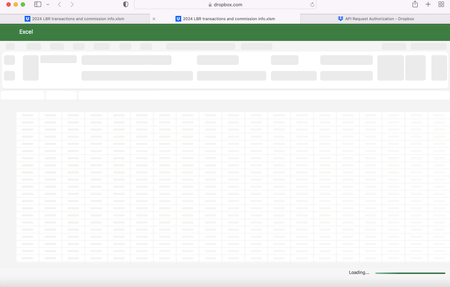
Page isn't loading when opening a file in "Excel for the web" on Safari
Hi - I'm hoping someone can help me. We've been using dropbox for a while and it's been going swimmingly, but in the recent few months there has been a change. When I open an excel document it used to open in 'Excel for the web' and was easily editable, but recently it's stopped loading properly. I'm trying to open it using Safari browser (my friend who is using Microsoft software isn't having the same issue), and now instead of the file loading it looks like this, but never loads: Can anyone help? I've restarted my computer and installed any updates. Many thanks.2.1KViews0likes22Comments
Unable to open docx file on Dropbox preview page so I cannot see what the comments are referring to
I shared a .docx file with my collaborators for commenting via Dropbox, and I think they commented using the Dropbox comment function. I am aware of the issue that Dropbox comments on a Word file are only visible on the website and not when the file is opened via the desktop app. However, my issue is that now the docx file does not open in the Dropbox website viewer, and I can only see the comments, but not which line they are referring to. The page just says '.docx files are supported but something went wrong'. When I download the file or open it in Word for the web, I cannot see any of the comments. Is there any solution to this?1.4KViews0likes17Comments
Excel files all open as corrupted files
Hi. I have a large amount of excel files stored in my dropbox..... Yesterday they opened and worked ok, but today, they all generate an error when being opened which reads..... "Excel cannot open the file '<filename>.xlsm' or <filename>.xlsx because the file format or file extension is not valid. Verify that the file has not been corrupted and that the file extension matches the format of the file" This occurs on 4 different computers running the latest Office365 version. Ive also tried downloading the file and then opening, but the same error message is generated. The files also will not open in the online version of excel or the quickviewer. We're talking about hundreds of excel files which were all working then suddenly are not. Any help, or suggestions would be greatly appreciated. Kind Regards1.1KViews0likes4Comments
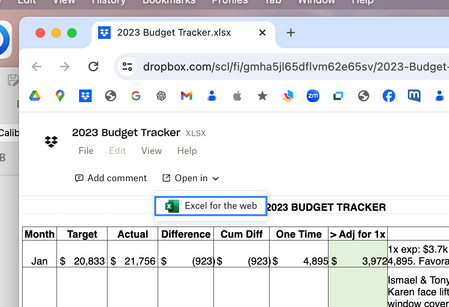
No longer to open a file in Excel
When I click on a dropbox link for an excel file that is embedded in an MSWord document I can no longer open the in the native Excel application residing on my Mac. It used to give me the option to either open in Excel or open in Excel for the web. Now per the picture attached, the only option showing is "Excel for the web". How do I reset so I can access both options. Thanks!Solved1.7KViews0likes7Comments