Our Community is in read-only mode until April 8th, learn more here. You can still search existing threads or get help via Dropbox Support, the Dropbox Help Center, or Learn.
Notifications
83 Topics
I'm constantly getting out of space messages
As described at English | The Dropbox Community except now these notifications are coming up every couple of minutes after I dismiss them. This is insane and unworkable. I have 500MB free; that’s more than plenty. I’m nowhere near running out of space. Something’s got to change.129Views0likes9Comments
How can we get instant notifications for new or updated files instead of weekly notifications?
I use Dropbox as a central depository for construction drawings and through "Editable access" permission settings allow external consultants to upload their drawings into nominated folders. The collection of folders for a construction project are shared with subcontractors, staff and other consultants on a "View only" permission setting. The problem that I seek your assistance with is a feature which Dropbox is lacking in. I need a method of automatic instant emailed notifications of new or updated files to all that have been set up for shared access to the project set of folders. Currently, the only avenue for notifications is electing to receive a weekly report. Please help ! TYIA54Views0likes1Comment
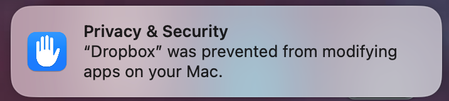
Why am I getting a notification on my Mac about Dropbox modifying apps?
Hi everyone! We're starting to notice this Drobox notification below pop up on our Mac community. When we click it, it takes us to Privacy & Security in System Settings but then does nothing. Anyone know what exactly this modifying apps means and what its asking for? Should we be concerned? This particular MBP is running macOS 15.7.4 (Intel) and version 243.4.6956 of the Dropbox app. Thank you!54Views0likes1Comment
Dropbox Community rank notifications
I have my dropbox community notifications set up the way I want them - except that there does not seem to be an option to turn on/off emails telling me "You have earned a new rank in The Dropbox Community!". There is an unsubscribe button at the bottom of the email but it just takes me to My Settings: | The Dropbox Community where there is nothing about ranks. I have "earn a new badge" set to Never.161Views0likes7Comments
The default notification settings on this forum should be set to "Never".
This should be set to never by default. It is not URGENT to get notifications about badges. It's just not. I do not care and I would assume most people just tryingto get answers to their quetions do not care either. For those that do care, they should opt in. Otherwise this is just spammy in my inbox. Thanks.80Views0likes1CommentGetting low space notifications when I have plenty of space
I am getting extremely tired of getting "You're running out of space!" notifications. I'm not running out of space. I have more than 1GB free. If these don't stop, I think I'll just move everything to iCloud Drive and delete Dropbox.Solved495Views0likes12Comments
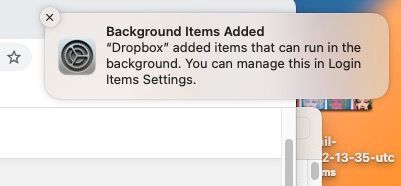
How do I end "Background items Added" notification and/or process?
I uninstalled Dropbox but keep getting this annoying notification on my mac that Dropbox is adding items that can run in the background even though the app is deleted and it is disabled in the appropriate setting. How do I get this to end once and for all? Thanks!Solved11KViews0likes19Comments
Turn off Dropbox Transfer notifications and emails
Hello, I am sick of the torrent of emails and red badges reminding me that I just created a transfer, someone downloaded the transfer I sent them to download, or the transfer is expiring etc. I want to turn off all of these emails with a toggle in the app. The numerous other posts and requests about this issue (dating back to the late 2010's) have gone unresolved, so I'm adding my voice here. Please prioritize fixing this problem! Or hire me to come and add the code in your backend real quick! Pleeeeease 🙏991Views0likes9Comments
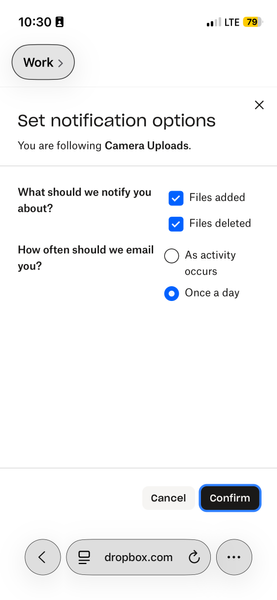
I followed my Camera Uploads folder but I don't get email notifications about it
I use the Camera Uploads feature on an iPhone SE, and then access the photos to list items on eBay, so I delete the photos after they’re used. I wanted to track how many photos were added and removed if possible, which the Follow feature looks like it should do, except I enabled it on my Camera Uploads folder 2 days ago and have not received any daily updates. I think I have it set correctly, and I receive other emails from Dropbox, so I don’t think that’s where the issue lies. Does that folder maybe not support the Follow feature even though it’s shown as an option?Solved103Views0likes1Comment