Need to see if your shared folder is taking up space on your dropbox 👨💻? Find out how to check here.
Team admin
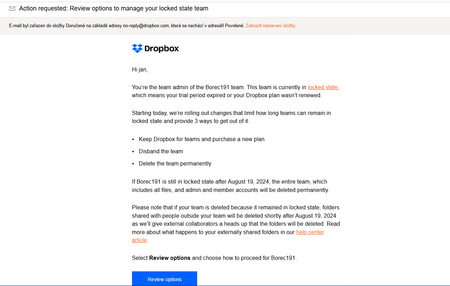
162 TopicsHow to remove a member from a downgraded team?
Dropbox Plan - Basic (Formerly had Business Standard) Are you a Team Member or Admin? - Admin Do you have access to the email linked to the account? Yes Question or Issue I'm the current Admin for my organization and a previous employee is still on our DropBox account as a "Member." From the Admin Console page, it looks like she has 1+ Gb of storage used in her account. If I "Disconnect" her from our account, will her docs be lost? Does she need to set up a separate account first and then, transfer her files before I disconnect her? Any insight would be helpful. Thank you.Solved140Views0likes6CommentsIs the admin of a team account able to access the contents of all folders?
Hi, I am the bookkeeper of a business. We would like to upgrade Dropbox to Standard and make it more secure. We think the manager should be the admin and a user, and I should be a user. At present, Dropbox and all its folders are accessible to anyone who can access the computer. We would like that to remain the case for some folders, but other folders should be password protected. I have shared one folder with our accountant, which I use to upload information which should remain confidential from the manager. Is the admin able to access the contents of all folders, even if they are not shared with them? Can this be done in Dropbox Standard and if so, how please? Many thanks.78Views0likes3CommentsMy Dropbox account was deleted by a business partner. How can I restore it?
FORMAL COMPLAINT: Unauthorized Transfer of Personal Account to Company Control To: Dropbox Support Team / Data Protection Officer Subject: URGENT - Unauthorized Transfer of Personal Account and Data to Company Control - Legal Action Required Date: 9th September 2025 Personal Account Email: [...] (DropBox Account Personal data on storage : 6.5 GB Company Account: [...] COMPLAINT SUMMARY I am filing this formal complaint regarding the unauthorized attachment and transfer of my personal Dropbox account to a company account, resulting in loss of control over my personal data without proper consent, notification, or legal authorization. The company admin is using my access as a hostage for other unauthorised activities and have disabled the access without notice or intimation to remove personal and private data. INCIDENT DETAILS What Happened: My personal Dropbox account (established prior to 2010) was attached to company account [Hackbook.ai] Control and administrative access of my personal account was transferred to company administrators on accepting the invitation to connect This occurred without clear notification, explicit consent, or adequate warning about data ownership implications I have lost access to personal files, folders, and data that predated any relationship No clear process was provided to separate personal data from company oversight Timeline: May 2025 connected to company account by invitation sent by [...] 8th Sept Account access was disabled Same date customer support was notified for access to be restored LEGAL VIOLATIONS AND RIGHTS INFRINGEMENT 1. DATA PROTECTION VIOLATIONS Under GDPR / CCPA / Local Privacy Laws: Right to Data Ownership: Unauthorized transfer of personal data ownership Lack of Informed Consent: No clear explanation of consequences before account linking Right to Data Portability: Restriction of access to personal data Right to Data Control: Loss of administrative control over personal information 2. CONTRACT LAW VIOLATIONS Breach of Service Agreement: Unilateral modification of account ownership without proper notice Lack of Consideration: Transfer of valuable digital assets without compensation Unconscionable Terms: Inadequate disclosure of ownership transfer implications 3. PROPERTY RIGHTS VIOLATIONS Digital Property Rights: Personal files created before employment constitute personal property Conversion: Unauthorized assumption of control over personal digital assets Unjust Enrichment: Company gaining control over personal data without compensation 4. CONSUMER PROTECTION VIOLATIONS Unfair Business Practices: Inadequate disclosure of account merger consequences Deceptive Practices: Failing to clearly communicate ownership transfer implications Breach of Fiduciary Duty: Platform failing to protect user interests Immediate Legal Rights: Right to Data Access: Full access to all personal files and metadata Right to Data Export: Complete backup of all personal data in portable format Right to Account Separation: Removal of company administrative control over personal data Right to Data Deletion: Removal of personal data from company-controlled systems Legal Remedies that may be exercised as part of this complaint: Data Protection Authority Complaints (GDPR/local privacy regulators) Consumer Protection Agency Complaints Small Claims Court Action for damages and data recovery costs Class Action Participation if similar cases exist Arbitration Claims under Dropbox Terms of Service Breach of Contract Claims for service agreement violations Immediate Actions Required (within 3 business days): Restore Full Access: Return complete administrative control of personal account Data Inventory: Provide complete list of all personal files under company control Separation Process: Implement immediate separation of personal data from company oversight of (swapmesh) folder Access Logs: Provide records of who accessed personal data during company control period Corrective Measures Required (within 7 business days): Data Export: Provide complete, downloadable backup of all personal data Account Restoration: Restore personal account to pre-transfer state without deletion of any data from (swapmesh) folder Privacy Audit: Confirm no personal data remains in company-controlled systems Documentation: Provide written confirmation of data separation completion Compensatory Actions Required: Service Credits: Compensation for loss of access and inconvenience Data Recovery Costs: Reimbursement for any data recovery expenses incurred Privacy Violation Damages: Compensation for privacy rights violation Legal Fee Coverage: Reimbursement for legal consultation costs if required UNAUTHORIZED ACTIONS UNDER TERMS OF SERVICE Based on Dropbox Terms of Service and Privacy Policy: Section : User data ownership rights Section : Consent requirements for account modifications Section : Notification requirements for significant account changes EVIDENCE PRESERVED Screenshots of account status changes Email communications (or lack thereof) regarding account transfer Access logs showing loss of administrative control Documentation of personal files predating company association Records of attempts to resolve issue through standard support channels ESCALATION NOTICE This complaint represents a serious violation of data protection laws and user rights. If not resolved within the timeframes specified above, I will pursue the following escalations: Regulatory Complaints: Filing with relevant data protection authorities Legal Action: Pursuing available legal remedies through appropriate courts Public Disclosure: Reporting incident to consumer advocacy organizations Professional Review: Consulting with privacy law attorneys for additional remedies REQUEST FOR EXECUTIVE REVIEW Given the severity of this data privacy violation, I request immediate escalation to: Dropbox Data Protection Officer Executive Customer Relations Team Legal Compliance Department CONTACT INFORMATION Name: Swapnil [...] Email: [...] Phone: +91 XXXXXXXXX / +973 XXXXXX Preferred Contact Method: [Email/Phone] Best Contact Times: [11 AM to 11PM] - Bahrain Time This unauthorized transfer of personal data represents a serious breach of trust and legal obligation. Personal digital files are valuable assets that warrant the same protection as physical property. I expect immediate, comprehensive resolution that fully restores my rights and control over my personal data. I look forward to your prompt response and corrective action within the specified timeframes. Sincerely, Swapnil [...] [personal details removed per Community Guidelines]128Views0likes7CommentsThe team admin could access my private folder when I joined the team
I had a personal Dropbox account for a decade. In the last 2 years, I have been included in a team account. I remember how the system looked skecthy and not reassuring in terms of privacy after joining the team, but I trust dropbox. My home folder had looked "only" shared with myself. Yesterday, my team leader decided to shut down the team account, but I lost all my personal/private files. Then I learned, somehow the team leader could move my files without my permission and put them all to a team member's space. My team member now has full access to my files. What kind of a irresponsibility is this? How could Dropbox, which is in bussiness for more than a decade, allow that? I had my old tax forms, bills, ID scans etc. in there, now someone else can access them? How? My privacy is violated, and how can I trust dropbox ever again?177Views0likes5CommentsHow can I prevent team members from sharing or downloading the data to use them as their own?
I am planning to start a work account with Dropbox, but my profession revolves around highly valuable data. My main concern is whether other users with access to the shared Dropbox account can download files without permission. If they do, they could potentially use the downloaded data to run their own business and generate revenue, which would be a serious issue. Is there a solution to prevent unauthorized downloads or ensure better control over shared data? I would appreciate any guidance on this.208Views0likes4CommentsCan we disable the team member folder?
PLEASE allow Admins of Business accounts to disable the auto-generated personal folder that is in each user's Business Dropbox. For my business, as well as many other businesses, having a personal folder in each user's Business Dropbox poses many problems. At the VERY LEAST, allow us to change the name of the personal folder so it's not directly tied to the user's name. If I could at least rename the folder to "DO NOT USE", without having to make that the user's name, that would be useful. First, it confuses employees, who mistakenly move or save files into this personal folder instead of the shared team folders. Second, it can cause naming problems, as I name my users by generic names instead of their personal names, because employees change often. For example, my user account names for my 3 users are the same as my shared team folder names. So now, when user "Financial" access their Dropbox, there is a shared team folder called "Financial", as well as their personal folder called "Financial" that cannot be renamed. Employees will absolutely be confused by this and put things in the wrong folders.... all because Dropbox has forced these ridiculous personal folders onto us. Third, most businesses require complete control over their cloud file sharing system, and the files within. Each user having their own personal folder causes a big problem for data security.707Views2likes3Comments"This account has been marked as inactive. Contact the team admin" error, but I am the admin
I was using my account and then after coming back to my account an hour later the log in now fails and saids This account has been marked as inactive. Contact the team admin, which is my account. No explanation or way to solve this has been given, it cant be due to inactivity because I was just using it.561Views0likes5CommentsRestricting the Dropbox desktop app to permitted (company) devices
I have dropbox business for our office and am trying to limit access/installation to company-issued devices. We don't want our employees to install and sync company dropbox account onto their own personal devices due to security reasons. Quite simply, company files are one lost and unsecured computer / laptop away from being lost to the real world. Is there a way to do this?250Views0likes4CommentsCan I increase the licenses on a Business trial?
Hi, I'm on a business trial plan at the moment and I want to add more license to the team (10 license). I tried doing it via the admin console in manage license, but it always says payment error, even though I have added the billing method. I tried with different browsers as well and nothing worked (mozila, chrome, opera, edge). I tried managing license from different panels, billing panel and member panel and both did not work and return the same payment error. Then I tried to invite 10 people into my team so I can have 10 license, but this also does not work. The first 2 invitations were sent successfully, but when I tried to invite more people, I get this error. How can I increase the number of license that I have on business trial? Or can this not be done at all? Thanks.183Views0likes5Comments