We’re Still Here to Help (Even Over the Holidays!) - find out more here.
Windows
18 Topics
Issues with sending a large quantity of files from a computer to a Dropbox folder with Handy backup
We are having issues with sending a large quantity of file from our computer to a dropbox folder. It works for the first 50 MB, then 1 file is skipped and the other files are send without any issues We are using Handy backup 8.5 We have a professional dropbox account with no storage issues STATUS:>08:54:04 Calculating data size... STATUS:>08:54:04 About to copy 69 files with approximate total size of 69.65 GB STATUS:>08:54:04 Processing root directory "__BACKUP"... ERROR:> 12:56:08 Dropbox: uploading file failed, status code 401 WARNING:>12:56:08 The error is ignored. It looks like it’s a security / bearer issue on having the connection open to long. After the error it looks like handy backup is connecting again, but skips the previous file. Is this a question about the HandyBackup's operation or about Dropbox's security/connection settings? Thanks! Integration Affected (Handy Backup) Operating System/Browser (if using the web) (Windows 11)17Views0likes2Comments
"This file has been moved" error when trying to open Excel files in the Dropbox folder
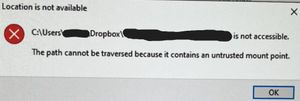
Integration Affected Microsoft 365 (specifically Excel) Operating System/Browser (if using the web) Windows 11 Question or Issue One of our users started getting errors yesterday when trying to open Excel documents that are stored within the Dropbox folder. The file opens, but brings up the following error: The file has not been moved, nobody else has this problem currently. It only happens when the file is within the dropbox folder on her computer. If we copy the file to a location outside of dropbox, it's fine. Searching the internet, it seems people who use Box (which I'm assuming is similar to Dropbox), are starting to have the same problem. It was reported in their community beginning on Nov 25, 2025 and more and more people are replying to it complaining of the same issue. A few different "fixes" were suggested by their IT which did not fix the problem and yesterday they say they have determined that it's a bug related to the latest Seamless Login release from Microsoft. Just throwing this out there in case it helps the issue to be resolved with Dropbox quicker. So far, only one of our team members is having this issue. Please help.413Views1like17Comments
Data loss: Boxcryptor classic files no longer readable
Integration Affected Boxcryptor classic 1.7.1 Device irrelevant Operating System/Browser (if using the web) Windows 11 Dropbox App Version (if using the app) 237.4.5655 Question or Issue Dropbox decided to update to windows files recently. This Update without warning did a) block my PC for at least a day b) ended up corrupting my encrypted files which I no longer can read. Please advise how to restore my files. This is likely the same issue as here, Dropbox's latest update leads to no access to Boxcryptor files. Can't copy or open them. | The Dropbox Community but the solution described there is to rely on old undynched folders which I do not have. Also, the topic is closed and does not let me continue. Text files end up with error message "cannot open .." Pdf will lead to "No file Permission ..." Excel: etc..148Views0likes10CommentsGetting an error backing up Dropbox files using BackupExec on Windows
Hi, We rely on Dropbox for making important business files available to remote colleagues. However, we also use Veritas Backup Exec to take daily copies of our entire network including Dropbox files and, up to now, it has worked perfectly, including our Dropbox files on disk. Having recently installed Windows Server 2025 (for running our network and BackupExec 2025) and with Windows 11 on all workstations, we find that attaching to our physical (Business) Dropbox files on the master hard drive causes the BackupExec backup to fail with the message: "Dropbox was not found or could not be accessed"; Completed Status: Failed Final Error: 0xe0008488 - Access is denied Final error category: Security Errors. This is despite all Dropbox folders & files being visible during backup selection. All network permissions are correct and verified and work perfectly for folders alongside the Dropbox folder. Please can somebody tell me what is different about the Dropbox folders on disk and how to fix this? Many thanks. Stephen82Views0likes3Comments
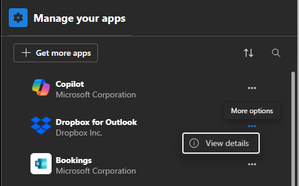
There's no option to remove the Dropbox for Outlook add-in on Windows 11.
Hello, I'm trying to remove "Dropbox for Outlook" Addin from Microsoft Outlook (new, lite version) running on Windows 11. It should be as easy as clicking "Remove" from the "Manage your apps" setting, but it's missing for the Dropbox add-in. Desktop version of Dropbox used to be installed, but was uninstalled. Looking forward on any advice on how to remove it. ThanksSolved137Views0likes6Comments
Macros have been blocked for my Excel files.
Hi We got problem activating Macros in Excel when opening files from dropbox. Excel has a messages in the top saying that Macros has being blocked. And there is no option to activate Macros, as there used to be. Any ideas Brgds Bent307Views0likes14CommentsThe Microsoft files on Windows 11 are prompting for a Dropbox sign in every time I try to open them.
Hello, I have the Dropbox desktop app installed and every time I open Excel or Word this Login screen appears asking to "Log in or sign up to Dropbox to link with Microsoft Office 365" Is there a way to disable this? Microsoft 365 Device PC Operating System/Browser (if using the web) Windows 11Solved4.1KViews6likes93CommentsRemove Dropbox login popup when opening an Excel file from my desktop app.
Application Affected Excel Device Lenovo Legion Operating System Windows 10 Dropbox App Version v231.4.5770 Issue: Recently, when opening Excel files on my Dropbox path (these files are also saved offline), Dropbox has been requesting that I log in to Dropbox from within Excel (a pop up appears). Doing so created a variety of issues (macros no longer being permitted to run, changes to files not syncing), so it is seemingly superior for me to NOT log in to Dropbox from within Excel. However, by not logging in, the popup appears every single time I open an Excel file. Apart from being annoying, this is also causing me issues when attempting to read and write Excel files from Matlab code. How can I permanently prevent this Dropbox login popup from appearing in Excel? Some things that I have tried and/or implemented that have NOT solved the problem: - Turned off "Show Dropbox badge" in preferences - Turned off "Show Dropbox in Microsoft Office as a save location" - Uninstalled and reinstalled Dropbox on my computer - Removed Dropbox as a "Connected service" in Excel - Removed Dropbox COM add in in Excel settings Thanks in advance.Solved792Views1like7Comments
I changed the name of my device, and now my Excel files won't open.
Device: N/A Operating System/Browser (if using the web): N/A Dropbox App Version (if using the app): N/A Question or Issue: I can open the Excel file (with a code) in Excel-online but not from my Excel on desktop. It has been working fine until my computer was refurbishedSolved136Views0likes4Comments