Your workflow is unique 👨💻 - tell us how you use Dropbox here.
desktop
144 Topics
Dropbox not syncing to Apple folders (Desktop, Documents, Downloads)
Device MacBook Air M4 Operating System/Browser (if using the web) Sequoia, Tahoe Dropbox App Version (if using the app) 241.4.4853 Dropbox Plan Family Question or Issue My files are on Dropbox online. I now need to download them to my Mac (I've tried this on both a Tahoe and a Sequoia machine). Although the Mac already has Desktop, Documents and Downloads folders, the Dropbox app creates a new parallel set of (virtual) folders under the same names, residing in the Dropbox folder (~/Library/CloudStorage/Dropbox. In the past Dropbox used to sync with the existing Apple folders, but that's not been the case since a few OS X/Dropbox versions. It is my understanding that the parallel folders are supposed to be there, but Mac would mirror these, to make it look like they are in the `Apple folders. It makes no difference whether either File Provider and/or Backup is on or off. How do get rid of this double folder issue?41Views0likes2Comments
My files aren't syncing. Is my app connected to the right account?
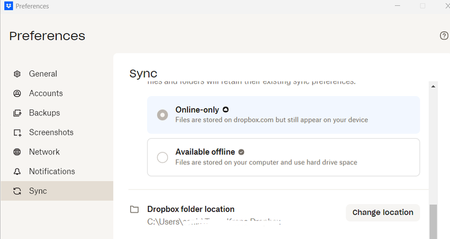
I am a new employee to a company. The previous employee had a dropbox acct on the same computer that I use, however my files are not syncing with the other team members for the company. When I open preferences below is the dropbox folder location which is that of the previous employee. How can I resolve this issue?182Views0likes21CommentsYou are not eligible for Dropbox on File Provider at this time
Device Macbook Air 2020 M1 Operating System/Browser (if using the web) Tahoe 26.3 Dropbox App Version (if using the app) 241.4.4853 Dropbox Plan Standard 2TB Question or Issue I have selective sync on. When I look at the Sync tab in Preference, it says "You are not eligible for Dropbox on File Provider at this time" under Dropbox Folder Updates. All of my synced files are defaulted to be online only and shows Zero bytes in Finder. There is no right click option that I can make them offline available.44Views0likes2Comments
How can I unlink a Dropbox Business account if I can no longer access this work account?
Good morning, I am using the Dropbox Desktop app and I would like to link my new Business Dropbox. Unfortunately, my previous' employers business Dropbox is still linked, but I can no longer sign in to this account to unlink it. Is there a work around that does not require me to sign in to my old business dropbox? Thank you!48Views0likes2CommentsScreenshot shortcut conflicting on Mac not allowing me to take screenshots
I have a free dropbox account and Command+Shift+3 & Command+Shift+4 to make screen captures seems to be conflicting with the Dropbox app. Nothing happens when I press the keys. I have a iMAC (intel) w/apple keyboard and am using macOS Sequoia 15.7.3. All the apple system keyboard short cut preferences are on. Is there a setting that needs to be turned off in the Dropbox preferences or a work around? The only time I can get it to work is when I am logged out of Dropbox. I have no problems with Dropbox syncing or conflicting with any other keyboard shortcuts.Solved152Views0likes4CommentsHow can I remove the Dropbox contextual menu items on Mac?
Macox, any version, I cannot remove the Dropbox contextual menu. Another thread on this topic is marked "Solved" but no solution is included, only a request to submit the request. Has a solution been provided yet? thanks!Solved123Views0likes5CommentsDropbox is showing that I use 4 devices, but one device is shown twice.
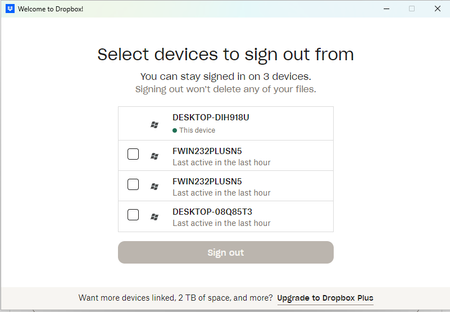
I've just set up a new device, and now Dropbox is not letting me sign in to my regular device because it says I am connected to 4 devices. In fact it's only 3, and Dropbox is showing one device twice.Solved131Views0likes4Comments
How to stop Dropbox from opening automatically on my Mac?
I've tried to follow the instructions that were provided to Walter on 2/6/23 to disable automatic Dropbox start-up when I open my Mac. When I click on the Dropbox icon at the bottom of my screen, I get the file folders that I've set up, not a page that has my Profile initials. Where do I locate the Preferences? Thanks for your help.Solved4.1KViews0likes2CommentsI've looked everywhere online for my selective sync settings, but I can't find them.
I have looked everywhere on my Dropbox.com account and cannot find sync anywhere. I have found preferences and there is nothing about sync there. I have a colleagues whose screen shows sync under this menu. I have been on Dropbox since 2008. I upgraded the desktop app but don't know if or how I can update the desktop application. Any suggestions? Could she possibly have a paid version if she has selective sync -- but even with the free version I should have sync shouldn't I so I can remove files I don't want to sync Her message: Across the menu bar at the top you should see a drop box icon. Click on it. [Note: this only opens my dropbox - I need to click my personal icon and then I get setting and preferences] Then you’ll see an option called settings or preferences. Click on it and you’ll see an option that says sync. [Note: I don't see sync option anywhere here] Click on that and look for an option that says ‘selective sync’ Here you can click only the folders you want.Solved8.6KViews0likes7Comments