Your workflow is unique 👨💻 - tell us how you use Dropbox here.
dropbox business
28 Topics
Dropbox issue with syncing to Synology after April 20 update
My synology NAS synchronized dropbox perfectly for years. After the April 20 update the synchronization caused mayhem on my NAS. Online all is well up to April 20 but no more synching of our work files after that. Now I found out yesterday that a warning email was sent that i never noticed, but how to solve it now? The dropbox has 4 team members and 5 top level folders, one of those folders was synched to the NAS for one team member. Now synching occurs to the private folder of that team member, synching hundreds of gigabytes for no reason since we have all that nfo already in the toplevel folder. We have had a business account for years, but now it is advanced(?!?) but more costly than the business? Apparently you need a business account to be able to sync. So I upgraded to business, but now dropbox tells me that will be implemented March 2025 😳. Any suggestions, on how to get my system back up and running the way it was?Solved8.8KViews2likes6Comments
Can't open select Google docs or sheets
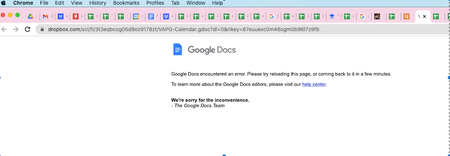
Hello, I've been using Dropbox Business integrated with Google Workspaces for over a year. While the integration between Google and Dropbox can be glitchy, my team appreciates the ability to store Google Docs & Sheets in Dropbox with the rest of our files and work on them simultaneously. Last week, we lost access to several files, receiving the error message below when trying to open select Google Docs & Sheets. I cannot restore these files to a previous version or download them -- they seem to be gone entirely/inaccessible. I called Dropbox help, and they were unable to resolve the issue, citing it as a problem with the third-party app (Google). It's clearly an issue with the integration between the two parties, so I'm frustrated that Dropbox can't help any further. I've tried clearing cookies & cache, signing out of Dropbox & Google accounts, and restarting my computer, but this did not help. Any ideas about how to retrieve these files, what the issue could be, or how to best access someone at Google who will understand how these files integrate with Dropbox to be able to troubleshoot successfully? I'd appreciate any help, thanks!Solved8.4KViews1like28Comments
Zapier Team Spaces
Not having the ability to use our Zapier anymore because of being upgraded to Team Spaces is a huge failure IMHO on Dropbox's end. Please DropBox update your DropBox integration on Zapier to allow us to select if we want to move files to a Team Space folder. All our business tools we were using with DropBox are now broken.7.3KViews5likes13Comments
Team folders in Power Automate have stopped working after 20/04/2024 upgrade
Since the upgrade to Dropbox on the 20/04/2024 we have encountered a number of issues with apps and programs that utilise Dropbox. Rather than confusing the issue, the first of these relates to Microsoft power automate. The team Dropbox folders that are shared with me and monitored by this program have now disappeared. The only Dropbox folders I can see our my specific folders, and not those that I have access to as part of a team. In my DBL Dropbox desktop folder I have my profile folder and then I have access to all the team folders that I am part of. I can access these on my desktop and online without an issue. The problem I have is that if I am trying to access these team folders through any other software, they are not visible following the upgrade on 20 April? This is causing major issues and I assume that there is a setting that needs to be changed for me and my colleagues? Any thoughts would be appreciated.6.3KViews3likes16Comments
Recent issues with Dropbox integration in Salesforce?
Has anyone had any recent issues with the Dropbox integration for Salesforce? We've been using it successfully for 8+ years, and it stopped working just last week. We (all users) are getting the following message when Salesforce tries to connect, and Dropbox has been unable to help: Script-thrown exception An unexpected error has occurred. Your solution provider has been notified. (Dropbox_for_SF)Solved6KViews0likes25Comments
Synology Cloud Sync not working since Dropbox Business update
Hi all, first post here, and I'm not sure where to post this, since I don't know the solution yet. We have a Dropbox Business subscription running with 15 users using several terabytes, more than our client computers can store. There are 3 main shared folders at the root folder, accessible to all users. And we have Synology NAS server which was configured to copy all data to its RAID5 storage (enough space), so we have a local copy of all data. This was done using the Cloud Sync app on the NAS. It was configured like a Dropbox user, with its own account and subscription. Since the Dropbox Business update, which renamed the root folder and added separate folders for each user, the NAS client does not see the shared folders anymore, and it simply removed all data from the NAS. When trying to set up the client again, the shared folders are not visible. Is there anything that can be done to get the previous backup solution working again? Maybe it is a problem with permissions? Or do you suggest using another method to mirror all data locally to our NAS storage. Thanks in advance 🙂Solved5.8KViews0likes8CommentsMigrating to office 365 Sharepoint
Hi I'm helping a charity set up their Office 365 When I try and sync Dropbox with their email & PW I get. "Please sign in with a work account." They tell me the details I have are the primary log in and I'm trying to migrate as admin in officeSolved5.4KViews0likes10Comments
SharePoint Online migration Dropbox error
I have my Dropbox administrator account connected in my SharePoint admin center and I am unable to scan my files. Upon trying to disconnect my connection, I was led to a broken link (https://www.dropbox.com/team/admin/settings/team_apps) and neither Microsoft or Dropbox support team is able to help. How can I go about scanning my files, I can't see them in my scan. This connection was made a long time ago, and I suspect that it has expired.Solved4.8KViews0likes13CommentsGoogle Documents Opened In Dropbox Are Crashing Chrome
I provide support for some end users, recently I have received reports from a few of my users that they are having trouble opening google document files in dropbox. The specific symptoms are as follows: - the user attempts to open a google document stored in dropbox, either through dropbox directly or through a link in an email or chat application - user is taken to the document in a new tab and asked to sign in to dropbox with an account - user selects "sign in with google account" and the page attempts to authenticate them - this process fails, displaying a generic error message (a la oops, something went wrong), and google chrome completely locks up, needing to be force quit We have done a fair bit of troubleshooting: - logging out of and back into both google and dropbox accounts - Restarting google chrome - Restarting their macbook - Clearing all chrome data (settings, cache, history, etc.) - Reinstalling chrome - Deleting all cache files in ~/Library/Application Support/Google/ - Opening the links in other browsers - logging into the user's google and dropbox accounts on a different local user account on the macbook - logging into the user's google and dropbox accounts on a different macbook altogether From these troubleshooting steps we have determined a few things: - the issue is only present in the google chrome browser, it does not present in safari or firefox - the issue is specific to the user's local account on that specific macbook, it is not present if the user logs into another local user account or another macbook - the issue seems to be related to the single-sign-on process I'm stumped at this point as to what could be causing this issue and was hoping your team might have some insight. Thanks in advance!Solved4.2KViews0likes4Comments