We're making some changes to the Dropbox Community 👩💻 - Find out more here.
iOS
68 Topics
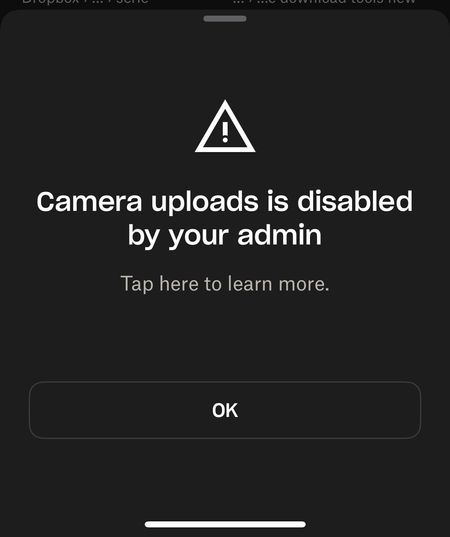
"Camera Uploads is disabled by your admin" error on iOS
So... i think there is something wrong with my dropbox ios app. It worked fine until about 2 hours ago. I have alread logged out, install/uninstall, power cycle the phone, everything level 1 helpdesk has been done. Yes, i have space, the account is working fine from the notebook. For example the screenshot upload from windows is fine. Both dropbox app and ios are the latest version. I'm not part of a team, never have been.Solved863Views4likes16Comments
Option to rename a file before uploading through the iOS app is not working
Suddenly today (and for the first time ever that I can remember) the RENAME button in the iPhone app upload is dead (does not work). Help please - I need to rename before uploading anything to Dropbox. Thanks, amcofficeSolved753Views4likes17Comments
I need iPhone Live Photos to upload.
I cannot believe Dropbox does not support iPhone Live photos. Why??? I used Onedrive or Google Photos to upload my photos. and all of them supported live photos. I am always waiting for Dropbox to support it. Anyone can tell me when? I'm still using the Free plan until dropbox to support it.1.9KViews3likes2Comments
“Couldn’t save content. Check your internet connection and refresh the page." on iOS mobile app
Running iOS 17.3, just updated. When I try to share content to Dropbox, I get an error message: “Couldn’t save content. Check your internet connection and refresh the page. There’s not internet connection issue; I’m connected. This is Dropbox-specific. If I use share to Save to Dropbox, that works fine; no error. This also seems unique to the latest iOS update, as I didn’t encounter it before that. I tried uninstalling and re-installing Dropbox, and simply re-starting. Neither helps.Solved18KViews3likes119CommentsCan we upload live photos through Camera Uploads?
I can see lots of posts asking for support for Live Photos. I feel quite cheated that I have lost the ability to see these photos. As someone else has also posted, I have little snippets of my mother’s voice and movement that I have lost forever and she has passed away. Dropbox offer a photo sync service which means they need to solve for Live Photos, they have been around since 2015 so it’s not a new function. Please prioritise a solution to upload and then restore Live Photos.Solved1.3KViews2likes6Comments
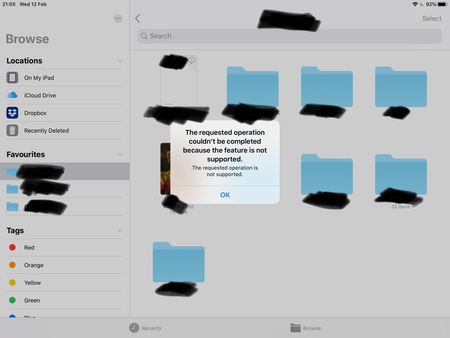
The Requested Operation Couldn’t Be Completed error - Dragging & Dropping into Files app on iPad
Dragging and dropping error using the stock files app on iPad OS (13 latest) with the latest version of Dropbox installed. Each time I try to drag and drop a file using the files app I'm greeted with an error message: The requested operation couldn't be completed because the feature is not supported. Any ideas to fix it? Or is it just another Dropbox issue that won't ever get addressed like the missing favourites bug? Note, dragging and dropping works flawlessly using Google Drive, One Drive, iCloud etc. I've tried removing and redownloaded Dropbox etc.9KViews2likes26Comments
Why are my iPhone photos imported as .heic files when uploading them to my Dropbox account?
This only happened this week, say on Tuesday (July 4th). Has never happened before. Now I cannot see these photos on the desktop version of Dropbox. On the Dropbox app for iPhone, I see the files (with the ending .heic) but I cannot open them and cannot preview them. What has happened and how do I fix this?Solved114KViews2likes15CommentsNew files from camera uploads not showing in the Photos tab in iOS 26 (17promax)
Device iPhone 17 pro max Operating System/Browser (if using the web) iOS 26 Dropbox App Version (if using the app) 444.2.2 Question or Issue Moving to a new iPhone and installed dropbox app. However, camera uploads is very buggy. It will upload the photos/videos, but the display will not show any new photos added. New items can be found in camera upload folder, but not in the "Photos" tab on the app as it will not fresh that at all. Tried uninstalling the app and reinstalling and sometimes get the error message that the camera uploads folder doesn't exist and will be created on next upload. But the folder is there and new images are added.465Views1like7Comments
"Upload couldn't be completed" error when uploading a .mov 46 GB file from the iOS app
i recorded a podcast on my iphone but when i try to upload it on the dropbox app so i have it on my pc to edit, i keep getting the same error saying the upload couldn't be completed and that the file may have been deleted. any help would be greatly appreciated!2KViews1like9CommentsCamera uploads keeps uploading deleted files to my Dropbox account
We use Dropbox to back up our photos when we travel. As we are traveling, I cull through the iOS photos on my iPad or my iPhone and delete the ones I don’t want. Sometimes I crop photos and edit them. When I’m finished, I open the Dropbox app and the camera upload starts. This has worked beautifully in the past. However, on this trip to Europe, it is uploading even the photos I deleted, and if I edited a photo, it’s uploading the original and then creating another copy with a -1 in the File name. What can I do to get this to stop. Why would it be uploading deleted files too. I don’t open Dropbox until I’ve done all the editing and deleting. Thanks for any feedbackSolved1.7KViews1like7Comments